Category Archives: DevOps

Pertaining to agile system administration concepts and techniques.

DORA AI Coding Report Breakdown

There’s a new DORA report out from Google, but it’s not the usual DevOps one we’ve come to expect – this one is entirely focused on the state of AI-assisted software development.

That’s not too surprising, straight up DevOps is last decade’s news – Gene Kim rebranded the DevOps Enterprise Summit and is publishing vibe coding books, the DevOps OGs like Patrick Debois and John Willis have been focusing on AI building, and so it makes sense that the DORA crew are also poking in that direction.

A lot of the shift in DevOps in recent years has been towards focusing on developer productivity. Whether that’s the rise of platforms to take burden and complexity away from devs, to Nicole Forsgren’s new SPACE metrics that extended her previous Accelerate/DORA metrics that were focused just on software delivery, everyone is keenly aware that unlocking the developers’ ability to create is important.

Companies I work with are really prioritizing that. At ServiceNow, they got Windsurf licenses for all and report a 10% productivity boost from it. And just “we have some AI” isn’t enough, Meta just cut one of their major AI teams because they had “gotten too bureaucratic” and slow so they wanted to move people to a newer team where they could get more done. So companies are taking developer productivity very seriously and spending real money and making big changes to get it.

Understanding Your Software Delivery Performance

As you read the report, you’ll notice that large chunks of it are NOT about AI directly. This first chapter, for example, recaps the important areas from previous DORA reports. It talks about metrics for software delivery and characterizes kinds of teams you see in the wild and their clusters of function and dysfunction. You don’t really get to AI till page 23.

Is this “AI-washing”? If so, it’s justified. People want “AI” to be the solution when they don’t understand their problem, or how to measure whether their problem is solved – AI can help with software engineering and DevOps but it does nothing to change the fundamental nature of any of it, so if you don’t understand the non-AI basics, if you’re handed AI to loose on your company you may as well be an armed toddler.

AI Adoption and Use

The report has good stats that dig deeper than news reports – while 90% of people are “using AI”, in general they use it maybe 1-2 hours out of their day and don’t go to it first all the time.

The thing I found the most surprising was what people were using it for. In my experience folks are using AI for the lighter work more often than actually writing code, but their research showed writing code was by far the most common use case (60%) and stuff like internal communication the least common task (48%) (outside calendar management at 25%, but the tools for that are terrible IMO).

Chatbots and IDEs are the vast majority of how people interact with AI still, integrated tool platforms only have 18% traction.

People do in general believe they’re being more productive from using AI, by a wide margin, and also believe their code quality has gone up! Pure vibe coding makes terrible quality code, I believe this is because how real coders are using AI is more thoughtful than just “write this for me.” And this is borne out in their trust metrics – most people do NOT trust AI output. 76% of respondents trust AI somewhat, a little, or not at all – despite 84% believing it has increased their productivity.

I think that’s super healthy – you should not trust AI output, but if you keep that in mind, it lets you use it and be more productive. You just have to double check and not expect magic. Consider that ServiceNow article I linked above about their Windsurf adoption, it’s not reastic to think AI is going to give you orders of magnitude of coding productivity increase – 10% is great though, more of an improvement than most other things you can do!

AI and Key Outcomes

That leads us into the meatier portion of the report, which is taking the research past “what people think” and trying to correlate real outcomes to these factors. Which is a little ticky, because developer morale is a part of what contributes to delivery and there may be a “placebo factor” where believing AI tools are making you better, makes you better whether or not the tool is contributing!

What they found is that while AI use does really improve individual effectiveness, code quality, and valuable work, it doesn’t help with friction and burnout, and has a significant negative effect on software delivery instability.

So what do we make of increased software delivery instability when we think we’re generating more and better code? And we think the org performance is still doing better? The report doesn’t know either.

My theory is similar to the answer to “why doesn’t everyone run multi-region systems when AWS us-east goes down from time to time?” Just to refresh you on the answer to that one, “it’s more expensive to do it right than to have an outage from time to time.” If you can cram more code down the pipe, you get more changes and therefore more instability. But just like companies gave up on shipping bug-free code long ago, some degree of failure with the tradeoff of shipping more stuff is a net financial win.

AI Capabilities Model

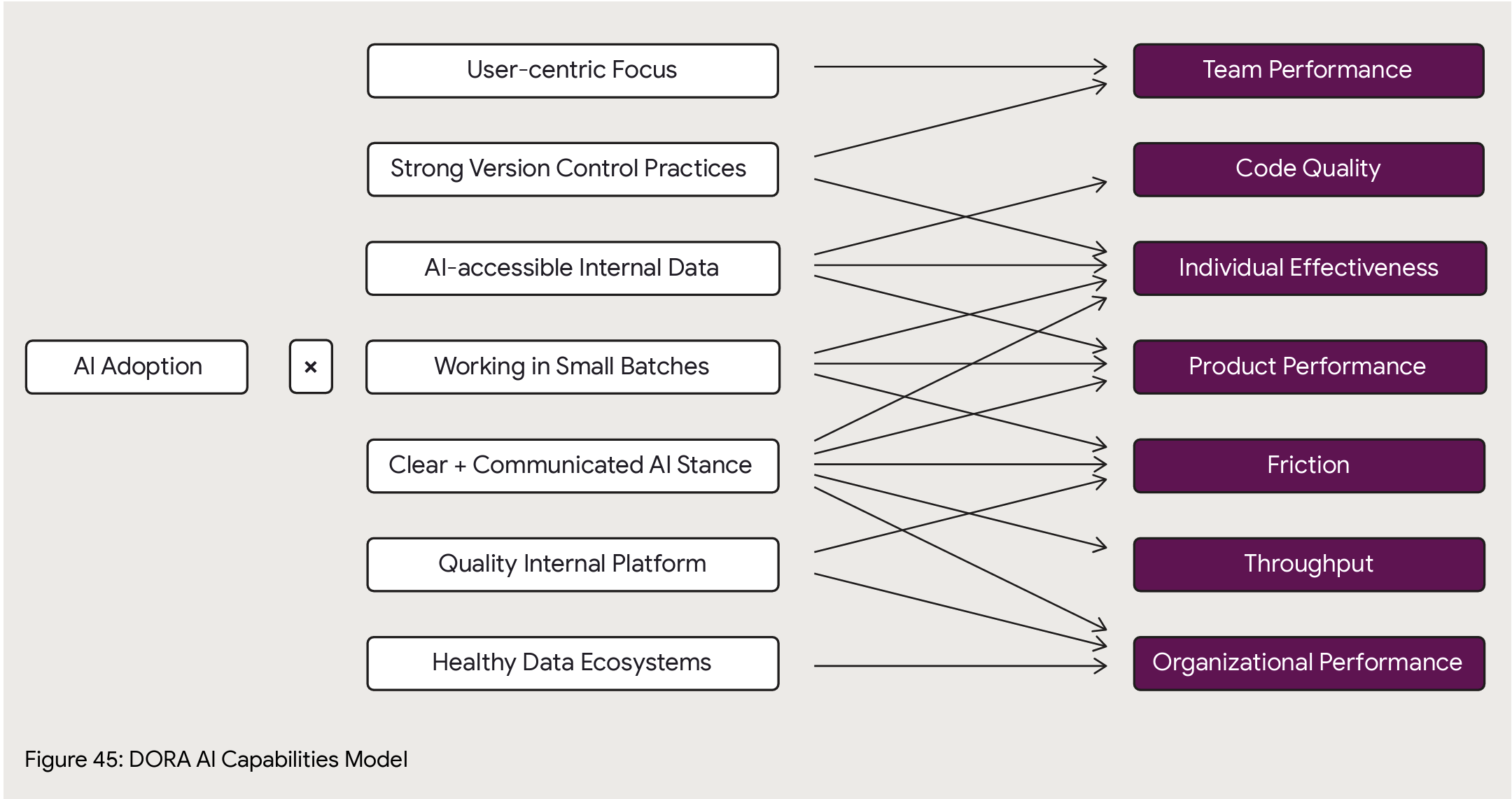
The reason I love DORA is they go deep and try to establish correlation of AI adoption best practices to outcomes. At page 49 is their big new framework for analysis of AI impact on an org. Here’s what they have so far on how specific practices correlate to specific outcomes, with caveats that it’ll take another year of data to know for sure (though AI innovation cycles are month by month, I hope they’ll find a way to get more data more quickly than a yearly cadence).
Platform Engineering

The report then takes another turn back to earlier DORA topics and talks about platform engineering, the benefits, and how to not suck at it.

For those who are unclear on that, you get wins from a platform that is user centric. So many organizations don’t – or deliberately mis- – understand that. You could call all the old centralized IT solutions from previous decades a “platform” – Tivoli, HP WhateverCenter, and so on – but they were universally hateful and got in the way of progress in the name of optimizing the work of some commodity team behind a ticket barrier. (I’ll be honest, there’s a lot of that at my current employer.)

I’m going to go a step farther than the report – if you don’t have a product manager guidlign your platform based on its end users’ needs, your platform is not really a platform, it’s a terrible efficiency play that is penny wise but pound foolish. Fight me.

Anyway, they then say “platforms, you know, it’s the place you can plug in AI.” Which is fine but a little basic.

Value Stream Management

Is important. The premise here is that given the basic premise of value flow (if you don’t know about lean and value streams and stuff, I’ve got a LinkedIn Learning course for you: DevOps Foundations: Lean and Agile), systems thinking dictates that if you accelerate pieces in your workflow you can actually harm your overall throughput, so major changes mean you need to revisit the overall value stream to make sure it’s still the right flow, and measure so you understand how speeding up pieces (like oh say making code) affects other pieces (like oh say release stability).

They find that AI adoption gets you a lot more net benefit in organizations that understand and engineer their value stream.

The AI Mirror

This section tries to address the mix of benefits and detriments we’ve already talked about with AI. It basically just says hey, rethink how you do stuff and see if you can use AI in a more targeted way to improve the bad pieces, so for software delivery try using it more for code reviews and in your delivery pipelines. It’s fine but pretty handwavey.

That’s understandable, I don’t think anyone’s meaningfully figured out how to bring AI to bear on the post-code writing part of the software delivery pipeline. There’s a bunch of hopefuls in this space but everything I’ve kicked the tires on seems still pretty sketch.

Metrics Frameworks

You need metrics to figure out if what you’re doing is helping or not. They mention frameworks like SPACE, DevEx, HEART, and DORA’s software delivery metrics, and note that you should be looking at developer experience, product excellence, and organizational effectiveness. “Does AI change this?” Maybe, probably not as much as you think.

And that’s the end at page 96, there’s 50 pages of credits and references and data and methodology if you want to get into it.

Those last 4 chapters feel more like an appendix, they don’t really flow with the rest of the report. The AI methodology talks about things to do specifically boost your AI capabilities (Clear and communicated AI stance… Working in small batches) which somewhat overlap (Quality internal platforms, User-centric focus) with these later chapters but to a degree don’t. If value stream management is shown to improve your AI outcomes then – why’s it not in the capability model?

I assume the answer is, to a degree, “Hey man this is a work in progress” which is fair enough.

Conclusion

I find two major benefits from reports like this, and judge their success based on how well they achieve them.

  1. Showing clear benefits of something, so you can use it to influence others to adopt it. This report does very well there. One of my complaints about the DORA reports is that in recent years they’d become more about the “next big thing” than about demonstrating the clear benefits of core DevOps practices, so I’d often go back and refer to older reports instead of the newer ones. But here – are people getting benefit from AI? Yes, and here’s what, and here’s what not. Very cleaar and well supported.
  2. Telling you how to best go about doing something, so you can adopt it more effectively. The report also does well here, with the caveat of “so much of this is still emerging and moving at hyperspeed that it’s hard to know.” They’ve identified practices within AI adoption and in the larger organization that are correlated to better outcomes, and that’s great.

And I do like the mix of old and new in this report. You have to wave the new shiny at people to get them to pay attention, but in the end there are core truths about running a company and a technology organization within a company – value streams, metrics, developer experience, release cadence and quality – that AI or any new silver bullet may change the implementation of, but does not change fundamentally, and it’s a good reminder that adopting sound business basics is the best way to take advantage of any new opportunity, in this case AI.

TL;DR – Good report, use it to learn how people are benefitting from AI and to understand specific things you can do to make your organization benefit the most from it!


Leave a comment

Filed under AI, DevOps

The Right Way To Use Tagging In The Cloud

This came up today at work and I realized that over my now-decades of cloud engineering, I have developed a very specific way of using tags that sets both infra dev teams and SRE teams up for success, and I wanted to share it.

Who cares about tags? I do. They are the only persistent source of information you can trust (as much as you can trust anything in this fallen world) to communicate information about an infrastructure asset beyond what the cloud or virtualization fabric it’s running in knows. You may have a terraform state, you may have a database or etcd or something that knows what things are – but those systems can go down or get corrupted. Tags are the one thing that if someone can see the infrastructure – via console or CLI or API or integrated tool – that they can always see. Server names are notoriously unreliable – ideally in a modern infrastructure you don’t reuse servers from one task to another or put multiple workloads on one, but that’s a historical practice that pops up all to often, and server names have character limits (even if they don’t, the management systems around them usually enforce one).

Many powerful tools like Datadog work by exclusively relying on tags. It simplifies operation and prevents errors if, when you add a new production app server, that automatically gets pulled into the right monitoring dashboards and alerting schemes because it is tagged right.

I’ve run very large complex cloud environments using this scheme as the primary means to drive operations.

Top level tag rules:

  1. Tag everything. Tagging’s not just for servers. Every cloud element that can take a tag, tag. Network, disk images, snapshots, lambdas, cloud services, weird little cloud widgets (“S3 VPC endpoint!”).
  2. Use uniform tags. It’s best to specify “all lower case, no spaces” and so on. If people decide to word a tag slightly differently in two places, the value is lost. Both the key and the value, but especially the key – teach people that if you say “owner” that means “owner” not “Owner” and “owning party” and whatever else.
  3. Don’t overtag with attributes you can easily see. Instance size, what AZ it’s in, and so on is already part of the cloud metadata so it’s inefficient to add tags for it.
  4. Use standard tags. This is what I’ll cover in the rest of this article.

At the risk of oversimplifying, you need two things out of your systems environment – compliance and management. And tags are a great way to get it.

Compliance

Attribution! Cost! Security! You need to know where infrastructure came from, who owns it, who’s paying for it, and if it’s even supposed to be there in the first place.

Who owns it?

Tag all cloud assets with an owner (email address) basically whatever is required to uniquely identify who owns an asset. Should be a team email for persistent assets, if it’s a personal email then the assumption should be if that person leaves the company those assets get deleted (good for sandboxes etc). 

The amount of highly paid engineer time I’ve seen wasted over the last decade of people having to go out and do cattle calls of “Hey who owns these… we need to turn some off for cost or patch them for security or explain them for compliance… No really, who owns these…” is shocking.

owner:myteam@mycompany.com

Who’s paying for it

This varies but it’s important. “Owner” might not be sufficient in an environment – often some kind of cost allocation code is required based on how your company does finances. Is it a centralized expense or does it get allocated to a client? Is it a production or development expense, those are often handled differently from a finance perspective. At scale you may need a several-parter – in my current consulting job there’s a contract number but also a specific cost code inside that contract number that we need all expenses divvied up between.

billing:CUCT30001

Where did it come from

Traceability both “up” and “down” the chain. When you go look at a random cloud instance, even if you know who it belongs to you can’t tell how it got there. Was it created by Terraform? If so where’s the state file? Was it created via some other automation system you have? Github? Rundeck? Custom python app #25?

Some tools like Cloudformation do this automatically. Otherwise, consider adding a source tag or set of tags with sufficient information to trace the live system back to the automation. Developers love tagging git commits and branches with versions and JIRA tickets and release dates and such, same concept applies here. Different things make sense depending on your tech stack – if you GitOps everything then the source might be a specific build, or you want to say which s3 bucket your tfstate is in… Here as an example, I’m working with a system that is terraform instantiated from a gitops pipeline so I’ve made a source tag that says github and then the repo name and then the action name. And for the tfstate I have it saved in an s3 bucket named “mystatebucket.”

source:github/myapp/deploy-action
sourcestate:s3/mystatebucket

When does it go

OK, I know the last two sound like the lyrics to “Cotton-Eyed Joe”, which is a bonus. But a major source of cost creep is infrastructure that was intended to be there for a short time – a demo, a dev cycle – that ends up just living forever. And sure, you can just send nag-o-grams to the owner list, but it’s better to tag systems with an expires tag in date format (ideally YYYY-MM-DD-HH-MM as God intended). “expires:never” is acceptable for production infrastructure, though I’ve even used it on autoscaling prod infrastructure to make sure systems get turned over and don’t live too long.

expires:2025-02-01-00-00-00
or
expires:never

Management

Operations! Incidents! Cost and security again! Keep the entire operational cycle, including “during bad production incidents”, in mind when designing tags. People tear down stacks/clusters, or go into the console and “kill servers”, and accidentally leave other infrastructure – you need to be able to identify and clean up orphaned assets. Hackers get your AWS key and spin up a huge volume of bitcoin miners. Identifying and actioning on infrastructure accurately and efficiently is the goal.

As in any healthy system, the “compliance” tags above aren’t just useful to the beancounters, they’re helpful to you as a cloud engineer or SRE. But beyond that, you want a taxonomy of your systems to use to manage them by grouping operations, monitoring, and so on.

This scheme may differ based on your system’s needs, but I’ve found a general formula that fits in most cases I come across. Again, it assumes virtual systems where servers have one purpose – that’s modern best practice. “Sharing is the devil.”

EARFI

I like to pronounce this “errr-feee.” It’s a hierarchy to group your systems.

  • environment – What environment does this represent to you, e.g. dev, test, production, as this is usually the primary element of concern to an operator. “environment:uat” vs “environment:prod”.
  • application – What application or system is this hosting? The online banking app? The reporting system? The security monitoring server? The mobile game backend? GenAI training? “application:banking”.
  • role – What function does this specific server perform? Webserver dbserver, appserver, kafka – systems in an identical role should have identical loadouts. “role:apiserver” vs “role:dbserver”. Keep in mind this is a hierarchy and you won’t have guaranteed uniqueness across it – for example, “application:banking,role:dbserver” may be quite different from “application:mobilegame,role:dbserver” so you would usually never refer to just “role:dbserver.”
  • flavor – Optional, but useful in case you need to differentiate something special in your org that is a primary lever of operation (Windows vs Linux?  CPU vs GPU nodes in the same k8s cluster? v2 vs v2?). I usually find there’s only one of these (besides of course region and things you shouldn’t tag because they are in other metadata). For our apiserver example, consider that maybe we have the same code running on all our api servers but via load balancer we send REST queries to one set and SOAP queries to another set for caching and performance reasons. “flavor:rest” vs “flavor:soap”.
  • instance – A unique identifier among identical boxes in a specific EARF set, most commonly just an integer. “instance:2”. You could use a GUID if you really need it but that’s a pain to type for an operator.

This then allows you to target specific groups of your infrastructure, down to a single element or up to entire products.  

  • “Run this week’s security patches on all the environment:uat, application:banking, role:apiserver, flavor:rest servers.” Once you verify, you can do the same on environment:prod.”
  • “The second of the three servers in that autoscaling group is locked up. Terminate environment:uat, application:banking, role:apiserver, flavor:rest, instance:2
  • “We seem to be having memory problems on the apiservers. Is it one or all of the boxes? Check the average of environment:prod, application:banking, role:apiserver, flavor:rest and then also show it broken down by instance tag. It’s high on just some of the servers but not all? Try flavor:rest vs flavor:soap to see if it’s dependent on that functionality. Is it load do you think? Compare to the aggregate of environment:uat to see if it’s the same in an idle system.”
  • “Set up an alert for any environment:prod server that goes down. And one for any environment:prod, application:banking, role:apiserver that throws 500 errors.”
  • “Security demands we check all our DB servers for a new vulnerability. Try sending this curl payload to all role:dbservers, doesn’t matter what application. They say it won’t hurt anything but do it to environment:uat before environment:prod for safety.”

So now a random new operator gets an alert about a system outage and logs into the AWS console and sees not just “i-123456 started 2 days ago,” they see

owner:myteam@mycompany.com
billing:CUCT30001
source:github/myapp/deploy-action
sourcestate:s3/mystatebucket

expires:never
environment:prod

application:mobilegame
role:dbserver
flavor:read-only
instance:2


That operator now has a huge amount of information to contextualize their work, that at best they’d have to go look up in docs or systems and at worst they’d have to just start serially spamming. They know who owns it, what generates it, what it does and has hints at how important it is. (prod – probably important. A duplicate read secondary – could be worse.) And then runbooks can be very crisp about what to do in what situation by also using the tags. “If the server is environment:prod then you must initiate an incident <here>… If the server is a role:dbserver and a role:read-only it is OK to terminate it and bring up a new one but then you have to go run runbook <X> and run job <y> to set it up as a read secondary…”

Feel free and let me know how you use tags and what you can’t live without!

Leave a comment

Filed under Cloud, DevOps, Monitoring

Announcing DryRun Security, Started by One of The Agile Admins

Today, DryRun Security, came out of stealth as the co-founders James Wickett (me) and Ken Johnson (@cktricky) launched the company. To the readers of The Agile Admin, you’ll know that I post about security and its connection with devops from time to time.

We launched the company because the arc of the industry has created silos where legacy security solutions have  been geared towards security professionals rather than those who write the software. 

This leads to three significant gaps.  The first is testing for security issues after it’s been deployed leads to wasted developer and security team cycles when problems are discovered. The second is many of the bugs being identified are not even relevant,  resulting in false-positives. Finally, the third is application security teams lack an accurate picture of which code reviews require their expertise. This is further exacerbated by the sheer velocity and number of daily and weekly code updates. All of these problems lead to inaccurate, delayed, and often incorrectly prioritized security testing and ultimately , an overall less-secure codebase. 

DryRun Security fixes the disconnect between security and developers by performing Contextual Security Analysis which runs where developers work. As a developer writes code, they dry-run security testing and analysis  and get results back in near real time, which is where the name “DryRun” comes from.  This type of testing builds the security context of the code and provides feedback to developers whenever they make changes or write new code.

“The disconnect between engineers and security testers is due to a lack of security context making it back to developers” said James Wickett, CEO and Co-Founder of DryRun Security, “DryRun Security was created to address this fundamental disconnect under the assumption that developers truly care about the security of the products they are building. With that assumption, we believe that security should be an integral part of the software development process.  That’s why it’s our mission to provide engineers with a tool that makes it easy to identify and fix potential security bugs while the developer is working on that section of code.”

“At DryRun Security, we understand that once a developer can see the security context of their changes, they can make better decisions and create more secure applications. This is different from  the way that testing has been happening over the past two decades which has made fixing bugs inefficient, driving up costs and creating unnecessary hurdles for developers and security professionals.” Said Ken Johnson, Co-Founder and CTO of DryRun Security. “I experienced these headaches firsthand, which is why I started DryRun Security with James. Our belief is that the solution we provide will give developers the ability to integrate contextual security analysis into their development workflow and fix issues before they become bigger problems.”DryRun Security is currently running a private beta for their product, and they are accepting signups to the list.

Please visit https://dryrun.security to signup and join the early access list.

Link to the full Press Release

Leave a comment

Filed under DevOps

How To Learn DevOps?

Hey all! James and I are preparing to revise our LinkedIn Learning course, DevOps Foundations, a three hour set of videos designed to orient beginners in the whole scope of DevOps. 

We created the course in 2016 primarily because at the time there were no good introductions to DevOps. You needed to know what blogs to follow and what events to go to and that was it. Even the DevOps Handbook hadn’t come out yet. And this provided a very high barrier to entry to the field. And we believe in learning and collaboration so we knew what we had to do!

Since then, it’s been one of the top tech courses on LinkedIn Learning with over 400,000 learners so far and has generated a dozen other courses drilling down into detail in specific areas. The things that make it worth it to me is the people we run across who say “this helped me improve my career.” My favorite was one gentleman who pulled me aside at the Aqua Security booth at RSA back before the pandemic and said “Hey, I had just gotten out of the Army and was trying to get a good job, and so was looking at tech. Your course oriented me enough that I got a sales job here!” Being able to help people like that is a rare privilege and we really value it.

Please fill out our survey to let us know what you think are the key things someone needs to learn about DevOps – whether they have some existing dev or ops knowledge or are just getting into it!

Here’s the old table of contents for reference… A lot of this hasn’t changed, the basics are still the basics, but it has been 7 years and a lot has changed, some things to add, some things to change, some things to cut. Let us know your opinion!

  • DevOps Basics
    • What Is DevOps? – Understand the meaning of DevOps and why you might care about it.
    • DevOps Core Values: CAMS – Culture, Automation, Measurement, and Sharing are the core values of DevOps.
    • DevOps Principles: The Three Ways – The Three Ways can guide your strategic approach to DevOps.
    • Your DevOps Playbook – There’s a developing list of patterns and methodologies that can help you transition to DevOps.
    • Ten Practices for DevOps Success: 10 through 6 – Tactical, pragmatic tips for DevOps success in your organization
    • Ten Practices for DevOps Success: 5 through 1 – Tactical, pragmatic tips for DevOps success in your organization
    • DevOps Tools – the Cart Or The Horse? – The role of tools in DevOps and tips for selecting and using tooling to achieve your end goal.
  • DevOps: A Culture Problem
    • The IT Crowd and the Coming Storm – Existing IT culture has both internal and external problems. Meanwhile, new challenges of scale and business cadence are pressing technology departments to change.
    • Use Your Words – Communication is the key to collaboration and solving problems when the stakes are high.
    • Do Unto Others – Build trust and respect and eliminate blame and hostility in your teams.
    • Throwing Things Over Walls – Break down the silos and establish a culture of responsibility and ownership, and align your teams to support the flow of concept to cash.
    • Kaizen: Continuous Improvement – Everything can be iterated upon to make it better – even yourself!
  • The Building Blocks of DevOps
    • DevOps Building Block: Agile – DevOps extends Agile principles to include deployment and operations.
    • DevOps Building Block: Lean – Understanding Lean can be the difference between a DevOps implementation that helps you achieve your company’s goals and one that’s just “the same but different.”
    • ITIL, ITSM, and the SDLC – Where does the “old school” fit in to a DevOps world?
  • Infrastructure Automation
    • Infrastructure As Code – Take a fundamentally different approach to building distributed systems whether in the datacenter or in the cloud.
    • Golden Image to Foil Ball – Learn about configuration mangement, automated provisioning, deployment and orchestration.
    • Immutable Deployment – With the rise of containers, different CM patterns are gaining currency.
    • Your Infrastructure Toolchain – Common tools in this space include Chef, Puppet, and Ansible but new container-based approaches like docker are on the rise. [Yes, this was before terraform and kubernetes, definitely places to update]
  • Continuous Delivery
    • Small + Fast = Better – Delivering small batches of change quickly reduces risk, improves quality, and restricts technical debt.
    • Continuous Integration Practices – Learn about Continuous Integration, Delivery, and Deployment, which you need and how to get there.
    • The Continuous Delivery Pipeline
    • The Role Of QA – Move from manual testing to automated with Test Driven Development (TDD) and Behavior Driven Development (BDD).
    • Your CI Toolchain – From Github to Jenkins, your code pipeline consists of many different parts with specific functions.
  • Reliability Engineering
    • Engineering Doesn’t End With Deployment – If you build it, you run it and other patterns for reliability engineering.
    • Design For Operation – Theory – Building a system to be resilient is the highest leverage step in ensuring high uptime and low MTTR.
    • Design For Operation – Practice – Ops has learned hard lessons about resiliency over the years – take it into account when building your applications.
    • Operate For Design: Metrics and Monitoring – Operational support isn’t just keeping the systems up, it provides crucial feedback back into the development cycle. {Yes, the kids call this observability now]
    • Operate for Design: Logging
    • Your SRE Toolchain – Monitoring, troubleshooting, and metrics are a vital space in your tooling strategy.
  • Additional DevOps Resources
    • Unicorns, Horses, and Donkeys, Oh My – In an emerging discipline, going to events to learn from other expert practitioners is your fastest route to success.
    • Ten Best DevOps Books You Need to Read – There’s a growing number of books on DevOps, here’s our top 10 reading list.
    • Navigating The Series of Tubes – DevOps information on the Web is fragmented and hard to find sometimes; here’s some of the best places to watch.
  • The Future of DevOps
    • Cloud to Containers to Serverless – Profound changes to our computing model have arrived to challenge many of our established practices.
    • The Rugged Frontier of DevOps: Security – Security is changing and is rapidly uptaking the DevOps movement, we cover the major implications here. {Yes. the kids call this DevSecOps now]
  • Conclusion
    • Next Steps: Am I a DevOp now? – Learn what next steps you should pursue for growing in DevOps understanding and practice.

Leave a comment

Filed under DevOps

DevOpsDays Austin 2023 Tips!

Well, the Agile Admins have handed the reins of DevOpsDays Austin off to a new generation! And DoDA 2023 is coming up next week! I’ll be there, participating rather than wrangling for once…

Shaun Mouton, one of the new core organizers, asked me to share an annotated overview of items which may be of interest to attendees! So read on, and hope to see you out at the conference.

Austin musical notes

for Visitors and Interested Parties

DevOpsDays Austin 2023 is coming up quite soon, and I thought I’d mention for the out-of-towners and folks who might want to know that there are some decent shows happening around the same time:

May 3rd: The Black Dahlia Murder w/Terror, etc at the Mohawk

  • Metalheads, trudge through some sludge. TBDM is here.

Daisy The Great at Antone’s

  • If twee indie pop heavy on harmony is your thing get your fill of Brooklyn’s darling sextet at Antone’s. Portland’s Olive Klug is playing too and this will probably be a really fun show.

The Drakes at Saxon Pub

  • The Drakes put on a tremendous rock n roll show at one of Austin’s classic venues.

Arc Angels at Gruene Hall

  • I can’t make this show and I’m bummed about it. You should go catch this Hill Country supergroup at one of Texas’ finest music venues.

Warren Hood at ABGB

  • I’ve heard good things about his shows but haven’t made it yet. Still, I feel pretty comfortable recommending this one.

Wednesdays with W.C. Clark at Pinballz Kingdom in Buda

  • The Godfather of Austin Blues lays it down. W.C.’s still got it and you can get it too.

Libby and the Loveless

  • Sam’s Town Point is a great place to hang out and see a show, and L&tL (nobody calls them that) will play a fine mix of country standards.

Michael Hale Organ Trio & Sketch at C-Boy’s Heart & Soul Bar

  • If you’re coming to Austin for the first time or haven’t been to C-Boy’s you might want to make this show. Great venue, great music.

Matt the Electrician & friends at The 04 Center

  • Matt’s fantastic, this is likely to be a great show, and the 04 is a good venue for them.

May 4th: Lil Wayne at Stubb’s

  • I might skip out on evening events if I can make this one. Sorry y’all, it’s Tha Carter.

Tennis at ACL Live at the Moody Theater

  • Tennis is a bit precious, but if you’re into it they’re a lot of fun. Dance it out at the Moody.

Barbara Nesbitt & Friends at The Continental Club Gallery

  • I’m getting a little annoyed writing these now, there’s so much to see. Nesbitt’s voice is a delightful slice of Americana.

Two Step Lessons

  • You’ve got good choices if you want to learn how to two-step on Thursday. Sam’s Town Point and the White Horse cater to newbies who want to learn how to put a little twang in their electric slide.

Large Brush Collection, Little Mazarn, Jenny Carson at Feels So Good

  • FSG started out as a differently named screenprinting shop and showed up at a few local tech conferences making shirts for attendees to-order. They’re chill people and put on a great series of shows at the shop.

Greg Koch at the 04 Center

  • Pretty sure Koch is going to tear the A-frame roof of the sucker. If you’re into groovy six-string acrobatics this will be a fun outing.

The Arc Angels with Madam Radar at Riverbend Centre

  • Again, probably going to have to miss this one For Reasons, but I’m not happy about it. Grab this chance to see some of our local greats burn the house down.

Manny Velazquez at the Little Longhorn Saloon

  • Manny V knows country music, puts on a good show, and Austin’s lucky to have him. Classic country sound at a fun little venue.

May 5th: The Blues Specialists at The Continental Club

  • The Blues Specialists have been holding down the Continental Club for ages with their Texas-style jump blues. If that sounds even a little like your jam, it’s absolutely your jam. Get you to the Continental, friend.

The Psychedelic Furs at ACL Live at the Moody Theater.

  • You a Furs fan? This would be a decent opportunity to catch them. The Moody Theater is a fine place to see a show. Oh, and apparently Evan Dando too, as a treat.

Charlie Robison at Gruene Hall

  • Charlie Robison is a genuine Austin treasure, and Gruene Hall is a stellar venue to see him perform. One of the finest singer-songwriters to come out of a town overflowing with them.

Wild Child at Emo’s

  • Austin indie pop band, they’ve got a lot of fun songs. The vocalist reminds me of my favorite New Orleans chanteuse.

Austin tasty eats

local food recommended by a local (it me, I grew up here)

Start here with this guide from Paul Czarkowski and friends for stuffing your face around this place. It could be somewhat out of date, things change pretty fast around here. I’ll add some notes of my own here even though I’ve contributed to that before:

Central TX BBQ

  • Don’t bother with the BBQ sides, it’s all about the meat. Have a nice salad somewhere else before and after or maybe a smoothie from Juiceland. Kerlin BBQ has sadly closed up shop, although they do still sell tasty kolaches. Gourdough’s may have closed too, which would be a blessing for my waistline.

Quesabirria tacos

  • These are still pretty hot right now, but prepare yourself. You dip the tacos in the cup of consomme and it all drips, this ain’t for fancy dress occasions. Bring extra napkins, and eat em fast before the tacos cool off from the griddle.

La Tunita 512 – 2400 Burleson Rd

  • this was one of Austin’s first offerings for quesabirria de res, and they’re delicious.

Actual Tacos

  • There’s Tacodeli and Torchy’s for the white people food that’s pretty tasty, and then there are tacos. These are taco joints.

Cuantos Tacos – 1108 E 12th St

  • Located about a mile away from the Alumni Center, Cuantos serves the sort of tacos you might find in CDMX. They’re good.

Veracruz All Natural (and Veracruz Fonda)

  • Somewhat fancy, somewhat down-to-earth, Veracruz is tasty and I am happy to recommend them to you.

Other Items Of Interest

If you’re spending any amount of time here and need something not covered by this guide feel free to holler at me on whatever social media platform you favor and can find me, I’ll be happy to come up with something that’ll put a smile on your face. I’m glad you’re going to be at the conference, please say hi or wave in my general direction if you get a chance!

Shaun

Leave a comment

Filed under Conferences, DevOps

New DevOps Courses Are Out!

James and I were revising one of our LinkedIn Learning courses, DevOps Foundations: Infrastructure as Code to keep up with the times, and while we were out there filming we knocked out some new courses as well!

DevOps for Managers talks about DevOps from the management perspective. What do you need to know, and how can you best unlock the success of the teams you’re working with when they are – or want to – excel at DevOps?

DevOps Antipatterns explores some common pitfalls that people fall into when starting out (or, even, later…)

Check them out! For reference here’s our whole curriculum that the agile admins have put out to help you in your path to thriving in tech.

Agile Admin LinkedIn Learning Courses

DevOps 101

DevOps 200-level

DevOps 300-level

DevOps 400-level

DevSecOps

Cloud Native

Observability

Leave a comment

Filed under DevOps

DevOps for Managers Library

James and I are working on a LinkedIn Learning course entitled “DevOps for Managers” and I wanted to share some of the books we love that we’ve found helpful in preparing it! We’d love to hear books you think are indispensable for DevOps managers. We’ve generally omitted general management books like First, Break All The Rules and DevOps non-management-specific books like Continuous Delivery, trying to focus on the specific intersection of tech and management.

Here’s our list, post yours in comments!

The Phoenix Project: A Novel about IT, DevOps, and Helping Your Business Win and The Unicorn Project: A Novel About Developers, Digital Disruption, and Thriving in the Age of Data by Gene Kim et al. demonstrate the benefits of DevOps transformations on an organization in a story format.

Accelerate: Building and Scaling High Performing Technology Organizations by Forsgren, Humble, and Kim gathers the DORA research on DevOps into a summary of how to practice high performance leadership and management.

The DevOps Handbook: How To Create World-Class Agility, Reliability, & Security in Technology Organizations by Kim, Humble, Debois, and Willis is an encyclopedic guide to implementing the Three Ways in an organization.

An Elegant Puzzle: Systems of Engineering Management by Will Larson is specifically about managing modern engineering teams.

Team Topologies: Organizing Business and Technology Teams for Fast Flow by Matthew Skelton and Manuel Pais focuses on team organization and the communication and outcome ramifications thereof.

Turn the Ship Around!: A True Story of Turning Followers into Leaders by David Marquet isn’t DevOps specific but is a great description of how to enable meaningful decision making at the lowest level. 

Measure What Matters: OKRs – The SImple Idea That Drives 10x Growth by John Doerr describes how to set goals using OKRs and avoid many of the naive goal-setting pitfalls that beset organizations that decide they want to be goal driven.

Smart & Gets Things Done: Joel Spoksly’s Concise Guide To Finding The Best Technical Talent by Joel Spolsky talks about how to attract, hire, and retain the best engineers.

The No Asshole Rule: Building a Civilized Workplace and Surviving One That Isn’t by Robert Sutton talks about traits to screen out to ensure a collaborative organization.

Managing Humans: Biting and Humorous Tales of a Software Engineering Manager by Michael Lopp has a good bit of engineer-managing wisdom.

The Lean Mindset: Ask The Right Questions by Mary and Tom Poppendieck shows how to focus your thoughts and iterate towards good products, including your internal products and services.

Building a StoryBrand: Clarify Your Message So Customers Will Listen by Donald Miller is intended for Marketing but for DevOps, especially platform teams, being able to concisely define and communicate your value is key.

A Seat at the Table: IT Leadership in the Age of Agility by Mark Schwartz helps IT leaders take on Agile, Lean, and DevOps.

I’ve heard about Camille Fournier’s The Manager’s Path, Julie Zhuo’s The Making of a Manager, and Lara Hogan’s Resilient Management but haven’t read any of them yet so can’t vouch.

1 Comment

Filed under DevOps, Management

DevOpsDays Austin 2023 – Under New Management!

Well, after ten years of running DevOpsDays Austin, James, Karthik, and I feel like it’s time to let a new generation of leaders have a crack at it!

DevOpsDays Austin 2023 planning is underway with a great organizer team – some experienced, some new. I’d like to introduce your new Austin core organizers to you!

Laura Santamaria is a Lead Developer Advocate at Dell and a long time supporter of the Austin tech user group scene, who’s been involved in running Austin DevOps and CloudAustin.

Daria Ilic is Director of People Operations at Six Nines IT (working with me, yay!) and has been an organizer for DevOpsDays Austin and CloudAustin.

Shaun Mouton is a Principal Software Engineer at Mastercard and has been an organizer with DevOpsDays Austin for many years.

All three are great people and we really look forward to seeing how the event continues to evolve under their able leadership! They’ve put together a great organizer team and are full speed ahead, so make sure and buy those sponsorships now and submit talks when they open up!

Leave a comment

Filed under Conferences, DevOps

DevOpsDays Austin 2022 Retrospective

DevOpsDays Austin was back in person in 2022 for our 10 year anniversary! So how’d it go? We are committed to transparency and metrics here so enjoy our retrospective.

Financially it went well; we sold 317 tickets and had 296 people show up (an almost unheard of 93% show rate), we were able to donate $28,000 to support the LGBT+ members of our community via Out Youth and The Trevor Project, bringing us to $100,000 donated to charity total over the history of the event, and still ended up with a $1000 increase in our bank account.

We also send out retrospective surveys to our attendees, speakers, sponsors, volunteers, and even our fellow organizers to find out how we’re doing and get an idea of what we should do better on (or keep doing) in the future!

Here’s the deeper details if you want them: DevOpsDays 2022 Retrospective

To sum up, however, it’s looking good! Our last surveys were from 2019, from our last pre-pandemic DevOpsDays Austin, so we have a previous number to compare to.

Our attendee NPS was up to 77 (44 responses) from 62 (50 responses). And the things people loved were, basically, the personal interaction. Community, people, discussions, and openspaces were the most cited positives by far. We knew people had been missing that for a couple years now so our retrospective format and event plan were specifically designed to promote small group interactions.

The gripes were more varied. Primary was the food, which is fair enough. While we don’t intend to change from a boxed lunch format – it leaves so much more time for the actual conference, so we left fancy catered lunches behind long ago – we were forced to use the venue caterer and they ran out of food especially veggie options, and we had asked for breakfast tacos both mornings and on day two the breakfast was what I can only call “leftover meat bits.” So room for improvement, with the understanding that boxed lunches are here to stay, but we’ll definitely see what we can do about better options and especially making sure there’s not shortages of anyone’s dietary needs.

The other leading concern we’re just plain going to ignore, and here’s why. It was “the retro format – but what about technical talks, what about content for newbies?”

At DevOpsDays Austin we explicitly reject the assumption that all events must be the same generic thing every time. We specifically change our format every year. We’ve had the Monsters of DevOps where we went for flying in big keynoters (including all the authors of the DevOps Handbook) and doing everything up huge; we’ve had DevOps Unplugged where talks were voted in on site and there were no sponsor tables. This year we had a “class reunion” format with talks only being 20 minute “retrospectives” from what the speaker’s learned over their time in DevOps (some speakers were experienced, others were new voices). We very, very clearly talked about this format on our website, social media, and emails to attendees and sponsors. In the end, people just don’t read, and there’s nothing really to do about that. And we won’t be doing the retro format two years in a row, we’ll keep mixing it up!

Organizer feedback was good (we have 20 organizers), up slightly, with everyone enjoying working with the group, and some concerns about unclear roles and roles already taken. That’s always a challenge – we have a lot of organizers but not all of them are up to actually leading something. We have people volunteer to own roles and then encourage them to reach out to the others/the others to chip in when we need something, but that doesn’t always go well, which is frustrating for everyone. In the end, most roles need someone who can commit to consistent participation over the planning period (there’s a couple specialty roles like making signage that can be backloaded, but not many). But we want to be inclusive and not tell people “no, take the year off if you can’t be putting in a couple hours a week including making the organizer calls, and truly own something.” We’ve wrestled with this for 10 years, no clear answer is in sight.

Speakers love speaking at the event. NPS was 92, slightly up from 90 in 2019. They love the audience, how supportive and welcoming they are, and how low stress and chill the experience is. There’s always some AV issues as a fly in the ointment – we do AV checks but not everyone shows up for them.

Volunteers have a good experience too. NPS was 88, slightly down from 94 but still good; we try to make sure that the load isn’t too much on any given volunteer so they can also enjoy the event. Posting the openspace topics is always a challenge each year; we tweet out photos and then desperately type them into the sessionize, but a bunch of attendees are social media impaired I guess and it’s hard to get the schedule to everyone, but there’s not a lot of options given that openspaces are predicated on doing the agenda immediately previous; I’m not sure more time would help short of printing out copies or having live monitors everywhere.

Sponsor feedback was down from 60 to 50 NPS. They do like the audience and authentic content. The main problem was the new venue and unclear flow meant that the platinum sponsor rooms were more out of the way than we’d planned (we gave them tables in the gold area as well once this became clear). And then the general sponsor gripes about it not being a good lead gen event. We always tell sponsors this is a good participation event, not a good lead gen event, no badge scanners, no sponsor list, etc., but a previously mentioned people don’t read, plus the teams being sent out aren’t the people buying the sponsorships and often just assume they’ll be getting a standard conference experience. We sell out every year so I’ll worry about it when that stops.

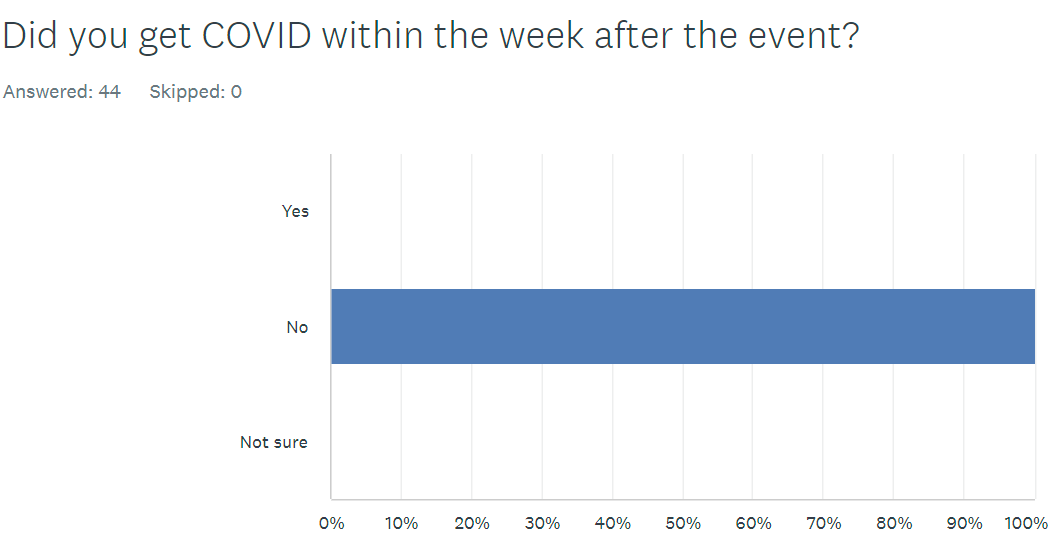
There’s one other thing worth mentioning, which is that we did require masking at the event and asked people to either be vaccinated or test prior to the event.

One the one hand, a couple sponsors and attendees griped about the masking.

On the other hand, despite other events resulting in superspreading (Kubecon EU, RSA, even some DevOpsDays events):

So, with all due respect, we are very happy with our choice and that we had a safe event. No one likes wearing masks. If you don’t like it enough to not come – don’t come. Hopefully it won’t be necessary next year.

Everything was pretty good! There was one issue, though – in all the survey sub-questions, there was a drop in the perceived friendliness of the organizer team, so we’re going to make some changes there – stay tuned to hear what!

Leave a comment

Filed under Conferences, DevOps

DevOpsDays Austin Donates to Out Youth and The Trevor Project To Support LGBTQ+ Youth

We were psyched to be back and meeting in person for DevOpsDays Austin 2022 this year! Charitable donation is a part of our Austin tech culture and very important to us, and since it was our 10th anniversary we aimed to hit a total of $100,000 in charitable donations since we started the event in 2012. And we did it! We’re happy to have $28,000 to give to local charities after our event this year.

That left us with the question of who to donate to. We like to choose things that fill the greatest need in our community at the time, and strongly bias towards supporting Austin area charities. Our state government decided to help us make our decision by starting a pogrom of discrimination against LGBTQ+ Texans.

Many of our colleagues in the Austin technology community are gay, lesbian, transgender, nonbinary, or identify with other nontraditional gender identities and sexual preferences, or have family members that are. I myself have a transgender son who I’ve loved and supported through his transition, and now he’s a happy, healthy adult. We find the attempts of the Texas government to institutionalize hostile behavior towards them deeply unacceptable and want to find ways to support them.

We looked initially at charities like Equality Texas that are working to ensure the rights of LGBTQ+ Texans, but as we discussed we wanted our funds to go directly to the benefit of people in need, and not all go to the lawyers fighting the long fight.

Since $28,000 is a lot, we decided to split it up into two $14,000 donations. After some research we nominated two recipients, Out Youth and The Trevor Project, and brought them to the DoDA organizer team for a vote, which they enthusiastically approved.

We selected Out Youth for our first donation as a deeply local Austin organization directly supporting LGBT youth.

For 32 years, Out Youth has supported Central Texas LGBTQIA+ youth and young adults by providing safe places where they are loved, acknowledged, and accepted for exactly who they are. Their life-saving and life-changing programs and services ensure these promising young people develop into happy, healthy, successful adults. Out Youth hosts a variety of programs to keep their youth mentally and physically safe such as drop-in times at their youth community center, by offering free individual counseling and group therapy sessions, and through their in-school-support services. To find out more information about ways to get involved and about their services, please visit outyouth.org today.

It’s funny that our relationships with these charities usually start with us showing up with a big surprise donation and then after that getting deeply involved with the organization; we plan to go tour their house and spread the word about volunteer opportunities with them to the Austin technology community.

Not only do I have a transgender son, but also fellow Agile Admin and conference organizer James lost a brother to suicide. So while The Trevor Project isn’t Austin based per se, it does help many Austinites, and its mission of suicide prevention among LGBTQ+ youth is deeply and personally meaningful to us both. Therefore we chose them for our second donation this year.

The Trevor Project has worked to save young lives by providing support through our free and confidential crisis programs on platforms where young people spend their time — online and on the phone: TrevorLifeline, TrevorChat and TrevorText. We also run TrevorSpace, the world’s largest safe space social networking site for LGBTQ youth, and operate innovative education, research, and advocacy programs.

  • The Trevor Project’s research has found that having at least one accepting adult in an LGBTQ young person’s life reduces their risk of suicide by 40%.
  • Transgender and nonbinary youth who reported having pronouns respected by all of the people they lived with attempted suicide at half the rate of those who did not have their pronouns respected by anyone with whom they lived.
  • “You are lovable” – this is one of the most common phrases The Trevor Project’s crisis counselors share with youth in crisis.
  • According to Trevor’s research 42% of LGBTQ youth seriously considered attempting suicide in the past year, including more than half of transgender and nonbinary youth.

You can sign up to become a volunteer counselor on their site; there’s extensive training and it requires a year commitment.

In closing, we appreciate the work Out Youth and The Trevor Project are doing and hope that others will look into finding ways to support them as well.

To the LBGTQ+ technologists in Austin, you are welcome, and both DevOpsDays Austin and other user groups we run like CloudAustin have published codes of conduct that don’t allow any hostile behavior towards you at our events, and we look forward to interacting with you there. Happy Pride Month!

Leave a comment

Filed under Conferences, DevOps