Well we haven’t had a lot of spare blogging time but we’ve been busy – the agile admins have been hard at work on some more LinkedIn Learning/lynda.com video courses to help make DevOps more accessible for the common man and woman.
Monitoring is a big part of SRE, but too much to do in the scope of all one course – so at the same time, Peco and I filmed a companion course, DevOps Foundations: Monitoring and Observability! Like the CD and IaC courses, this alternates theory with demos.
Along with the recent DevOps Foundations: Lean and Agile I did with Karthik, we feel like we’ve now completed a curriculum that can introduce you to all the major areas of DevOps and prepare you to grow from there. (Link to lynda.com playlist.) The guys are doing other courses with lynda as well, we’ve kinda gotten addicted to doing them! You can check them all out by your favorite Agile Admin:
I love talking to the folks I meet at conferences and whatnot who have done the courses; let us know what other areas you’d like to get the Agile Admin learning treatment!
We’re not a consultancy or anything – just four practitioners here in Austin who love giving back to the community when we’re not doing our day jobs. We get some royalties per click from the classes, but other than that we don’t have anything to sell you. We got into this to help people make sense of the confusing DevOps landscape and we’ll keep doing it as long as it seems like it’s meeting that goal, so your feedback is needed to let us know if we should keep going and if so on what.
Ah, observability, the new buzzword of the day. Monitoring vendors aplenty are using the word, to basically mean “better monitoring!” You know, #monitoringlove not #monitoringsucks. Because monitoring doesn’t help with debugging and doesn’t have app instrumentation right?
Well, I have to say “bah” to that. So here’s the thing. I’m an electrical engineer by education, and I spent a lot of time working at National Instruments, an engineering test and measurement company. You may be surprised to know these terms have actual definitions that don’t require Twitter arguments to discover.
Monitoring is an activity you perform. It’s simply observing the state of a system over a period of time.
Why do we monitor? For three reasons, in general.
Problem Detection – you know, alerting, or seeing issues on dashboards.
Problem Resolution – root cause and troubleshooting.
How do we monitor? Well, that’s called instrumentation. You can instrument your systems and get CPU and stuff, you can use synthetic probes, you can use JavaScript bugs to get end user monitoring, you can emit metrics from applications, you can introspect services and apps via whatever parts are exposed (from JMX to nginx stats to sysdig traces), you can take network traces… (Some folks are similarly trying to redefine “instrumentation” to just mean application instrumentation, which is lame, and in defiance of the fact that application performance management tools that do app instrumentation have existed for decades.)
You can instrument metrics or events; metrics have certain sampling frequency and resolution…
So what is observability? This isn’t a new term. It comes from system control theory. You know, the stuff that makes your A/C system and electrical plants and your car work.
Observability is a measure of how well the internal states of a system can be inferred from knowledge of its external outputs.
Observability is a property of a system. You can monitor a system using various instrumentation, but if the system doesn’t externalize its state well enough that you can figure out what’s actually going on in there, then you’re stuck.
So is observability hippy bullcrap? No, of course not. In a DevOps world, it’s very important that the apps and systems concentrate on making themselves both observable and controllable (I leave it to the reader to research controllability, unless I get agitated enough to post about that too). Do you make yourself “easy to monitor”?
Externalizing custom metrics contributes to observability (you know, like with dropwizard metrics). So does good logging. So does proper architecture! Take a system that sticks all kinds of messages into one message queue rather than using separate queues for separate types – the latter is more observable; you can more readily see how many of what is flowing through. (It’s more controllable too, as you can shut off one queue or another.)
Making your system observable is therefore important, so that if you monitor it with appropriate instrumentation, you understand the state of the system and can make short or long term plans to change it.
While a monitoring tool can definitely contribute to this via its innovation in instrumentation, analysis, and visualization, in large part observability is a battle won or lost before you start sticking tools on top of the system. It’s very important to take it into account when designing and implementing services. No tool is going to “give you” observability and that’s the usual silver bullet fallacy heard from someone who wants to sell you something.
I’m not saying every vendor is using the term wrongly (in fact I just came across this New Relic post that is very well done), but I have to say I am less than impressed when common engineering terms are so widely misused and misunderstood widely in our industry.
Would you like to know more? Peco and I are working on a new lynda.com course on monitoring and observability! There’ll be real engineering, a broad canvas of the different kinds of monitoring instrumentation, tips on implementation and use… We’ve both been using and/or building monitoring tools for decades now so we hope to have some useful info for you.
I never make New Year’s resolutions, but I want to do something different for 2018!
One thing I’m learning a lot about is Kubernetes and the CNCF ecosystem around it over the past couple of years and often find myself having a hard time keeping up with ecosystem sometimes. There are almost weekly releases on the many projects, and getting started content for all the new tools and technology is hard to find.
So! I plan to do quick 101 blogs on different topics under the Container/Kubernetes/CNCF umbrella. My first blog article will be on Prometheus- The monitoring tool that integrates GREAT with k8s! It’ll be based on my GitHub code here: https://github.com/karthequian/prometheus-demo (shhh sneak peak).
But, I need your help! Give me a list of things you are confused about in the container space, or want more info on, and I’ll be happy to do the legwork on it!
Being knee deep in the Kubernetes and CNCF ecosystem is very exciting, and it reminds me a lot of the early days of the Docker ecosystem. Kubecon in December had a lot going on with a plethora of projects and lots of vendors. In the future, I believe Kubernetes will be the defacto platform that many large enterprises will use as their orchestration and IT platform when they look to modernize their architecture. It is either all Kubernetes, or all cloud native, or serverless, or somewhere in between.
And speaking of K8s, my Lynda courses on Kubernetes just released! I had filmed them late last year at Lynda’s campus in Carpinteria, CA- Learning Kubernetes and Kubernetes: Native Tools!
Learning Kubernetes covers all the information you’ll need to get started using Kubernetes- the concepts, examples, install and everything you’ll need to get started rocking with k8s!
Kubernetes: Native Tools is a shorter course that covers the different tools available in the k8s ecosystem.
Let me know what you think- and, reach out if you have questions or issues! K8s might be overwhelming initially, but stick with it, and it’ll make your container management life so much easier!
Hey all! We’re starting work on next year’s DevOpsDays Austin – our seventh here in the ATX. Many of you have come out to the event (or another of the great DevOpsDays around the world). Well, we have some changes in store this year!
Last year’s DevOpsDays Austin, “Monsters of DevOps” was bigger than ever and had a stadium rock theme – we had a huge venue, all the DevOps VIPs we could pull down (including the first time all 4 authors of the DevOps Handbook managed to get together at an event), multiple content tracks, killer swag, great food, a hackathon, the best Happy Hour I’ve attended at a conference, we invited in and comped local user groups to give talks… Part of our continuing trajectory to make DoDA more all encompassing and awesome.
But – every year we sit down and discuss vision before we launch into the conference. What do we want to accomplish and why? Who are we serving and why? Why are we, personally, putting in huge amounts of unpaid work to serve the community? “Because it’s there and we did it last year” isn’t a good answer, so we like to really put some thought into it.
This time when we talked about it, first in our core group and then with the rest of the 2017 organizers, we realized that we’ve been concentrating on “bigger” but we’ve been putting more and more money and effort into the parts of the event that aren’t really of high DevOps value. Here in Texas, it’s easy to conflate bigger with better, since we’re both the biggest and the best! But we’re not sure that’s right. Many of the more expert people we know here in Austin don’t really come out to the event any more, unless they are giving a talk or recruiting for their current gig. Talks and openspaces have kept focused on introducing new people to DevOps, enterprise folks, “horses and donkeys,” and so on.
And as we talked, we said “Well – what do we personally get out of the conference nowadays as attendees?” The answer was “not much.” Openspaces are huge and end up being a couple people talking. Talks are either pretty familiar from the conference circuit or also designed for new folks. We have more content but it’s more passive content, sit and watch. It’s good for the newbies but not as much for the experienced folks.
We contrasted this to the first couple DevOpsDays we went to in Silicon Valley. The first couple were just in a big auditorium at LinkedIn. There weren’t any sponsor booths. More of the event was focused on the openspaces and interaction between the highly driven participants. We ate box lunches wherever we could perch in the parking lot outside – and swag was just a t-shirt. Heck, the third one was in a weird abandoned building Dave Nielsen had access to, we had to carry our own chairs around to talks and the food and stuff was in a concrete-and-cage loading dock. But it’s those events we got the most out of.
Therefore, this year DevOpsDays Austin is going to go to what we call a “Summit” format. We’re reducing the size of the event, and focusing more on local, motivated practitioners. What does this mean?
No sponsor tables. We’d love sponsors to participate, but in recent years we’ve gotten more folks who have either just sent aggressive marketers, or sent people we enjoy and then locked then down behind tables. So we’ve come up with a sponsorship package that gets them exposure and value but lets them actually participate in the event. Folks that just want to churn leads will self-select out. The sponsorships are less expensive, and we’ll just have venue food etc. instead of premium.
No preselected talks. Well, OK, maybe we’ll have one keynote a day. But I went to a ProductCamp here in Austin and they did something brilliant – they had a RFC but don’t do a final selection – finalists show up and the audience votes on what talks they want to hear (kinda like openspaces but more prepared). This means people who say ‘well… I’ll come to your event if I can talk (or sponsor if I can talk, or…)’ will self-select out. You come because you want to be here, and you can give a talk!
Smaller headcount. We’re lowering the cap (including sponsors and organizers and volunteers) to 400. We’re going to get openspaces to be the kind of highly engaged discussions that make the so valuable. We’re going to be up front with people that attendees are expected to engage. DoD used to be the only thing around to learn from. But now, if you’re an enterprise person that wants to have some DevOps talked at them – you have variety of options now, like you can go to DevOps Enterprise Summit (also a great event), or to another DevOpsDays like the one in Dallas using the conference format, or one of a dozen events either completely DevOps or DevOps-tracked. But for here in Austin this year, we need something where the unicorns can also have an event meaningful to them, so they can gather and refresh on what’s going on. Not to say only “unicorns” are welcome, but frankly we’d prefer people only come out if they intend to discuss, share, and engage; this will not be a passive-learning friendly event.
No streaming. Every year we put a lot of work and money into live-streaming and/or recording the event. But it’s often problematic, and doesn’t get viewed a lot – there’s so much content out there now. But even worse, we end up having to degrade the experience of real attendees around the requirements of broadcast – space, money, schedule, the presenter has to stay in a little box… So we’re not going to do it. You want to participate – come out and participate.
But How Can This Work???
That was everyone’s initial reaction to this plan. But that’s silly – it has worked. We’re just doing things that DevOpsDays has already done, that ProductCamp has already done, and so on. It’s just not what’s become customary. After the organizers had a little time for it to sink in, they all rallied behind it with a vengeance.
We’ve run the numbers and just the basic $200/head attendee fees can pay for the venue, basic food, and a shirt, even if we get zero sponsors. (We won’t have zero sponsors, we just put our sponsor page up and someone bought in the first hour it was live.) As we get more funding we’ll pump up the event, but deliberately focus on the core experience of highly skilled techies learning from each other, instead of adding distractions.
How Dare You Dis My Format???
This is the format we’d like to try this year. Other events will use other formats and that’s fine. Here at DoDA we try something different every year! We were the first to have multiple content tracks (over the complaints of some purists). We added a hackathon, we added a local user group track… Last year we went big with a vengeance, and it was cool. Now we’re going to do more small and exclusive, and that’ll be cool. Next year, it’ll be different. Whatever your event is doing, more power to you, don’t confuse us having a vision we believe in with us thinking you’re “wrong.”
Come on down!
We’d love to see everyone out at DevOpsDays Austin 2018! Come ready to interact and share. Come ready to give a talk, with the risk it won’t make. Come sponsor your company, just you won’t have a table to lounge at. This change has gotten us excited about running our seventh DevOpsDays, and we bet you’ll love it!
We all know from DevOps blameless retrospective wisdom that there is no such thing as a single “root cause.” One of the most common root causes people like to assign blame to is “human error”. Not to mince words, this is usually political, buck-passing CYA of the highest order.
I just read a great article on the recent U.S. Navy ship collision issues I wanted to pass on. If you have been keeping up with the news, there has been a rash of Navy ships colliding with other ships causing fatalities. When you go Google it up, you see a whole bunch of “Navy attributes it to human error…”
But now go read this article, Something’s Wrong In The Surface Fleet And We’re Not Talking About It. It’s written by Capt. Michael Junge, an experienced Naval officer. The TL;DR is that you can say “human error” all you want, fire someone, and call it case closed, but these accidents are a systemic amount of understaffing of Naval surface ships and massive undertraining and maintenance that is a leading indicator of even worse to come should an actual wartime deployment be necessary.
Even in engineering, we are tempted to push the problem down onto the person that made a mistake. Fully engaging with the system that caused the need for the action that caused the mistake, the lack of validation that makes mistakes possible, and so on is hard thinkin’. It is threatening when people point out flaws in processes and systems and code you had a hand in. But the only way to actually improve your situation is to soberly assess what the actual contributors to issues are, and work towards fixing them.
Just had a problem that I thought I’d document the solution to for the world…
In our build pipeline at work, we use maven and the fabric8 docker-maven-plugin to manage our builds. We love it, developers can just “mvn install” locally and then the Atlassian Bamboo build system just “mvn deploy”s in the exact same way.
Well, so we had some builds that suddenly weren’t able to pull the base images specified in our Dockerfiles down from Dockerhub, breaking the build with 500 error messages like:
[ERROR] DOCKER> Unable to pull 'library/debian:sid' from registry 'docker.io' : received unexpected HTTP status: 500 Server Error (Internal Server Error: 500) [received unexpected HTTP status: 500 Server Error (Internal Server Error: 500)]
But it worked fine on our local box. And it could pull our custom images from Artifactory fine. What’s the problem here? Bamboo? The plugin? Well, some helpful community folks helped home in on it, it turns out that for some versions of Java 1.8, 8u131 and prior at least going back to 112, where there’s some problem (TLS? Root certs? Not really sure) that messes up when pulling a docker.io container from inside Java during our docker build step. My team’s microservices aren’t Java based so the Java version doesn’t come up much – but of course maven uses Java.
Upgrading the JDK version to 8u144 made the problem go away. We actually have an up to date curated Java version we use in Bamboo for our Java builds, but folks doing Python builds were just using the default “JDK 1.8” that Atlassian is putting on their Bamboo build agent AMI, which is of course old and suffers from this issue.
I grew up in Muscat, Oman, and it was an exciting time when we got Internet at home in 1996. By 1998, all of my friends who had Internet at home were first on ICQ and then on AOL IM. AOL IM was huge when I went to college in the early 2000’s and was the primary way to connect friends together to chat. Back then, it was rare to have chat rooms, and the rooms that existed were usually long-running things set up to talk about general topics.
The first time I saw value in a chat room in a professional setting was when I got invited to a Basecamp “deploy room” by fellow Agile Admin Peco (or was it Ernest?) at NI when our quarterly release cycle was going super poorly, and all of us (100 other people) were waiting around at hour #34 trying to figure out why some random enterprise application was holding up the rest of the release process. Post invitation to the room, I was able to look at the past messages between the ops team about application failures, and then realized pretty quickly that our databases weren’t actually responding like they should. It took all of 10 minutes to ask someone on the ops side with credentials to run a database query, and figure out that the db creds were all wrong. 2 hours later, the release was all done…
That moment made me realize that 1×1 chats were great, but having a persistent chat rooms with teams of people added value to an organization.
Recently, a colleague asked me a simple question that made me reflect. He asked, “What’s the big deal about Slack?”. At work, there’s been a big push to move towards Slack, when we’ve had 1×1 chat forever. Here are my 5 most compelling reasons for doing so:
1) Collaboration++: 15 years ago, software was a simpler, and there was no cloud/microservices. You’d have 1 large binary to deploy for a platform, and typically have a few folks who understood the overall workings of platform. Today, with microservices, you require a bunch of applications to deploy, and each of these have specific owners who understand specifics. Thus, you’re going to have to have conversations with multiple folks to figure out any issues. Having this in a room setting versus a 1×1 setting gets you to a resolution faster.
2) Chat metadata: Chat is less about words, and more about conversations that include images, links, slash commands, workflows etc. Chatops tools make pasting these much easier than before, and looking at formatted code in Slack is so much easier to read than looking at the same in pidgin.
3) Chat History: Chat apps now give you history – even from when you were not online or in the chat room. This is valuable from the perspective that you can see everything from when you weren’t around, and don’t have to ask someone to keep repeating the problem over and over again. You can just scroll up, read the context, and be ready to help if you can. This is my one knock against IRC (or at least the implementation of IRC at a company I worked at); it was nice to have everyone in a spot, but it only worked when we were VPN’ed in, and had no history.
4) Pipelining with chatbots: Continuous Integration/Delivery is all the rage these days! Having a chat system that allows for your devops systems to push data is a primary requirement in order to build a pipeline of this sort. Responses to broken builds, tests, alerts are quicker when the data associated with these are transmitted to a chatroom that you’re looking at, than having to look at Jenkins all the time. Chatbots are invaluable in this scenario, and help you with information flow.
5) The new normal: A new generation of engineers already do this. It’s already part of the culture for the next generation of engineers who work on open source (for example, kubernetes slack) and there’s even chatter about slack at Universities now. The world is evolving towards broader conversation, and not having chatops tools will hurt your company in terms of hiring and retention.
Agree/Disagree, or have a different perspective? Let me know by commenting below!
Working at Stackengine, and now at Oracle, I’ve been working in the Docker ecosystem for the last 5 years!
While containerization has taken the IT and devops world by storm, a lot of larger enterprises might still be on the outside looking in. If you find yourself in that boat, you’re in luck!
Here’s a quick video on getting you running your very first Docker container on your Mac in under 5 minutes.
Also, I had the pleasure of traveling back to my childhood hometown of Bengaluru and presenting a workshop at Code Conf this year. I’ll create a separate post about my travels, but I got to present a workshop lab that is an Introduction to Containers. This lab is a perfect follow on to the video above, and will help you get started on your Docker journey! Let me know if you have questions.
If you’re more of a product manager, or just looking for why you’d want to use Docker, and understand its usecases, you can take a look at this presentation I had published on Why to docker? as shown below.
Questions, comments, or concerns? Hit us up by leaving a comment below…
As part of our embarrassment of conference riches here in Austin this year, I just went to HashiConf 2017 last week (Sept. 19-20). HashiConf is the company conference for HashiCorp, the guiding hand behind a whole set of cool open source projects used by many newfangled technorati. We use many of these at AlienVault and so I went to see what’s hot and new! If you’re not familiar, here’s the open source tools Hashi runs:
Vagrant– Run multi-server development environments on your laptop. We’ve mostly moved on to using Docker Compose for this but if you’re not using docker yet it’s mandatory!
Packer – A utility for building VM images, including AWS AMIs, Azure, etc. At AlienVault we use this extensively to bake images for virtual appliances.
Terraform – An infrastructure as code tool, like AWS CloudFormation but cross-cloud. We use this on one of our products; I personally don’t have a lot of experience with it though.
Consul– A distributed configuration store and service discovery tool. I did a consul setup for one of our products.
Vault– a secret store – it stores credentials encrypted but can also dynamically provision them. I am very interested in us starting to use this.
Nomad – a cluster scheduler – does more than Amazon ECS but less than Kubernetes.
I wanted to go to the Vault training but it was sold out by the time I managed to poke the sullen beast sufficiently to get registered.
The good news is that all of the sessions will allegedly have video posted publicly at some point! So you won’t have to rely on my notes below, which is good. Here’s the conference schedule. All the session videos are now available as a YouTube playlist at:
If I were some kind of paid blogger or this was some ad-driven site I’d say “We’re done with part one, come back next post for more!” But I’m not, so read on to get all my debrief from the conference. If it’s too long, you’re too old!!!
Day One
The Day 1 keynote was packed with info. It started with Mitchell Hashimoto (the Hashicorp founder, as you might suspect from the name) talking about the mad growth they’ve seen – in 5 years since founding they’re up to 130 employees, conducted 150 releases across their 6 products last year, and had 22 million downloads of these tools in the last year (1.5M in the last month). Makes sense to me; most people I know use at least one Hashi product even if it’s just vagrant or packer.
They have Terraform, Nomad, Vault, and Consul Enterprise (hosted) offerings.
Let me take an aside to say – while it’s admirable they didn’t spend most of the conference pushing their paid products (I’m looking at you Dockercon), there was so little information on them that it was confusing. Back a year ago when I started in on a Consul implementation I poked around their site trying to figure out their hosted offering (called Atlas at the time) and was basically thwarted. And it’s not much better now. What do these give you? What do they cost? I had a *lot* of hallway conversations with people who similarly had tried to look into them and been rebuffed. “It’s like buying a Ferrari,” said one person who I’ll leave anonymous. “There’s no list price, calling them just starts some conversation about whether you should really be a customer of theirs or not.” Sucks, I like using hosted services rather than rolling my own if it at all makes financial sense, but who has time for that?
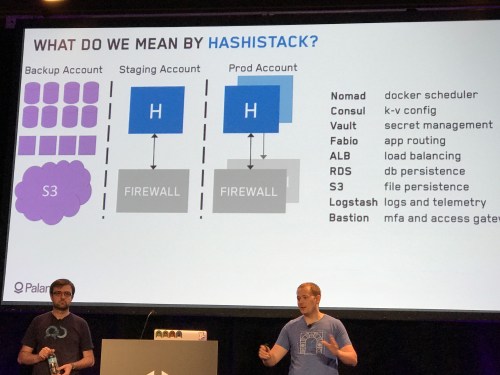
Anyway, so they started working their way down the products to make announcements. They’re now marketing these as “The Hashistack!”
Terraform
It’s going gangbusters and they added lots of features including a UI console, imports from external and local variables, stability, remote backends, and more. I can testify to this, before the remote backends and you had to keep state in a file – that sucked. (For those of you familiar with AWS and not Terraform, let me explain – CloudFormation has two parts to it – the actual templates and then the storage of system state. The AWS fabric itself keeps the state for you and you get it via API. Since Terraform is cloud agnostic the tool needs to store state itself; and instead of starting with a database or whatnot they just started with a file and have expanded from there. Now you can do S3, consul, various other stuff.)
Their big announcement is the Terraform Module Registry. I like to call it the TerrorHub or even the TerrorDome (with apologies to Public Enemy). Basically, you know, where people share stuff in the community like dockerhub.
I find this super interesting. Done right, repos like this are a huge force multiplier for modern tools. On the Open Threat Exchange, I’ve been happy just to use AWS CloudFormation. We’re not interested in cross-cloud at all, and we use changesets and exports and other modern CF things, so going to Terraform wouldn’t really get us much -maybe some extra modularity, but we do continuously deployed microservices and things are factored out where we don’t need a giant ass template anyway. But, AWS does a crappy job of providing and enabling the community to provide decent CloudFormation templates. They try – but they’re hard to find in the giant rat’s nest of AWS docs, they are generally somewhat problematic (e.g. the quickstart Mongo CF they provide has a node hardcoded to be the primary and the others to be secondaries – but mongo works by consensus elections of the primary man!!!). Now, it’s possibly to bork this up, the Chef community had fragmentation around this till they finally put together the Chef Supermarket in 2015; we use Puppet at AV currently and at the time we selected it with the deciding factor being easier access to high quality modules for re-use.
They had Corey Sanders from Microsoft show off their Azure console that now has an embedded “Azure Cloud Shell” (just a container they expose via browser) and now it’s coming pre-loaded with Terraform! Azure’s been Johnny on the spot with docker and Linux and Hashi stuff over the last few years.
Terraform Enterprise apparently has a lovely visual viewer for workspaces and is API everything and will have general signups open by EOY.
Vault
In an automated environment, “don’t keep your passwords in source” is really kind of a laughable lie. I mean, you can not hardcode them and insert them from something else, something properly also kept in source control… Hence Vault. Vault is an internal project they open sourced 2.5 years ago. Network configurations have become increasingly complex – hey did you know network perimeters aren’t secure any more?
Secret management, encryption as a service, privileged access management are all critical needs, Vault has added on bunches of functionality to them – and its secure plugins open it up to you!
Dan McTeer from Adobe came out to describe how his team makes self service security solutions as an internal platform (using Vault amongst other things) so the many, many other Adobe ops teams don’t have to waste time reinventing the wheel.
Vault 0.8.3 has tight and easy kubernetes integration. Kubernetes has a secret store but… Not a good one. (And before any k8s people get their shorts in a wad, the “take it all or leave it all” attitude from some k8s people is why some folks are sticking with more composable solutions. Don’t say your components are pluggable out one side of your mouth and then give people flak for doing it out the other.)
Consul
Consul can do so many things it’s hard to talk about sometimes. “Service discovery and distributed config store?” Hard for novices to get their heads around. There’s a session I’ll describe later that does a great job of demystifying it. For now, note that they added dead server cleanup and other new functionality.
Since Consul is built on very academic stuff like SWIM and RAFT, they’ve started a research arm and have published their first paper on Lifeguard: SWIM-ming with Situational Awareness which reduces gossip protocol false positives by 98%.
And, they have just gone 1.0 with Consul! So it’s battle tested, mother approved.
Nomad
Nomad’s their batch and service scheduler. I have to admit, I went into the conference with a “bah who cares” attitude about Nomad, but afterwards I think it has its points.
Previous reviews I read compare it unfavorably against Kubernetes and Swarm. To be fair they are deliberately smaller and more composable, which is why we are still on ECS and haven’t taken the big ol’ step to Kubernetes ourselves yet. (Kubernetes: The OpenStack of 2017).
Anyway, new stuff.
Everything’s API and CLI – so now they have a UI integrated into the binary, like Consul!
Role based ACL policies driven by ACL tokens. “IAM for Nomad.”
Citadel passed 1M containers under Nomad
Nomad Enterprise has native namespacing for larger shared environments.
The Big Secret Announcement
Mitchell gives us a big ol’ windup. In terms of total automation we went from VMs and config management to cloud and IoC to containers and microservices to schedulers… What’s next?
How do you enforce rules? Forbid changing config outside work hours (consul)… Ensure all services have health checks (nomad)… Ensure all TLS certs are 2048 bits (vault)… Ensure all AWS instances are tagged (terraform)…
Announcing Sentinel – a policy as code engine suitable for use in a continuous delivery pipeline.
Define and version your compliance rules, test and automate them.
Language: Easy to learn and use, mostly one liners, easy logic.
Can do active enforcement (block) and passive (check).
Levels of fail – advisory, soft, hard.
Workflow (“simulator”) – can mock and test locally.
Plugins as imports.
Terraform Enterprise uses this, so like you can make rules before the plan and apply to validate changes
Consul Enterprise, use during KV modifies or service registrations
Vault Enterprise, role and endpoint governing policies
Nomad Enterprise, run on job create/update introspecting on their details (e.g. artifacts only come from this repo)
It wasn’t immediately clear if this only worked with the Enterprise offerings or not, but it appears (after talking to other confused folks over the 2 days) that the answer is yes. Well, that sucks, as it limits adoption to the 1% who care of the 1% who have managed to get any Enterprise offerings. Oh well.
I’ve been asked if this is like Chef’s InSpec. Kinda, but InSpec is for compliance rules “inside the box” and Sentinel is for rules about the system, just like Chef is to Cloudformation. So IMO they’d be super complementary.
Finally, Dave McJannet, the CEO, came on to talk about the Hashicorp Partner Network for resellers and integrators.
Guiding principles:
Workflows not technologies
Automation through codification
Open and extensible
All right, that was the keynote! Don’t worry, I didn’t take that many notes from other things.
Having just heard about Sentinel, and not being clear yet I couldn’t use it if not on all Enterprise offerings, I skedaddled over to a session on it. Again, these will eventually be online so I’m not trying to duplicate whole talks and demos in text, this is to give you some flavor and opinions.
Defining, communicating, implementing, and auditing policy gets complex with scale. And it then becomes a huge source of friction on real operational work, despite attempts to document it. So just like we’ve fixed similar problems, let’s do it as code.
Then he says all the things Mitchell did in the keynote, but slower.
Example policy: Terraform can’t execute when consul healthchecks are failing
Yay golang!
Made their own simplistic DSL.
We’re 15 minutes into a 40 minute slot. I kinda want to switch to the terraform session, but I know from the attendance here that it’s standing room only over there.
import “time” <- you can import libs it knows how to get info from (sockaddr, tfplan, job)
main = rule { time.pst.hour is not 3 } <- functioney syntax, rules are the main thing, plain english “or”s and stuff
if an element returns undefined that’s ok
variables, dynamic typing
types of policy – advisory (just tells ya), soft (can be overridden), hard (no screw you)
writing and testing policies, you can use their simulator, e.g. “sentinel test”
Demo!
sentinel apply <file>
make test folder (test/<policy>/<test>.json
config, mock, say what rule you want to test, then it’ll run all the tests with “sentinel test <policy>”
It integrates with nomad enterprise, and he shows how you accidentally change a deployment count too low and it fails the rule and doesn’t happen.
Liz Rice of Aqua (@aquasecteam) has a product written around Vault.
How to handle secret attributes and lifecycle in docker? Passing secrets into containers goes from
Bad:
in source code
in image/dockerfile
To less bad but still bad:
Env vars – can exec in and see it, can docker inspect it and see it, can cat /proc/<pid>/environ, leak into logs…
mount volume with directory with secrets – tempfs is in memory. can still get it via docker exec and /proc.
Docker orchestrator support for secrets:
Nomad + Vault – secrets passed as files, tasks get tokens to retrieve values
Docker – swarm has service support but not for pocs. rotation needs restart though, and secrets go into the raft log encrypted -but the key is right there unless you lock your swarm.
kubernetes – in a pod yaml, namespaced, as vol or env var, can turn on RBAC with —authorization-mode RBAC. Stored in etcd and you have to make sure it’s encrypted.
A docker -pluggable secret backend is in progress.
In kubernetes – use kubernetes-vault
For others – Aqua Security secrets management!
With aqua you can’t get the secret via inspect or /proc, and it has audit logs n stuff.
tiny.cc/secrets
Make the secure thing the easy thing to do
it gets pretty complicated fast.
There are 6 pillars of security in your infrastructure:
encryption
access segmentation
patching
centralized logging
mfa
defensive backups
He will skip talking about #1 and #2 because they are obvious and boring.
Patching
MalwareBytes shows: It now takes 4 days on average to weaponize new exploits. Patching needs to be in phases, alert on failures, roll back, run daily
They use immutable AMIs with packer/terraform. They burn a common AMI with vault/consul/nomad/filebeat and just turn on what’s needed on a given server. Versions are kept in a variable.json file.
Their terraform lays out 3 ASGs for nomad/consul, vault, and then nomad workers.
How to bounce a hashistack:
delete node/add node for consul/nomad
like that with stepdown for vault
nomad workers – add new ones, drain old ones
Ain’t nobody got time for that.
They wrote “bouncer” to do that easily and automatically, open sourced at github/palantir/bouncer. So you have it rebuild and roll in new versions daily. Ta da!
Logs
You need them to do incident response. You want <5 min latency, many formats, long retention, source identified – and opt-out not opt-in (in other words you get all the damn logs and not just the 3 you know about).
They started with workers shipping logs to a SIEM. Then they shipped to logstash which sends to multiple locations. They have a custom rsyslog template that puts everything into json, because logging in json is always better. [If you don’t believe that you will be tied to a chair and Charity Majors will bludgeon you with a whiskey bottle until you are reeducated. -Ed.]
Then they go journald to rsyslog for nomad etc. Other ones, filebeats watches. Telemetry should monitor high risk files and get insights into running procs, kernel versions, etc.
MFA
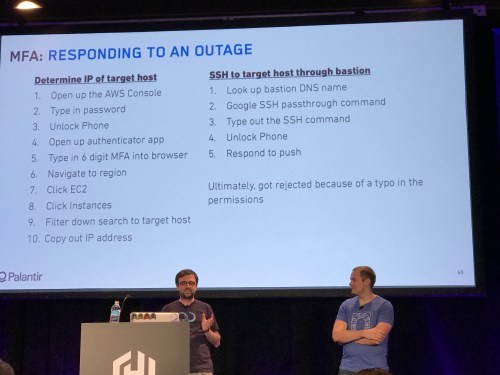
MFA on everything? Sure! But… It’s bullshit. The process of getting logged in and the number of logins and MFAs you have to do to go from “sitting down at your desk” to “logged into the necessary box” is ridiculous.
MFA is Bullshit
Need to simplify finding hosts, ssh’ing.
They wrote a go wrapper around sesh, aws, and vault commands called vault-ssh-helper. They also use a duo pam module and a yubikey (way faster than phone mfa).
from laptop, get vault token which then are used to look up aws creds, then used to look up ssh, one MFA later you’re in. ssh/mfa becomes the easy path.
Defensive Backups
Use a separate backup account with you not the admin. back up storage by default, not opt in. You need those backups available for testing too.
So, RDS. We have a job that makes a snapshot, shared with a second account. A lambda in the other account reads it, makes a copy, and shares it back.
It’s run from a nomad batch job, assumes all RDS and S3 needs to be backed up.
Securing nomad jobs and vault policies
First, gate on checkin, and second, stop bad code.
gpg sign commits – sign with yubikey
or, duobot (https://github.com/palantir/duo-bot) calls the duo api and sends you a push to your mobile.
They built some bots to automate all this, approver, duo-bot (mfa absed deploy) and bulldozer (auto-merge if status green) – (github)
Unit tests for jobs – naming schemes, folder structure, health checks
CI converges to what’s in the repo hourly
Converged infrastructure – you know, scheduling workloads.
New table stakes – fast, observable, self service, auto cleanup.
Testing in prod is a reality. Here, he avoids using any of the common “test in prod” memes, for which I salute him.
Emergent behaviors of large systems – conways law and hyrum’s law – and microservice complexity means that local testing is still a fable. Scaling peaks, human error can’t be locally simulated.
On their site, user calls gets segmented at edge (opentrace, zipkin), routed to the right backend, and publish its telemetry for analysis. A front end envoy proxy to split to proxies that go to edges
Feature flags are inferior!
Data plane for Routing – envoy, linkerd, nginx+. Integration with the control plane is important.
Options: Envoy in container? Sidecar as proxy? Host based envoy?
Control Plane itsisomething or… I lost some of it here.
Instrument with segment identifiers, make apps experiment aware, interesting data is usually wrong.
That was all the notes I took from Day 1. I also spent time talking with people I knew, some vendors (Amazon, Hashi, Datadog, a new APM vendor called Instana…)
Day Two
Well, the scheduled keynoter dropped, so we got a quick sub:
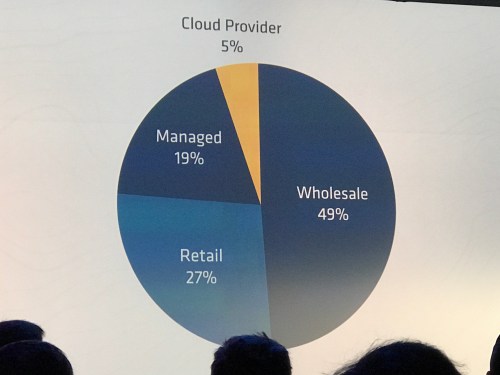
Wholesale colos are hideously less energy efficient – once adjusted by volume, they use 49% vs cloud’s 5% of the energy picture.
Due to overprovisioning, invalid IT procurement focus (bulk), unused “zombie” servers, lack of standard utilization metric
IT managers can’t identify owners for 15-30% of the servers but are reluctant to decomm them!
Electric costs are paid by someone else.
Priority of efficiency low compared to deploy, avail, security, reliability
Schedulers help with this. And use the cloud you poor benighted momos. (I added that last part)
Kelsey is obviously huge into Kubernetes but he loves the Hashistack too. And sometimes he uses both nomad and kubernetes at the same time? CRAZY EH???
He presents some info from circleci on why they use kubernetes and nomad both (kubernetes good for containers, nomad does non-containers)
Demo time!
dynamic credential provisioning via vault – vault makes a mysql username, the app uses it, then vault deletes it!
he tells his android phone “create nomad” and it deploys it in k8s
make your nomad worker pool in the cloud, not on K8S
EBay classifieds runs a buttload of single tenant Elasicsearches. So do we, which made me very interested in his talk.
They spin it up with terraform, nomad, etc.
challenges
– discover master nodes
– direct traffic to right cluster
– port conflicts
– data persistency
– control resources
– deal with hardware outages automatically
– separate auth
– enforce tls
– enforce allocation placement
Very quick notes, really need the video or slides:
Use LB, fabio, consul, nomad, docker
consul based discovery plugin for elasticsearch
nomad 0.5 has “sticky” ephemeral disks
use saltstack, trying to reduce amount of CM. just set up nomad, consul, fabio;
render job files per cluster; deploys/renews ssl certs
accessing dbs – root password, app passwords. tracking, sharing, rotating and distribution…
vault can make dynamic mysql creds!
they already had consul and use puppet, so used jsok/puppet-vault and used consul-HA backend
so they deployed vault onto the consul servers
initializing vault – GPG support built in and then init vaults in each DC with the API.
what about vault unsealing? jaxxstorm/unseal
add your vault servers to a config fule, add your encrypted unseal key, it prompts for your GPG keyring password and unseals all the vaults
so unseal every morning
to config all the DCs
UKHomeOffice/vaultctl, also new terraform vault provider
for mysql config, they run puppet to install db and vault user and roles, then API call to the region’s vault to add as a backend.
to make logins easy, ldap auth with policies… but manual. apptio/breakglass like vault ssh in that it gets ad password and then does all the stuff to get to mysql, ssh, docker
if you’re using consul as a backend then turn on acls and block ports 8500/1
consul snapshot to take backups, test weekly bu restoring to different port vault, connect to the consule, unseal and verify
lessons
– pick 1 thing and vault it
– consul+vault gives you HA for free
– automation has tradeoffs (secret zero problem)
– engineers love the http api
OK so this went by fast and I didn’t take extensive notes because I knew most of it – but if you are using consul it is absolutely mandatory that you seek this out. It’ll explain in quick form a dozen different things to do with consul from using consul-template to the one I didn’t know about…
Consul supports prepared queries with complex logic, you can use them e.g. for automated failover as part of service discovery.
So reviews.service.consul -> reviews.query.consul and it execute a query where it can have failover servers and all.
That’s my notes! I also caught up with some folks from ScaleFT, who are implementing the Google BeyondCorp zero trust model as a product, we are very very interested in it. Network perimeters and ssh keys? Busted, like in 1990 busted. Do something better.
Well I hope that’s enough for ya… I was definitely impressed, found a reason to maybe use terraform, found a reason to maybe use nomad, definitely want to use vault and more consul. I wish sentinel was usable by civilians. Good crowd, good conference, make sure and watch the videos when they emerge!

 James and I did DevOps Foundations: Site Reliability Engineering, which explains our view of what SRE is, and its position in the DevOps arena. This rounds out our “DevOps 201” series, where we delve down into the three practice areas of DevOps – continuous delivery, infrastructure as code, and SRE.

 the agile admin