
Tag Archives: velocityconf

Velocity 2010: Day 2 Keynotes Continued

Back from break and it’s time for more!  The dealer room was fricking MOBBED.  And this is with a semi-competing cloud computing convention, Structure,  going on down the road.

Lightning Demos

Time for a load of demos!

dynaTrace

Up first is dynaTrace, a new hotshot in the APM (application performance management) space.  We did a lot of research in this space (well, the sub-niche in this space for deep dive agent-driven analytics), eventually going with Opnet Panorama over CA/Wily Introscope, Compuware, HP, etc.  dynaTrace broke onto the scene since and it seems pretty pimp.  It does traditional metric-based continuous APM and also has a “PurePath” technology where they inject stuff so you can trace a transaction through the tiers it travels along, which is nice.

He analyzed the FIFA page for performance.  dynaTrace is more of a big agenty thing but they have an AJAX edition free analyzer that’s more light/client based.  A lot of the agent-based perf vendors just care about that part, and it’s great that they are also looking at front end performance because it all ties together into the end user experience.  Anyway, he shows off the AJAX edition which does a lot of nice performance analysis on your site.  Their version 2.0 of Ajax Edition is out tomorrow!

And, they’re looking at how to run in the cloud, which is important to us.

Firebug

A Firefox plugin for page inspection, but if you didn’t know about Firebug already you’re fired.  Version 1.6 is out!  And there’s like 40 addons for it now, not just YSlow etc, but you don’t know about them – so they’re putting together “swarms” so you can get more of ’em.

In the new version you can see paint events.  And export your findings in HAR format for portability across tools of this sort.  Like httpwatch, pagespeed, showslow.  Nice!

They’ve added breakpoints on network and HTML events.  “FireCookie” lets you mess with cookies (and breakpoints on this too).

YSlow

A Firebug plugin, was first on the scene in terms of awesome Web page performance analysis.  showslow.com and gtmetrix.com complement it.   You can make custom rules now.  WTF (Web Testing Framework) is an new YSlow plugin that tests for more shady dev practices.

PageSpeed

PageSpeed is like YSlow, but from Google!  They’ve been working on turning the core engine into an SDK so it can be used in other contexts.  Helps to identify optimizations to get time to first pane, making JS/CSS recommendations.

The Big Man

Now it’s time for Tim O’Reilly to lay down the law on us.  He wrote a blog post on operations being the new secret sauce that kinda kicked off the whole Velocity conference train originally.

Tim’s very first book was the Massacomp System Administrator’s Guide, back in 1983.  System administration was the core that drove O’Reilly’s book growth for a long time.

Applications’ competitive advantage is being driven by large amounts of data.  Data is the “intel inside” of the new generation of computing.  The “internet operating system” being built is a data operating system.  And mobile is the window into it.

He mentioned OpenCV (computer vision) and Collective Intelligence, which ended up suing the same kinds of algorithms.  So that got his thinking about sensors and things like Arduino.  And the way technology evolves is hackers/hobbyists to innovators/entrepreneurs.  RedLaser, Google Goggles, etc. are all moves towards sensors and data becoming pervasive.  Stuff like the NHIN (nationwide health information network).  CabSense.  AMEE, “the world’s energy meter” (or at least the UK’s) determined you can tell the make and model of someone’s appliances based on the power spike!  Passur has been gathering radar data from sensors, feeding through algorithms, and now doing great prediction.

Apps aren’t just consumed by humans, but by other machines.  In the new world every device generates useful data, in which every action creates “information shadows” on the net.

He talks about this in Web Squared.  Robotics, augmented reality, personal electronics, sensor webs.

More and more data acquisition is being fed back into real time response – Walmart has a new item on order 20 seconds after you check out with it.  Immediately as someone shows up at the polls, their name is taken off the call-reminder list with Obama’s Project Houdini.

Ushahidi, a crowdsourced crisis mapper.  In Haiti relief, it leveraged tweets and skype and Mechanical Turk – all these new protocls were used to find victims.

And he namedrops Opscode, the Chef guys – the system is part of this application.  And the new Web Operations essay book.  Essentially, operations are who figures out how to actually do this Brave New World of data apps.

And a side note – the closing of the Web is evil.  In The State of the Internet Operating System, Tim urges you to collaborate and cooperate and stay open.

Back to ops – operations is making some pretty big – potentially world-affecting- decisions without a lot to guide us.  Zen and the Art of Motorcycle Maintenance will guide you.  And do the right thing.

Current hot thing he’s into – Gov2.0!  Teaching government to think like a platform provider.  He wants our help to engage with the government and make sure they’re being wise and not making technopopic decisions.

Code for America is trying to get devs for city governments, which of course are the ass end of the government sandwich – closest to us and affecting our lives the most, but with the least funds and skills.

Third Party Pain

And one more, a technical one, on the effects of third party trash on your Web site – “Don’t Let Third Parties Slow You Down“, by Google’s Arvind Jain and Michael Kleber.  This is a good one – if you run YSlow on our Web site, www.ni.com, you’ll see a nice fast page with some crappy page tags and inserted JS junk making it half as fast as it should be.  Eloqua, Unica, and one of our own demented design layers an extra like 6s on top of a nice sub-2s page load.

Adsense adds 12% to your page load.  Google Analytics adds 5% (and you should use the new asynchronous snippet!).  Doubleclick adds 11.5%.  Digg, FacebookConnect, etc. all add a lot.

So you want to minimize blocking on the external publisher’s content – you can’t get rid of them and can’t make them be fast (we’ve tried with Eloqua and Unica, Lord knows).

They have a script called ASWIFT that makes show_ads.js a tiny loader script.  They make a little iframe and write into it.  Normally if you document.write, you block the hell out of everything.  Their old show_ads.js had a median of 47 ms and a 90th percentile of 288 ms latency – the new ASWIFT one has a mdeian of 11 ms and a 90th %ile of 32 ms!!!

And as usual there’s a lot of browser specific details.  See the presentation for details.  They’re working out bugs, and hope to use this on AdSense soon!
Leave a comment

Filed under Conferences, DevOps

Velocity 2010: Day 2 Keynotes

The Huddled Masses

Day 2 of Velocity 2010 starts off with a bang!  It’s Day 1 for a lot of people; Day 1 is optional workshops.  Anyway, Steve Souders (repping performance) and Jesse Robbins (repping ops) took the stage and told us that there are more than 1000 people at the show this year, more than both previous years combined!  And sure enough, we’re stuffed past capacity into the ballroom and they have satellite rooms set up; the show is sold out and there’s a long waiting list.  The fire marshal is thrilled.  Peco and I are long term Velocity alumni and have been to it every year – you can check out all the blog writeups from Velocity 2008 and 2009!  As always, my comments are in italics.

Jesse stripped down to show us the Velocity T-shirt, with the “fast by default” tagline on it.  I think we should get Ops representation on there too, and propose “easy by design.”   “fast by default/easy by design.”  Who’s with me?

Note that all these keynotes are being Webcast live and on demand so you can follow along!

Datacenter Revolution

The first speaker is James Hamilton of AWS on Datacenter Infrastructure Innovation.  There’s been a big surge in datacenter innovation, driven by the huge cloud providers (AWS, Google, Microsoft, Baidu, Yahoo!), green initiatives, etc. A fundamental change in the networking world is coming, and he’s going to talk about it.

Cloud computing will be affecting the picture fundamentally; driving DC stuff to the big guys and therefore driving professionalization and innovation.

Where does the money go in high scale infrastructure?  54% servers, 21% power distribution/cooling, 13% power, 8% networking, 5% other infrastructure.  Power stuff is basically 34% of the total and trending up.  Also, networking is high at 8% (19% of your total server cost).

So should you virtualize and crush it onto fewer servers and turn the others off?  You’re paying 87% for jack crap at this point.  Or should you find some kind of workload that pays more than the fractional cost of power?  Yes.  Hence, Amazon spot instances. The closer you can get to a flat workload, the better it is for you, everyone, and the environment.

Also, keeping your utilization up is critical to making $ return.

In North America, 11% of all power is lost in distribution.  Each step is 1-2% inefficient (substation, transformer, UPS, to rack) and it all adds up.  And that’s not counting the actual server power supply (80% efficient) and on board voltage regulators (80% efficient though you can buy 95% efficient ones for a couple extra dollars).

Game consoles are more efficient computing resources than many data centers – they’ve solved the problem of operating in hot and suboptimal conditions.  There’s also potential for using more efficient cooling than traditional HVAC – like, you know, “open a window”.

Sea Change in Net Gear!  Network gear is oversubscribed.  ASIC vendors are becoming more competitive and innovating more – and Moore’s Law is starting to kick in there (as opposed to the ‘slow ass law’ that’s ruled for a while). Networking gear is one of the major hindrances to agility right now – you need to be able to put servers wherever you want in the datacenter, and that’s coming.

Speed Matters

The second keynote is Urs Hölzle from Google on “Speed Matters.”

Google, as they know and see all, know that the average load time of a Web page is 4.9 seconds, average size 320 kb.  Average user bandwidth is 1.8 MB.  math says that load should be 1.4 seconds – so what up?

Well, webpagetest.org shows you – it’s not raw data transfer, it’s page composition and render.  Besides being 320 kB, it has 44 resources, makes 7 DNS resources, and doesn’t compress 1/3 of its content.

Google wants to make the Web faster.  First, the browser – Chrome!  It’s speed 20 vs Firefox at 10 vs IE8 at like 2.  They’re doing it as open source to spur innovation and competition (HTML5,  DNS prefectch, VP8 codec, V8 JS engine).  So “here’s some nice open source you could adopt to make it better for your users, and if you don’t, here’s a reference browser using it that will beat your pants off.  Enjoy!”

TCP needs improvements too.  It was built for slow networks and nuke-level resiliency, not speed.  They have a tuning paper that shows some benefits – fast start, quick loss recovery makes Google stuff 12% faster (on real sites!).  And no handshake delay (app payload in SYN packets).

DNS needs to propagate the client IP in DNS requests to allow servers to better map to closest servers – when DNS requests go up the chain that info is lost.  Of course it’s a little Big Brother, too.

SSL is slow.  False start (reducing 1 roudn trip from the handshake) makes Android 10% faster.  Snap start and OCSP stapling are proposed improvements to avoid round trips to the client and CA.

HTTP itself, they promote SPDY.  Does header compression and other stuff, reduces packets by 40%.  It’s the round trips that kill you.

DNS needs to be faster too.  Enter Google’s Public DNS.  It’s not really that much data, so for them to load it into memory is no big deal.

And 1 Gbps broadband to everyone’s home!  Who’s with me?  100x improvement!

This is a good alignment of interests.  Everyone wants the Web to be faster then they use it, and obviously Google and others want it to be faster so you can consume their stuff/read their ads/give them your data faster and faster.

They are hosting for popular cross-Web files like jQuery, fonts, etc.  This improves caching on the client and frees up your servers.

For devs, they are trying to make tools for you.  Page Speed, Closure Compiler, Speed Tracer, Auto Spriter, Browserscope, Site Performance data.

“Speed is product feature #1.”  Sped affects search ranking now.  Go to code.google.com/speed and get your speed on!  Google can’t do it alone…  And slow performance is reducing your revenue (they have studies on that).

Are You Experienced?

Keynote 3 is From Browsers to Mobile Devices: The End User Experience Still Mattersby Vik Chaudhary (Keynote Systems, Inc.).  As usual, this is a Keynote product pitch.  I guess you have to pay the piper for that sponsorship. Anyway, they’re announcing a new version of MITE, their mobile version of KITE, the Keynote Internet Testing Environment.

Mobile!  It’s big!  Shakira says so! Mee mee mee mee!

Use MITE to do mobile testing; it’ll test and feed it into the MyKeynote portal.  You can see performance and availability for a site on  iPhone, Blackberry, Palm Pre, etc.  You can see waterfalls and screenshots!  That is, if you pay a bunch extra, at least that’s what we learned from our time as a Keynote customer…

MITE is pretty sexy though.  You can record a transaction on an emulated iPhone.  And analyze it.  Maybe I’m biased because I already know all this, and because we moved off Keynote to Gomez despite their frankly higher prices because their service and technology were better.  KITE was clever but always seemed to be more of a freebie lure-them-in gimmick than a usable part of a real Keynote customer’s work.

Now it’s break time!  I’ll be back with more coverage from Velocity 2010 in a bit!

Leave a comment

Filed under Conferences, DevOps

Velocity 2010: Ignite!

Welcome to the bonus round.  Tonight there is an Ignite! round, which is where a bunch (14 in this case) people do super quick 20 slide/15 seconds per slide presentations on interesting things.

Alex Polvi from Cloudkick on Cloud Data Porn!

James just talked to these guys before we came out here and we’re supposed to talk with him.  The service looks boss (it’s cloud based cloud monitoring).  And he has the “best hair in cloud computing!”

Amazon vs Rackspace vs Slicehost stats.  Machines off – on slicehost they keep them up, and on Amazon they all eventually get turned off.  Amazon has larger RAM values and Slicehost has larger disk, and Amazon has larger % disk used.

Based on that – he guesses AWS has 230k hosts online; the others have way way fewer.  700 TB of memory; Rackspace and Slicehost are more in the 150 range.  But they have more like 5 PB of disk and Amazon has less than half.

And he calcu-guesses EC2 (us-east) has about 11,000 physical hosts, and they only get about 10 VMs per host while the others get more.

Justin Huff on How to do a Triathlon!

No, really.  Swim, bike, run.  And you get to follow some hot buns.

Brent Chapman on Netomata Automates Network Configuration

If you do something right 95% of the time, when you do it 6 times it’s only 74% correct.  So automated networks are better.  More reliable from consistent configs.  Doesn’t rely on personal consistency.  Easier to maintain and troubleshoot.  Easier to scale.

Automation cycle – design, generate configs, deploy, control via change control, feedback look.  Netomata does the generation – you put in a network description and config templates (in Ruby) and it generates configs.  And it’s open source and community sharing based.  “Chef for Networks!”

Amy Lightholder on How to Network like a Ninja When You’re Nobody

Aka “the glad-handing dandy HOWTO”.  Scope out the event in advance – people, venue, etc.  Check in early.  Be friendly, real, yourself, etc.  Volunteer for things.  Hell, just pitch in. And twitter your uterus off – read and contribute to the hashtag stream (hint: use tweetchat).  Be funny, useful, smart, etc.  Give attention – listen.  Get attention by organizing impromptu events or taking pictures and posting them.  Use “foursquare”, it’s like Yelp checkins but more generic.  Get or give rides (even in your trunk).  Find workout buddies.  Don’t eat alone – get people. Take breaks to make notes an do followup.   Send invitations to LinkedIn and whatnot now not later.  And have fun.  Be fun, not a snob.

Mark Lin, on Metrics Simplified

Making sense of all those metrics is a challenge.  You have to know your system – you can only improve to “five nines” if you do.  Sending/collecting metrics is complicated.  Doing a poll based collection server isn’t fun.  They did it using graphite, rabbitmq, a graphite local proxy, and something internal called RockSteady that uses the Esper CEP engine.  They stick events to a port through netcat into a RabbitMQ server.  Then they graph it in graphite.  The graphs have lines for version changes vs latencies and metrics.  Graph = post event forensics.  Rocksteady treats each metric as an event.  Has SQL-like syntax.  Auto thresholding and prediction.  Correlation and determine dependencies.  Capture metrics when something crosses a threshold.  Assemble timing info per request.  Actual time spent in each component in an app.

Make metric sending simple, have a nice UI to make sense of the data, and real time processing of  the metrics rocks.

That all sounded cool and I wish I knew what the hell he was talking about.  I’ll sic Peco on hunting him down and talking metrics!

Petascale Storage by Tim Lossen from Germany

Data is growing, and it’s expensive to store.  Could we use open source hardware to get a good “return on byte?”  In the Open Storage Pod, he used laptop disks.  Denser, cooler, less power.  Use port multipliers.  Made 20 TB nodes. and put into 6 node pods in a single rackmount enclosure (4U).   A rack has 10 pods = 1.2 PB.  A container has 8 racks.  diaspora! (?) using PCMCIA.  5 TB cube.  openstoragepod.org.

When Social Edges Go Black by Jesper Andersen

Social software messes you up when things go wrong.  Info has emotional content, but social software just passes it on through.  He made a site called Avoidr that uses Foursquare to avoid people.  Facebook similarly, keeps bugging you to refriend people who hurt you.

Matching systems work well.  What if we match complementary emotions and make “The Forgiveness Engine,” based on the confessional idea. certaintylabs.com

Anderson Lin on Ten Things You Have To Do Differently In China

It’s a huge emerging Internet market.

10.  You need a license (ICP) to Web in China. used to be a rubber stamp and now not so much.

9.   You have to get in country.  Bandwidth going in is all jacked up.  Internal is 5x faster.

8.  Not all IDC (data centers) are created equal.  Some are very ghetto.

7.  You need multiple carriers to cover China – north and south and they don’t talk.  China Telecom and China Unicom, you have to buy from both.

6.  The “China Price” of bandwidth is high.

5.  No Visa, no Mastercard, no checks.  Debit cards only – UnionPay, Alipay, COD.

4.  You have to reach a young audience – 30% under 18.

3.  Do you qq?  Massive IM protocol in China.

2.  You have to get used to regulations.

1.  Now for the really bad news… IE6 is 60-70% of the market.  Everyone caters to it.

libcloud: A Unified Interface to the Cloud by Paul Querna, Cloudkick

libcloud is a Python library that brokers to cloud APIs – Amazon, Rackspace, Softlayer – they all use different APi tehcnologies and that’s obnoxious.  It does compute, not storage and stuff.  Cloud API standards haven’t worked, so it’s translation time.  It supports 16 cloud providers.  It has a simple API – list_nodes(), reboot, destroy, create.

Can do neat tricks like get locations, price per hour, and boot a box in the currently cheapest location!

Don’t update a wiki, pssh on list list_nodes().

Fabric + libcloud to pull data.

Silver Lining: python Django deployment on the cloud built on top of libcloud.

Mercury: Drupal deployment on the cloud, same deal.

Image formats – there is no standard yet – AMIs and dd’ing.

Experimenting with Java version in progress.

It’s open source (Apache).

  • JClouds – Java-world equivalent
  • Apache Deltacloud – Ruby-ish equivalent
  • Fog (Ruby)

libcloud.org

Web Performance Across the HTTP to HTTPS Transition by Sean Walbran, Digital River

HTTP is all great, but when you go HTTPS for encryption things go awry.  Only use it for sharing secrets.  Performance at the transition is critical. It’s slow by default. Not just the encryption overhead, but interaction with the CDN and browser cache and new network connection on port 443.  You can try to connect ahead on mouseover.  Do SSL offload.  And HTTPS gets LRUed out of cache.  Use different domains and prefetch.  Try to leverage the browser cache, but the browser doesn’t believe your previously cached stuff.  Set Cache-Control: public.  IE is even worse.  Use prefetching while they’re browsing insecurely.  Firefox+JQuery you try to prefetch but get zero byte stuff anf it’s hinky.

Chuck Kindred on The ABCs of Gratitude

Things he’s grateful for, to purge his soul.

Mandi Walls on Lies, Damn Lies, and Statistics

Turn your intuition into data.  Means and medians you know.  Standard deviation, significance, and regression are the next level.

Mean is a way of addressing a metric across a large group.  But it hides outliers if it’s the only metric.  Mean vs median difference shows outlier pull.  A normal distribution is defined by the  mean and standard deviation.  Standard deviation is a measurement of the spread of the distribution.  In Excel, there’s a Data Analysis package add-on and use “Descriptive Statistics” and it can pull all that.

If your data is pretty normal, 68% of stuff siwitin one standard deviation.  NORMDIST function tells you how far out you are.

Regression shows relationships between sets of data.  CPU vs hits per minute for example.  “R square” – close to 1 means relationship!

Billy Hoffman on The 2010 state of web performance.  Zoompf!

Evaluated the Alexa top 1000 to see what they’re doing in terms of perf optimization.  There’s a lot of bloat.  78% of sites aren’t compressing right.  80% of sites are not optimizing images (and pngcrush/jpgtran get you 15% improvement).

Too many requests!!  30% of all static resources aren’t being cached.  Don’t forget there’s a cache somewhere inthe middle usually, but query strings and stuff bust them.  Combine!

Silly requests – like for grey images instead of defining colors.  JS with no executable.  CSS with no rules.  1 in 5 sites are giving PHP without executing, or other 404s, 500s, etc.

But, the companies were clearly doing something.  But we suck at it.  We’re failing the basics.  Why can’t we do crap that’s a decade old?  Manage it, apply it uniformly?  You can go to zoompf.com (/2010report) now and check your shit!

Sam Ramji (Apigee) on Open APIs, Darnwin’s Finches, and Success vs Extinction

Competitive pressures force adaptation, like Darwin’s finches.  Your API is your DNA now.  Web 2010 is about using glue APIs.  Siri is some thing that replicates open APIs.  They were bought by Apple and now all those APIs will be in Apple stuff.  Most traffic is coming on APIs now not pages.  It’s what has made Twitter mutate like finches.

Whew!  Superfast knowledge transfer.  After, we got beers with the Cloudkick guys, they are some pretty cool cats.  Next time… Day 2!

2 Comments

Filed under Conferences, DevOps

Velocity 2010: Cloud Security: It Ain’t All Fluffy and Blue Sky Out There!

Cloud security, bugbear of the masses.  For my last workshop of Velocity Day 1 I went to a talk on that topic.  I read some good stuff on it in Cloud Application Architectures on the plane in and could stand some more.  I “minor” in security, being involved in OWASP and all, and if there’s one area full of more FUD right now than cloud computing, it is cloud security.  Let’s see if they can dispel confusion!  (I hope it’s not a fluffy presentation that’s nothing but cloud pictures and puns; so many of these devolve into that.)

Anyway, Ward Spangenberg us Directory of Security operations for Zynga Game Networks, which does Farmville and Mafia Wars.  He gets to handle things like death threats.  He is a founding member of the Cloud Security Alliance ™.

Gratuitous Definition of Cloud Computing time!  If you don’t know it, then you don’t need to worry about it, and should not be reading this right now.

Cloud security is “a nightmare,” says a Cisco guy who wants to sell you network gear.  Why?  Well, it’s so complicated.  Security, performance, and availability are the top 3 rated challenges (read: fears) about the cloud model.

In general the main security fuss is because it’s something new.  Whenever there is anything new and uncharted all the risk averse types flip out.

With the lower level stuff (like IaaS), you can build in security, but with SaaS you have to “RFP” it in because you don’t have direct control.

Top threats to cloud computing:

  • Abuse/nefarious use
  • Insecure APIs
  • And more but the slide is gone.  We’ll go over it later, I hope.  Oh, here’s the list.

Multitenancy

The “process next door” may be acting badly, and with IPs being passed around and reused you can get blacklisted ones or get DoSsed from traffic headed to one.  No one likes to share.  You could get germs.  Anyway, they have to manage 13,000 IPs and whitelisting them is arduous.

Not Hosted Here Syndrome

You don’t have insight into locations and other “data center level” stuff.  Even if they have something good, like a SAS 70 certification, you still don’t have insight into who exactly is touching your stuff.  Azure is nice, but have you tried to get your logs?  You can’t see them.  Sad.

Management tools and development frameworks don’t have all the security features they should.  Toolsets are immature and stuff like forensics are nonexistent.  And PaaS environments that don’t upgrade quickly end up being a large attack surface for “known vulnerabilities.”  You can reprovision “quickly” but it’s not instantaneous.

DoS

Stuff like DDoS and botnets are classic abuse.  He says there’s “always something behind it” – people don’t just DoS you for no profit!  And only IaaS and PaaS should be concerned about it!  I think that’s quite an overstatement, especially for those of us who don’t run 13,000 servers – people do DoS for kicks and for someone with 100 or fewer servers, they can be effective at it.

Note “Clobbering the Cloud” from DefCon 17.

Insecure Coding

XSS, injection, CSRF, all the usual… Use the tools.  Validate input.  Review code.  And insecure crypto, because doing real crypto is hard.

Malicious insiders/Pissy outsiders

Devs, consultants, and the cloud company.  You need redundant checks.  Need transparent review.

Shared Technology Issues

With a virtualized level, you can always potentially attack through it.  Check out Cloudburst and Red Pill/Blue Pill.

Data Loss and Leakage

Can happen.  Do what you would normally do to control it.  Encrypt some stuff.

Account or Service Hijacking

Users aren’t getting brighter.  Phishing etc. works great.  There’s companies like Damballa that work against this.  Malware is very smart in lots of cases, using metrics, self-improving.

Public deployment security impacts

Advantages – anonymizing effect, large security investments, pre-certification, multisite redundancy, fault tolerance.

Disadvantages – collateral damage, data & AAA security requirements, regulatory, multi-jurisdictional data stores, known vulnerabilities are global.

Going hybrid public/private helps some but increases complexity and adds data and credential exchange issues.

IaaS issues

Advantages: Control of encryption, minimized privileged user attacks, familiar AAA mechanisms, standardized and cross-vendor deployment, full control at VM level.

Disadvantages: Account hijacking, credential management, API security risks, lack of role based auth, full responsibility for ops, and dependence on the security of the virtualization layer.

PaaS Issues

Advantages: Less operational responsibility, multi-site business continuity, massive scale and resiliency, simpler compliance analysis, framework security features.

Disadvantages: Less operational control, vendor lockin, lack of security tools, increased likelihood of privileged user attack, cloud provider viability.

SaaS Issues

Advantages: Clearly defined access controls, vendor’s responsible for data center and app security, predictable scope of account compromise, integrationwith directory services, simplified user ACD.

Disadvantages: Inflexible reporting and features, lack of version control, inability to layer security controls, increased vulnerability to privileged user attacks, no control over legal discovery.

Q&A

If  you are using something like Flash that goes in the client, how do you protect your IP?  You don’t.  Can’t.  It’ll get reverse engineered.  You can do some mitigations.  Try to detect it.  Sic lawyers on them.  Fingerprint code.

Yes, he plays all their games.

In the end, it’s about risk management.  You can encrypt all the data you put in the cloud, but what if they compromise your boxes you do the encryption on,  or what if they try to crack your encryption with a whole wad of cloud boxes?  Yep.  It brings the real nature of security into clearer relief – it’s a continuum of stopping attacks by goons and being vulnerable to attacks by Chinese government and organized crime funded ninja Illuminati.

Can you make a cloud PCI compliant?  Sure.  Especially if you know how to “work” your QSA, because in the end there’s a lot of judgment calls in the audit process.  Lots of encryption even on top of SSL; public key crypt it from browser up using JS or something, then recrypt with an internal only key.  Use your payment provider’s facilities for hashing or 30-day authorizations and re-auth.  Throw the card number away ASAP and you’re good!  Protecting your keys is the main problem in the all-public cloud.  (Could you ssh-agent it, inject it right into memory of the cloud boxes from on premise?)

Private cloud vs public cloud?  Well, with private you own the infrastructure.

This session was OK; I suspect most Velocity people expect something a little more technical.  There weren’t a lot of takeaways for an ops person – it was more of an ISSA or OWASP “technology decisionmaker”  focused presentation.  If he had just put in a couple hardcore techie things it would have helped.  As it was, it was a long list of security threats that are all existing system security threats too.  How’s this different?  What are some specific mitigations; many of these were offered as “be careful!”  Towards the end with the specific IaaS/PaaS/SaaS implications it got better though.

8 Comments

Filed under Cloud, Conferences, DevOps, Security

Velocity 2010: Infrastructure Automation with Chef

After a lovely lunch of sammiches, we kick into the second half of Workshop Day at Velocity 2010.  Peco and I (and Jeff and Robert, also from NI) went to Infrastructure Automation with Chef, presented by Adam Jacob, Christopher Brown, and Joshua Timberman of Opscode.  My comments in italics.

Chef is a library for configuration management, and a system written on top of it.  It’s also a systems integration platform, as we will see later.  And it’s an API for your infrastructure.

In the beginning there was cfengine.  Then came puppet.  Then came chef.  It’s the latest in open source UNIXey config management automation.

  • Chef is idempotent, which means you can rerun it and get the same result, and it does minimal work to get there.
  • Chef is reasonable, and has sane defaults, which you can easily change.  You can change its mind about anything.
  • Chef is open source and you can hack it easily.  “There’s more than one way to do it” is its mantra.

A lot of the tools out there (meaning HP/IBM/CA kinds of things) are heavy and don’t understand how quickly the world changes, so they end up being artifacts of “how I should have built my system 10 years ago.”

It’s based on Ruby.  You really need a third gen language to do this effectively; if they created their own config structure it would grow into an even less standard third gen language.  If you’re a sysadmin, you do indeed program, and people that say you’re not are lying to you.  Apache config is a programming language. Chef uses small composable primitives.

You manage configuration as idempotent resources, which are put together in recipes, and tracked like source code with the end goal of configuring your servers.

Infrastructure as Code

The devops mantra.  Infrastructure is code and should be managed with the same rigor.  Source control, etc.  Chef enables this approach.  Can you reconstruct your business from source code, data backup, and bare metal?  Well, you can get there.

When you talk about constraints that affect design, one of the largest and almost unstated assumptions nowadays is that it’s really hard to recover from failure.   Many aspects of technology and the thinking of technologists is built around that.  Infrastructure as code makes that not so true, and is extremely disruptive to existing thought in the field.

Your automation can only be measured by the final solution.  No one cares about your tools, they care about what you make with them.

Chef Basics

There is a chef client that runs on each server, using recipes to configure stuff.  There’s a chef server they can talk to – or not, and run standalone.  They call each system a “node.”

They get a bunch of data points, or attributes, off the nodes and you can search them on the server, like “what version of Perl are you running.”  “knife” is the command line tool you use to do that.

Nodes have a “run list.”  That’s what roles or recipes to apply to a node, in order.

Nodes have “roles.”  A role is a description of what a node should be, like “you’re a Web server.”  A role has a run list of its own, and attributes to modify them – like “base, apache2, modssl” and “maxchildren=50”.

Chef manages resources on nodes.  Resources are declarative descriptions of state.  Resources are of type package or service; basically software install and running software.  Install software at a given version; run a service that supports certain commands.  There’s also a template resource.

Resources take action through providers.  A provider is what knows how to actually do the thing (like install a package, it knows to use apt-get or yum or whatever).

Think about it as resources go through a platform to pick a provider.

Recipes apply resources in order.  Order of execution is determined by the order they’re listed, which is pretty intuitive.  Also, systems that fail within a recipe should generally fail in the same state.  Hooray, structured programming!

Recipes can include other recipes.  They’re just Ruby.  (Everything in Chef is Ruby or JSON). No support for asynchronous actions – you can figure out a way to do it (for file transfers, for example) but that’s really bad for system packages etc.

Cookbooks are packages for recipes.  Like “Apache.”  They have recipes, assets (like the software itself), and attributes.  Assets include files, templates (evaluated with a templating language called ERB), and attributes files (config or properties files).  They try to do some sane smart config defaults (like in nginx, workers = number of cores in the box).  Cookbooks also have definitions, libraries, resources, providers…

Cookbooks are sharablehttp://cookbooks.opscode.com/ FTW! They want the cookbook repo to be like CPAN – no enforced taxonomy.

Data bags store arbitrary data.  It’s kinda like S3 keyed with JSON objects .  “Who all plays D&D?  It’s like a Bag of Holding!”  They’re searchable.  You can e.g. put a mess of users in one.  Then you can execute stuff on them.  And say use it instead of Active Directory to send users out to all your systems.  “That’s bad ass!” yells a guy from the crowd.

Working with Chef

  1. Install it.
  2. Create a chef repo.  Like by git cloning their stock one.
  3. Configure knife with a .chef/knife.rb file.  There’s a Web UI too but it’s for feebs.
  4. Download some cookbooks.  “knife cookbook site vendor rails -d” gets the ruby cookbook and makes a “vendor branch” for it and merges it in.
  5. Read the recipes.  It runs as root, don’t be a fool with your life.
  6. Upload them to the server.
  7. Build a role (knife role create rails).
  8. Add cloud credentials to knife – it knows AWS, Rackspace, Terremark.
  9. Launch a new rails server (knife ec2 server create ‘role[rails]’) – can also bootstrap
  10. Run it!
  11. Verify it!  knife ssh does parallel ssh and does command, or even screen/tmux/macterm
  12. Change it by altering your recipe and running again.

Live Demo

This was a little confusing.  He started out with a data bag, and it has a bunch of stuff configured in it, but a lot of the stuff in it I thought would be in a recipe or something.  I thought I was staying with the presentation well, but apparently not.

The demo goal is good – configure nagios and put in all the hosts without doing manual config.

Well, this workshop was excellent up to here – though I could have used them taking a little more time in “Working with Chef” – but now he’s just flipping from chef file to chef file and they’re all full of stuff that I can’t identify immediately because I’m, you know, not super familiar with Chef.  THey really could have used a more “hello world”y demo or at least stepped through all the pieces and explained them (ideally in the same order as the “working with chef” spiel).

Chef 0.8 introduced the “chef shell,” shef.    You can run recipes line by line in it.

And then there was a fire alarm!  We all evacuate.  End of session.

Afterwards, in the gaggle, Adam mentioned some interesting bits, like there is Windows support in the new version.  And it does cloud stuff automatically by using the “fog” library.  And unicorn, a server for people that know about 200% more about Rails than me.  That’s the biggest thing about chef – if you don’t do any other Ruby work it’s a pretty  high adoption bar.

One more workshop left for Day 1!

6 Comments

Filed under Conferences, DevOps

The Tenets of Hosting a Technical Workshop for Humans

How to have a successful technology workshop.  Inspired by a workshop at Velocity 2010.

  1. Name your session correctly and enter a description that is suitable and specific. Calling it “From design to deploy” and having a workshop about installing a key-value store and setting up an app are two vastly different things.
  2. If there are pre-requisites list them with the description so people can prepare (or skip your session).
  3. Don’t assume everyone  will have an Apple laptop in their hands. That runs OSX 10. That has access to local network. That runs Chrome 6 or Safari.
  4. Before you dive into configuration and install steps, explain what your software does and why we should care. Then explain what the workshop is going to do and how.
  5. Hand out some materials so people can go at their own pace.
  6. Don’t write the demo materials and code the night before you are giving a presentation at a major conference.
  7. Have an assistant to help individual folks so you don’t run from person to person like a butt monkey while everyone else twiddles their thumbs.
  8. Don’ be lazy and terse with your slides. Unless you have some really good software that is solid and works with any input on any environment, under any condition.
  9. As people are performing the steps of the workshop, follow along and display what you are doing why explaining the steps. Don’t sit around and drop smart-ass tongue-in-cheek comments about the world. Hopefully you have rehearsed and tested the steps as you present them to your audience.
  10. If you are showing snippets of code on different slides, don’t just explain how they work together and that function on page calls a method on page 3. Show the code structure and then dive into it.
  11. Don’t assume the workshop network will be the same as your home network with every host open to everyone else.
  12. Make sure the software version you are demoing is tested and stable. Or don’t tell people there are no single points of failure in your badass software.
  13. Test your demo and and the instructions that people will be performing.
  14. Have a backup plan even if it involves handing out materials and doing pen and paper exercises.
  15. Leave some materials with folks that can be handy to follow up on the workshop.
  16. Thank your audience for being patient :).
  17. When you think you are done preparing, prepare some more.

Leave a comment

Filed under Conferences, DevOps

Velocity 2010: Cassandra Workshop

My second session is a workshop about the NoSQL program Cassandra.  Bret Piatt from Rackspace gave the talk.  As always, my comments are in italics. Peco and Robert joined me for this one.

It’s not going to cover “why Cassandra/why NoSQL?” Go to slideshare if you want ACID vs distributed data stores handwringing.  It’ll just be about Cassandra.

He has a helpful spreadsheet on Google Docs that assists with various tasks detailed in this presentation.

We’ll start with the theory of distributed system availability and then move on to model validation.

Distributed System Theory

Questions to ask when designing your Cassandra cluster.

  1. What’s your average record size?
  2. What’s your service level objective for read/write latency?
  3. What are your traffic patterns?
  4. How fast do we need to scale?
  5. What % is read vs write?
  6. How much data is “hot”?
  7. How big will the data set be?
  8. What is my tolerance for data loss?
  9. How many 9’s do you need?

Record Size

Don’t get sloppy.  Keep your record sizes down, nothing’s “cheap” at scale.  Something as simple as encoding scheme (utf32) can increase your data size by a factor of 4.

Response Time

People expect instant response nowadays.  Cassandra’s read and write times are a fraction of, for example, mySQL’s.  A read is 15 ms compared to about 300 ms on a 50 GB database.  And writing is 10x faster than reading!!!

As in the previous session, he recommends you have a model showing what’s required for each part of a Web page (or whatever) load so you know where all the time’s going.

He notes that the goal is to eliminate the need for a memcache tier by making Cassandra faster.

Traffic Patterns

Flat traffic patterns are kinda bad; you want a lull to run maintenance tasks.

Scaling Speed

Instant provisioning isn’t really instant.  Moving data takes a long time.  On a 1 Gbps network, it thus requires 7 minutes to get a 50 GB node and 42 for a 300 GB node.

Read vs Write

Why are people here looking at Cassandra?  Write performance?  Size and sharding?  No clear response from the crowd.

Since writing is so much faster than reading, it drives new behaviors.  Write your data as you want to read it; so you don’ thave to filter, sort, etc.

Hot Data

Hot data!  What nodes are being hit the most?  You need to know cause you can then do stuff about it or something.

Data Loss

Before using Cassandra, you probably want an 8 node cluster, so 200 GB minimum.  And you want to double when it fills up!  If you’re doing smaller stuff, use relational.  It’s easier.  You can run Cassandra on one node which is great for devs but you need 8 or more to minimize impact from adding nodes/node failure and such.

And nodes will fail from bit rot.  You need backups, too, don’t rely on redundancy.  Hard drives still fail A LOT and unless you’re up to W=3 you’re not safe.

Uptime

Loads of 9’s, like anything else, require other techniques beyond what’s integral to Cassandra.

He mentions a cool sounding site called Availability Digest, I’ll have to check it out.

Model Validation

Now, you’re in production.  You have to overprovision until you get some real world data to work with; you’re not going to estimate right.  Use cloud based load testing and stuff too.  Spending a little money on that will save you a lot of money later.  Load test throughout the dev cycle, not just at the end.

P.S.  Again, have backups.  Redundancy doesn’t protect against accidental “delete it all!” commands.

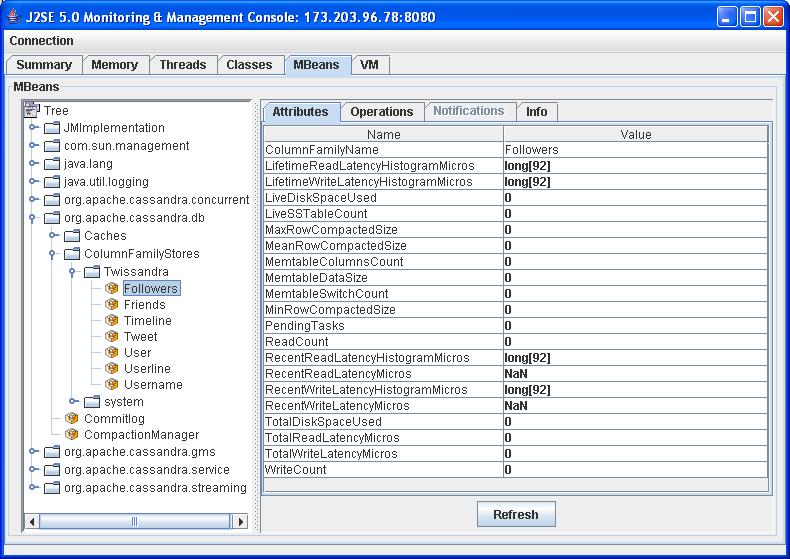
There’s not a lot of tools yet, but it’s Java.  Use jconsole (included in the JDK) for monitoring, troubleshooting, config validation, etc.   It connects to the JVM remotely and displays exposed JMX metrics.  We’ve been doing this recently with OpenDS.  It does depend on them exposing all the right metrics… It doesn’t have auth so you should use network security.  I’ll note that since JMX opens up a random high port, that makes this all a pain in the ass to do remotely (and impossible, out of the Amazon cloud).

He did a good amount of drilling in through jconsole to see specific things about a running Cassandra – under MBeans/org.apache.cassandra.db is a lot of the good stuff; commit logs, compaction jobs, etc.  You definitely need to run compactions, and overprovision your cluster so you can run it and have it complete.  And he let us connect to it, which was nice!  Here’s my jconsole view of his Cassandra installation:

Peco asked if there was a better JVM to use, he says “Not really, I’m using some 1.6 or something.  Oh, OpenJDK 1.4 64-bit.”

“Just because there’s no monitoring tools doesn’t mean you shouldn’t monitor it!”

You should know before it’s time to add a new node and how long it will take.

More tools!

  • Chiton is a graphical data browser for Cassandra
  • Lazyboy – python wrapper/client
  • Fauna – ruby wrapper/client
  • Lucandra – use Cassandra as a storage engine for Lucene/solr

Questions

Any third party companies with good tools for Cassandra?  Answer – yes, Riptano, a Rackspace previous employee thing, does support.

Do you want to run this in the cloud?  Answer – yes if you’re small, no if you’re Facebook.

What about backups?  Answer – I encourage you to write tools and open source them.  It’s hard right now.

This session seemed to strangely be not “about” Cassandra but “around” Cassandra.  Not using Cassandra yet but being curious, it gave me some good ops insights but I don’t feel like I have a great understanding…  Perhaps could have had a bit more of an intro to Cassandra.  He mentioned stuff in passing – I hear it has “nodes”, but never saw an architecture diagrams, and heard that you want to “compact,” but don’t know what or why.

3 Comments

Filed under Conferences, DevOps

Velocity 2010: Scalable Internet Architectures

My first workshop is  Scalable Internet Architectures by Theo Schlossnagle, CEO of OmniTI.  He gave a nearly identical talk last year but I missed some of it, and it was really good, so I went!  (Robert from our Web Admin team attended as well.)

There aren’t many good books on scalability.  Mainly there are three – Art of Scalability, Cal Henderson’s Building Scalable Web Sites, and his, Scalable Internet Architectures.  So any tips you can get a hold of are welcome.

Following are my notes from the talk; my own thoughts are in italics.

Architecture

What is architecture?  It encompasses everything form power up to the client touchpoint and everything in between.

Of necessity, people are specialized into specific disciplines but you have to overcome that to make a whole system make sense.

The new push towards devops (development/operations collaboration) tries to address this kind of problem.

Operations

Operations is a serious part of this, and it takes knowledge, tools, experience, and discipline.

Knowledge
– Is easy to get; Internet, conferences (Velocity, Structure, Surge), user groups

Tools – All tools are good; understand the tools you have.  Some of operations encourages hackiness because when there is a disruption, the goal is “make it stop as fast as possible.”

You have to know how to use tools like truss, strace, dtrace through previous practice before the outage comes.  Tools (and automation) can help you maintain discipline.

Experience comes from messing up and owning up.

Discipline is hardest.  It’s the single most lacking thing in our field. You have to become a craftsman. To learn discipline through experience, and through practice achieve excellence. You can’t be too timid and not take risks, or take risks you don’t understand.

It’s like my old “Web Admin Standing Orders” that tried to delineate this approach for  my ops guys – “1.  Make it happen.  2.  Don’t f*ck it up.  3.  There’s the right way, the wrong way, and the standard way.”  Take risks, but not dumb risks, and have discipline and tools.

He recommends the classic Zen and the Art of Motorcycle Maintenance for operations folks.  Cowboys and heroes burn out.  Embrace a Zen attitude.

Best Practices

  1. Version Control everything.  All tools are fine, but mainly it’s about knowing how to use it and using it correctly, whether it’s CVS or Subversion or git.
  2. Know Your Systems – Know what things look like normally so you have a point of comparison.  “Hey, there’s 100 database connections open!  That must be the problem!”  Maybe that’s normal.  Have a baseline (also helps you practice using the tools).  Your brain is the best pattern matcher.
    Don’t say “I don’t know” twice.  They wrote an open source tool called Reconnoiter that looks at data and graphs regressions and alerts on it (instead of cacti, nagions, and other time consuming stuff).  Now available as SaaS!
  3. Management – Package rollout, machine management, provisioning. “You should use puppet or chef!  Get with the times and use declarative definition!”  Use the tools you like.  He uses kickstart and cfengine and he likes it just fine.

Dynamic Content

Our job is all about the dynamic content.  Static content – Bah, use akamai or cachefly or panther or whatever.  it’s a solved problem.

Premature optimization is the root of all evil – well, 97% of it.  It’s the other 3% that’s a bitch.  And you’re not smart enough to know where that 3% is.

Optimization means “don’t do work you don’t have to.”  Computational reuse and caching,  but don’t do it in the first place when possible.
He puts comments for things he decides not to optimize explaining the assumptions and why not.

Sometimes naive business decisions force insane implementations down the line; you need to re-check them.

Your content is not as dynamic as you think it is.  Use caching.

Technique – Static Element Caching

Applied YSlow optimizations – it’s all about the JavaScript, CSS, images.  Consolidate and optimize.  Make it all publicly cacheable with 10 year expiry.

RewriteRule (.*)\.([0-9]+)\.css $1.css makes /s/app.23412 to /s/app.css – you get unique names but with new cached copy.  Bump up the number in the template.  Use “cat” to consolidate files, freaks!

Images, put a new one at a new URI.  Can’t trust caches to really refresh.

Technique – Cookie Caching

Announcing a distributed database cache that always is near the user and is totally resilient!  It’s called cookies.  Sign it if you don’t want tampering.  Encrypt if you don’t want them to see its contents.  Done.  Put user preferences there and quit with the database lookups.

Technique – Data Caching

Data caching.  Caching happens at a lot of layers.  Cache if you don’t have to be accurate, use a materialized view if you do.    Figuring out the state breakdown of your users?  Put it in a separate table at signup or state change time, don’t query all the time.  Do it from the app layer if you have to.

Technique – Choosing Technologies

Understand how you’ll be writing and retrieving data – and how everyone else in the business will be too!  (Reports, BI, etc.)  You have to be technology agnostic and find the best fit for all the needs – business requirements as well as consistency, availability, recoverability, performance, stability.  That’s a place where NoSQL falls down.

Technique – Database

Shard your database then shoot yourself.  Horizontal scaling isn’t always better.  It will make your life hell, so scale vertically first.  If you have to, do it, and try not to have regrets.

Do try “files,” NoSQL, cookies, and other non-ACID alternatives because they scale more easily.  Keep stuff out of the DB where you can.

When you do shard, partition to where you don’t need more than one shard per OLTP question.  Example – private messaging system.  You can partition by recipient and then you can see your messages easily.  But once someone looks for messages they sent, you’re borked.  But you can just keep two copies!  Twice the storage but problem solved.  Searching cross-user messages, however, borks you.

Don’t use multimaster replication.  It sucks – it’s not ready for prime time.  Outside ACID there are key-value stores, document databases, etc.  Eventual consistency helps.  MongoDB, Cassandra, Voldemort, Redis,  CouchDB – you will have some data loss with all of them.

NoSQL isn’t a cure-all; they’re not PCI compliant for example.  Shiny is not necessarily good.  Break up the problem and implement the KISS principle.  Of course you can’t get to the finish line with pure relational for large problems either – you have to use a mix; there is NO one size fits all for data management.

Keep in mind your restore-time and restore-point needs as well as ACID requirements of your data set.

Technique – Service Decoupling

One of the most fundamental techniques to scaling.  The theory is, do it asynchronous.  Why do it now if you can postpone it?  Break down the user transaction and determine what parts can be asynchronous.  Queue the info required to complete the task and process it behind the scenes.

It is hard, though, and is more about service isolation than postponing work.  The more you break down the problem into small parts, the more you have in terms of problem simplification, fault isolation, simplified design, decoupling approach, strategy, and tactics, simpler capacity planning, and more accurate performance modeling.  (Like SOA, but you know, that really works.)

One of my new mantras while building our cloud systems is “Sharing is the devil,” which is another way of stating “decouple heavily.”

Message queueing is an important part of this – you can use ActiveMQ, OpenAMQ, RabbitMQ (winner!).  STOMP sucks but is a universal protocol most everyone uses to talk to message queues.

Don’t decouple something small and simple, though.

Design & Implementation Techniques

Architecture and implementation are intrinsically tied, you can’t wholly separate them.  You can’t label a box “Database” and then just choose Voldemort or something.

Value accuracy over precision.

Make sure the “gods aren’t angry.”  The dtrace guy was running mpstat one day, and the columns didn’t line up.  The gods intended them to, so that’s your new problem instead of the original one!  OK, that’s a confusing anecdote.  A better one is “your Web servers are only handling 25 requests per second.”  It should be obvious the gods are angry.   There has to be something fundamentally wrong with the universe to make that true. That’s not a provisioning problem, that’s an engineering problem.

Develop a model.  A complete model is nearly impossible, but a good queue theory model is easy to understand and provides good insight on dependencies.

Draw it out, rationalize it.  When a user comes in to the site all what happens?  You end up doing a lot of I/O ops.  Given traffic you should then know about what each tier will bear.

Complexity is a problem – decoupling helps with it.

In the end…

Don’t be an idiot.  A lot of scalability problems are from being stupid somewhere.  High performance systems don’t have to scale as much.  Here’s one example of idiocy in three acts.

Act 1 – Amusing Error By Marketing Boneheads – sending a huge mailing with an URL that redirects. You just doubled your load, good deal.

Act 2 – Faulty Capacity Planning – you have 100k users now.  You try to plan for 10 million.  Don’t bother, plan only to 10x up, because you just don’t understand the problems you’ll have at that scale – a small margin of error will get multiplied.

Someone into agile operations might point out here that this is a way of stating the agile principle of “iterative development.”

Act 3 – The Traffic Spike – I plan on having a spike that gives me 3000 more visitors/second to a page with various CSS/JS/images.  I do loads of math and think that’s 5 machines worth.  Oh whoops I forgot to do every part of the math – the redirect issue from the amusing error above!  Suddenly there’s a huge amount more traffic and my pipe is saturated (Remember the Internet really works on packets and not bytes…) .

This shows a lot of trust in engineering math…  But isn’t this why testing was invented?  Whenever anyone shows me math and hasn’t tested it I tend to assume they’re full of it.

Come see him at Surge 2010!  It’s a new scalability and performance conference in Baltimore in late Sep/early Oct.

A new conference, interesting!  Is that code for “server side performance, ” where Velocity kinda focuses on client side/front end a lot?

Leave a comment

Filed under Conferences, DevOps

Hello from Velocity!

Peco and I made it safely to Velocity 2010 in Santa Clara, CA!  We had a little bit of plane delay coming in from Austin, but I made good use of it – read George Reese’s excellent book Cloud Application Architectures and listened to the also-excellent first DevOps Cafe podcast by John Willis and Damon Edwards!

When we got in, we went to meet my old friend Mike for some tasty Malaysian food at the Banana Leaf restaurant; Mike and I worked at Fedex together and he went through Sun and LinkedIn and is now going indie as an iPhone developer.

We’re staying at the Hyatt where the conference is being held, which is pretty swank; somehow we got access to some executive club thing with free food and drinks at all hours.

Registration went fast, despite Peco being heavily distracted by World Cup games (silly Bulgarians!) and now we’re ensconced in our first workshops.  Next, I’ll give you a detailed breakdown of the first one, Scalable Internet Architectures by Theo Schlossnagle, CEO of OmniTI.  Peco went to a session on “Riak,” which we’d never heard of – I admonished him to write it up too!

Leave a comment

Filed under Conferences, DevOps

Velocity and DevOpsDays

Two of the three agile admins – myself and Peco – will be in Santa Clara for Velocity next week, and DevOpsDays following in Mountain View.  If you’re going to be there (or lurk in the Silicon Valley area) feel free and ping us to meet up!

We’ll be blogging up all the fun from both events, though often we start out with liveblogging and then fall behind and the final parts don’t come out till somewhat after.  But, that’s life in the big city.

Leave a comment

Filed under Conferences, DevOps