
Monthly Archives: June 2010

Velocity 2010: Cassandra Workshop

My second session is a workshop about the NoSQL program Cassandra.  Bret Piatt from Rackspace gave the talk.  As always, my comments are in italics. Peco and Robert joined me for this one.

It’s not going to cover “why Cassandra/why NoSQL?” Go to slideshare if you want ACID vs distributed data stores handwringing.  It’ll just be about Cassandra.

He has a helpful spreadsheet on Google Docs that assists with various tasks detailed in this presentation.

We’ll start with the theory of distributed system availability and then move on to model validation.

Distributed System Theory

Questions to ask when designing your Cassandra cluster.

  1. What’s your average record size?
  2. What’s your service level objective for read/write latency?
  3. What are your traffic patterns?
  4. How fast do we need to scale?
  5. What % is read vs write?
  6. How much data is “hot”?
  7. How big will the data set be?
  8. What is my tolerance for data loss?
  9. How many 9’s do you need?

Record Size

Don’t get sloppy.  Keep your record sizes down, nothing’s “cheap” at scale.  Something as simple as encoding scheme (utf32) can increase your data size by a factor of 4.

Response Time

People expect instant response nowadays.  Cassandra’s read and write times are a fraction of, for example, mySQL’s.  A read is 15 ms compared to about 300 ms on a 50 GB database.  And writing is 10x faster than reading!!!

As in the previous session, he recommends you have a model showing what’s required for each part of a Web page (or whatever) load so you know where all the time’s going.

He notes that the goal is to eliminate the need for a memcache tier by making Cassandra faster.

Traffic Patterns

Flat traffic patterns are kinda bad; you want a lull to run maintenance tasks.

Scaling Speed

Instant provisioning isn’t really instant.  Moving data takes a long time.  On a 1 Gbps network, it thus requires 7 minutes to get a 50 GB node and 42 for a 300 GB node.

Read vs Write

Why are people here looking at Cassandra?  Write performance?  Size and sharding?  No clear response from the crowd.

Since writing is so much faster than reading, it drives new behaviors.  Write your data as you want to read it; so you don’ thave to filter, sort, etc.

Hot Data

Hot data!  What nodes are being hit the most?  You need to know cause you can then do stuff about it or something.

Data Loss

Before using Cassandra, you probably want an 8 node cluster, so 200 GB minimum.  And you want to double when it fills up!  If you’re doing smaller stuff, use relational.  It’s easier.  You can run Cassandra on one node which is great for devs but you need 8 or more to minimize impact from adding nodes/node failure and such.

And nodes will fail from bit rot.  You need backups, too, don’t rely on redundancy.  Hard drives still fail A LOT and unless you’re up to W=3 you’re not safe.

Uptime

Loads of 9’s, like anything else, require other techniques beyond what’s integral to Cassandra.

He mentions a cool sounding site called Availability Digest, I’ll have to check it out.

Model Validation

Now, you’re in production.  You have to overprovision until you get some real world data to work with; you’re not going to estimate right.  Use cloud based load testing and stuff too.  Spending a little money on that will save you a lot of money later.  Load test throughout the dev cycle, not just at the end.

P.S.  Again, have backups.  Redundancy doesn’t protect against accidental “delete it all!” commands.

There’s not a lot of tools yet, but it’s Java.  Use jconsole (included in the JDK) for monitoring, troubleshooting, config validation, etc.   It connects to the JVM remotely and displays exposed JMX metrics.  We’ve been doing this recently with OpenDS.  It does depend on them exposing all the right metrics… It doesn’t have auth so you should use network security.  I’ll note that since JMX opens up a random high port, that makes this all a pain in the ass to do remotely (and impossible, out of the Amazon cloud).

He did a good amount of drilling in through jconsole to see specific things about a running Cassandra – under MBeans/org.apache.cassandra.db is a lot of the good stuff; commit logs, compaction jobs, etc.  You definitely need to run compactions, and overprovision your cluster so you can run it and have it complete.  And he let us connect to it, which was nice!  Here’s my jconsole view of his Cassandra installation:
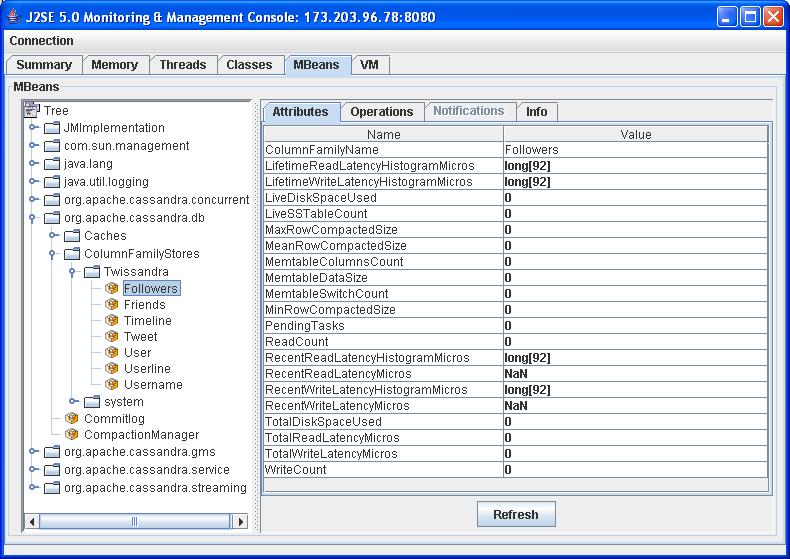
Peco asked if there was a better JVM to use, he says “Not really, I’m using some 1.6 or something.  Oh, OpenJDK 1.4 64-bit.”

“Just because there’s no monitoring tools doesn’t mean you shouldn’t monitor it!”

You should know before it’s time to add a new node and how long it will take.

More tools!

  • Chiton is a graphical data browser for Cassandra
  • Lazyboy – python wrapper/client
  • Fauna – ruby wrapper/client
  • Lucandra – use Cassandra as a storage engine for Lucene/solr

Questions

Any third party companies with good tools for Cassandra?  Answer – yes, Riptano, a Rackspace previous employee thing, does support.

Do you want to run this in the cloud?  Answer – yes if you’re small, no if you’re Facebook.

What about backups?  Answer – I encourage you to write tools and open source them.  It’s hard right now.

This session seemed to strangely be not “about” Cassandra but “around” Cassandra.  Not using Cassandra yet but being curious, it gave me some good ops insights but I don’t feel like I have a great understanding…  Perhaps could have had a bit more of an intro to Cassandra.  He mentioned stuff in passing – I hear it has “nodes”, but never saw an architecture diagrams, and heard that you want to “compact,” but don’t know what or why.

3 Comments

Filed under Conferences, DevOps

Velocity 2010: Scalable Internet Architectures

My first workshop is  Scalable Internet Architectures by Theo Schlossnagle, CEO of OmniTI.  He gave a nearly identical talk last year but I missed some of it, and it was really good, so I went!  (Robert from our Web Admin team attended as well.)

There aren’t many good books on scalability.  Mainly there are three – Art of Scalability, Cal Henderson’s Building Scalable Web Sites, and his, Scalable Internet Architectures.  So any tips you can get a hold of are welcome.

Following are my notes from the talk; my own thoughts are in italics.

Architecture

What is architecture?  It encompasses everything form power up to the client touchpoint and everything in between.

Of necessity, people are specialized into specific disciplines but you have to overcome that to make a whole system make sense.

The new push towards devops (development/operations collaboration) tries to address this kind of problem.

Operations

Operations is a serious part of this, and it takes knowledge, tools, experience, and discipline.

Knowledge
– Is easy to get; Internet, conferences (Velocity, Structure, Surge), user groups

Tools – All tools are good; understand the tools you have.  Some of operations encourages hackiness because when there is a disruption, the goal is “make it stop as fast as possible.”

You have to know how to use tools like truss, strace, dtrace through previous practice before the outage comes.  Tools (and automation) can help you maintain discipline.

Experience comes from messing up and owning up.

Discipline is hardest.  It’s the single most lacking thing in our field. You have to become a craftsman. To learn discipline through experience, and through practice achieve excellence. You can’t be too timid and not take risks, or take risks you don’t understand.

It’s like my old “Web Admin Standing Orders” that tried to delineate this approach for  my ops guys – “1.  Make it happen.  2.  Don’t f*ck it up.  3.  There’s the right way, the wrong way, and the standard way.”  Take risks, but not dumb risks, and have discipline and tools.

He recommends the classic Zen and the Art of Motorcycle Maintenance for operations folks.  Cowboys and heroes burn out.  Embrace a Zen attitude.

Best Practices

  1. Version Control everything.  All tools are fine, but mainly it’s about knowing how to use it and using it correctly, whether it’s CVS or Subversion or git.
  2. Know Your Systems – Know what things look like normally so you have a point of comparison.  “Hey, there’s 100 database connections open!  That must be the problem!”  Maybe that’s normal.  Have a baseline (also helps you practice using the tools).  Your brain is the best pattern matcher.
    Don’t say “I don’t know” twice.  They wrote an open source tool called Reconnoiter that looks at data and graphs regressions and alerts on it (instead of cacti, nagions, and other time consuming stuff).  Now available as SaaS!
  3. Management – Package rollout, machine management, provisioning. “You should use puppet or chef!  Get with the times and use declarative definition!”  Use the tools you like.  He uses kickstart and cfengine and he likes it just fine.

Dynamic Content

Our job is all about the dynamic content.  Static content – Bah, use akamai or cachefly or panther or whatever.  it’s a solved problem.

Premature optimization is the root of all evil – well, 97% of it.  It’s the other 3% that’s a bitch.  And you’re not smart enough to know where that 3% is.

Optimization means “don’t do work you don’t have to.”  Computational reuse and caching,  but don’t do it in the first place when possible.
He puts comments for things he decides not to optimize explaining the assumptions and why not.

Sometimes naive business decisions force insane implementations down the line; you need to re-check them.

Your content is not as dynamic as you think it is.  Use caching.

Technique – Static Element Caching

Applied YSlow optimizations – it’s all about the JavaScript, CSS, images.  Consolidate and optimize.  Make it all publicly cacheable with 10 year expiry.

RewriteRule (.*)\.([0-9]+)\.css $1.css makes /s/app.23412 to /s/app.css – you get unique names but with new cached copy.  Bump up the number in the template.  Use “cat” to consolidate files, freaks!

Images, put a new one at a new URI.  Can’t trust caches to really refresh.

Technique – Cookie Caching

Announcing a distributed database cache that always is near the user and is totally resilient!  It’s called cookies.  Sign it if you don’t want tampering.  Encrypt if you don’t want them to see its contents.  Done.  Put user preferences there and quit with the database lookups.

Technique – Data Caching

Data caching.  Caching happens at a lot of layers.  Cache if you don’t have to be accurate, use a materialized view if you do.    Figuring out the state breakdown of your users?  Put it in a separate table at signup or state change time, don’t query all the time.  Do it from the app layer if you have to.

Technique – Choosing Technologies

Understand how you’ll be writing and retrieving data – and how everyone else in the business will be too!  (Reports, BI, etc.)  You have to be technology agnostic and find the best fit for all the needs – business requirements as well as consistency, availability, recoverability, performance, stability.  That’s a place where NoSQL falls down.

Technique – Database

Shard your database then shoot yourself.  Horizontal scaling isn’t always better.  It will make your life hell, so scale vertically first.  If you have to, do it, and try not to have regrets.

Do try “files,” NoSQL, cookies, and other non-ACID alternatives because they scale more easily.  Keep stuff out of the DB where you can.

When you do shard, partition to where you don’t need more than one shard per OLTP question.  Example – private messaging system.  You can partition by recipient and then you can see your messages easily.  But once someone looks for messages they sent, you’re borked.  But you can just keep two copies!  Twice the storage but problem solved.  Searching cross-user messages, however, borks you.

Don’t use multimaster replication.  It sucks – it’s not ready for prime time.  Outside ACID there are key-value stores, document databases, etc.  Eventual consistency helps.  MongoDB, Cassandra, Voldemort, Redis,  CouchDB – you will have some data loss with all of them.

NoSQL isn’t a cure-all; they’re not PCI compliant for example.  Shiny is not necessarily good.  Break up the problem and implement the KISS principle.  Of course you can’t get to the finish line with pure relational for large problems either – you have to use a mix; there is NO one size fits all for data management.

Keep in mind your restore-time and restore-point needs as well as ACID requirements of your data set.

Technique – Service Decoupling

One of the most fundamental techniques to scaling.  The theory is, do it asynchronous.  Why do it now if you can postpone it?  Break down the user transaction and determine what parts can be asynchronous.  Queue the info required to complete the task and process it behind the scenes.

It is hard, though, and is more about service isolation than postponing work.  The more you break down the problem into small parts, the more you have in terms of problem simplification, fault isolation, simplified design, decoupling approach, strategy, and tactics, simpler capacity planning, and more accurate performance modeling.  (Like SOA, but you know, that really works.)

One of my new mantras while building our cloud systems is “Sharing is the devil,” which is another way of stating “decouple heavily.”

Message queueing is an important part of this – you can use ActiveMQ, OpenAMQ, RabbitMQ (winner!).  STOMP sucks but is a universal protocol most everyone uses to talk to message queues.

Don’t decouple something small and simple, though.

Design & Implementation Techniques

Architecture and implementation are intrinsically tied, you can’t wholly separate them.  You can’t label a box “Database” and then just choose Voldemort or something.

Value accuracy over precision.

Make sure the “gods aren’t angry.”  The dtrace guy was running mpstat one day, and the columns didn’t line up.  The gods intended them to, so that’s your new problem instead of the original one!  OK, that’s a confusing anecdote.  A better one is “your Web servers are only handling 25 requests per second.”  It should be obvious the gods are angry.   There has to be something fundamentally wrong with the universe to make that true. That’s not a provisioning problem, that’s an engineering problem.

Develop a model.  A complete model is nearly impossible, but a good queue theory model is easy to understand and provides good insight on dependencies.

Draw it out, rationalize it.  When a user comes in to the site all what happens?  You end up doing a lot of I/O ops.  Given traffic you should then know about what each tier will bear.

Complexity is a problem – decoupling helps with it.

In the end…

Don’t be an idiot.  A lot of scalability problems are from being stupid somewhere.  High performance systems don’t have to scale as much.  Here’s one example of idiocy in three acts.

Act 1 – Amusing Error By Marketing Boneheads – sending a huge mailing with an URL that redirects. You just doubled your load, good deal.

Act 2 – Faulty Capacity Planning – you have 100k users now.  You try to plan for 10 million.  Don’t bother, plan only to 10x up, because you just don’t understand the problems you’ll have at that scale – a small margin of error will get multiplied.

Someone into agile operations might point out here that this is a way of stating the agile principle of “iterative development.”

Act 3 – The Traffic Spike – I plan on having a spike that gives me 3000 more visitors/second to a page with various CSS/JS/images.  I do loads of math and think that’s 5 machines worth.  Oh whoops I forgot to do every part of the math – the redirect issue from the amusing error above!  Suddenly there’s a huge amount more traffic and my pipe is saturated (Remember the Internet really works on packets and not bytes…) .

This shows a lot of trust in engineering math…  But isn’t this why testing was invented?  Whenever anyone shows me math and hasn’t tested it I tend to assume they’re full of it.

Come see him at Surge 2010!  It’s a new scalability and performance conference in Baltimore in late Sep/early Oct.

A new conference, interesting!  Is that code for “server side performance, ” where Velocity kinda focuses on client side/front end a lot?

Leave a comment

Filed under Conferences, DevOps

Hello from Velocity!

Peco and I made it safely to Velocity 2010 in Santa Clara, CA!  We had a little bit of plane delay coming in from Austin, but I made good use of it – read George Reese’s excellent book Cloud Application Architectures and listened to the also-excellent first DevOps Cafe podcast by John Willis and Damon Edwards!

When we got in, we went to meet my old friend Mike for some tasty Malaysian food at the Banana Leaf restaurant; Mike and I worked at Fedex together and he went through Sun and LinkedIn and is now going indie as an iPhone developer.

We’re staying at the Hyatt where the conference is being held, which is pretty swank; somehow we got access to some executive club thing with free food and drinks at all hours.

Registration went fast, despite Peco being heavily distracted by World Cup games (silly Bulgarians!) and now we’re ensconced in our first workshops.  Next, I’ll give you a detailed breakdown of the first one, Scalable Internet Architectures by Theo Schlossnagle, CEO of OmniTI.  Peco went to a session on “Riak,” which we’d never heard of – I admonished him to write it up too!

Leave a comment

Filed under Conferences, DevOps

Velocity and DevOpsDays

Two of the three agile admins – myself and Peco – will be in Santa Clara for Velocity next week, and DevOpsDays following in Mountain View.  If you’re going to be there (or lurk in the Silicon Valley area) feel free and ping us to meet up!

We’ll be blogging up all the fun from both events, though often we start out with liveblogging and then fall behind and the final parts don’t come out till somewhat after.  But, that’s life in the big city.

Leave a comment

Filed under Conferences, DevOps

Another CloudCamp Austin Wrapup

James already posted, but I took notes too so here’s my thoughts!

CloudCamp was a great time.  Dave Nielsen did a great job facilitating it.  Pervasive Software hosted the shindig.  It started with Mike Hoskins, Pervasive CTO, telling us about how they started an “innovation lab” to reinvigorate Pervasive after being in business for 25 years, and that led to their DataCloud2 product hosted on EC2.

Then there were three lightning talks.

Barton James, Dell cloud evangelist, talked about the continuum between traditional compute to private cloud to public cloud, and how the midsection of that curve will shift over time to solidly center over private cloud.  I think that’s accurate; all the data center nonsense of the last number of years is certainly starting to convince us that you only want to manage hardware if there’s no other choice…   He talked about paths to the cloud- either starting with virtualization and then adding on capabilities until something is really cloud-ready, or just greenfielding something new (that’s what we’re doing!). It was good, apparently Dell has thought more about the cloud since their original ill-conceived attempt to trademark it as a server name.

Oscar Padilla, a senior engineer with Pervasive, spoke about their path moving their existing software to the cloud (very interesting to us,  since we’re doing the same) and the duality in being a both a cloud consumer (Amazon IaaS) and a cloud provider (Pervasive’s SaaS product).  This is an increasingly common pattern; I’d say that being a SaaS provider and not using IaaS  (unless you’re really huge) is likely a mistake on your part.  He also talked about the importance of adding an API so others can leverage your software – this is a huge point and it’s bizarre to me other people still aren’t getting this.

Finally, Walter Falk of IBM spoke about how the hybrid cloud is the bomb.  Hybrid cloud, or “cloud bursting,” is where you run your own nice and cheap local hardware for minimum loads and scale into the cloud for extra capacity.  He also showed a diagram indicating what kinds of workloads are low hanging fruit for cloudification (information intensive, isolated workloads, mature processes…  You’ve probably all seen the slide by now).  And he talked about how ecosystem is very important even for IBM – other people doing good stuff in the space.  “Go to ibm.com/cloud!”

Then we did a little impromptu panel thing, where I and some other folks were drafted up to answer questions.  This revealed something interesting, which is that a LOT of the people there were apparently coming from the cloud provider point of view, and had questions about power consumption and what hypervisor options there are.  As an IaaS consumer/SaaS provider, my main input there is “I don’t want to care about all that nonsense, thus I use IaaS!”   I answered a question about “how to define PaaS,” but my response was not thrilling enough to relate here.

Next came the conference sessions – we did the normal unconference thing of random people writing down topics and doing shows of hands on who cares about that.  The ones that got the largest response were Application Architecture for the Cloud and Systems Management for Cloud Consumers (the latter was mine; the panel gave me the heads up that I’d best add “consumers” to the end of that to not get stuck in storage-container-datacenter hell).

I didn’t go to Application Architecture for the Cloud but spoke to our guys that did and they did something that IMO should have been done in the larger group – did some quick demographics voting!  Bill, one of our devs, tells me that the responses were:

  • What language are you using?  2/3 Java, 1/3 .NET.
  • What cloud are you using?  Vast majority Amazon (even among the .NETters), notable minority Azure, trace amounts of others.
  • Are you internal IT or product focused?  50/50 split.
  • Are you using noSQL stuff?  A small number.
  • Are you using Rails?  No.
  • Are you using SOA/SOAP stuff?  No.
  • Are you using memcache?  A couple are, but more are doing app level caching with JPA or whatnot.

James covered the goings-on in Systems Management for the Cloud well; besides the specific tool takeaways I enjoyed the quote from one of the ServiceMesh guys about the practice of taking your traditional static infrastructure and just implementing it on the cloud without rearchitecting to take advantage of its dynamic nature is called “moving shit to shit.”  I was very impressed with the guys from ServiceMesh and from Pervasive that we met there; we’ve all already hooked up and done lunch to talk more.  All great guys doing some cutting edge stuff.

The last session was on Software to SaaS – taking existing software you sell for on premise use and turning it into a cloud offering.  Phil Fritz from IBM broke a lot of it down very accurately – there are some challenges from the customer side (trust, opex vs capex) but the vast majority of problems you face are internal.  And only a few of those internal issues are really technical in the “make it work in the cloud” sense, the rest are about metering, billing, the sales force not selling it because they don’t understand it or it’s against their usual commission model, forking of code and testing inefficiency, (IBM has a strict rule that there’s not a separate SaaS branch of the software, you have to fold fixes into trunk, which is extremely wise).  This is all very good stuff – our main issues with bringing SaaS to market similarly hasn’t been the technical side, it’s been the product marketers’ doubt, the “it’s not supported” in our ERP/billing system, sales and support staff education…

Then there was a wrapup, but it was like 10 at night on a weeknight so most of the norms had cleared out already.

In closing, it was an awesome event and we made some great contacts for further discussion.  Thanks to Dave and Pervasive for bringing CloudCamp to Austin, and I hope to see another soon!

Leave a comment

Filed under Cloud

F5 On DevOps and WordPress Outages

Lori MacVittie has written a very interesting post on the F5 blog entitled “Devops: Controlling Application Release Cycles to Avoid the WordPress Effect.”

In it, she analyzes a recent WordPress outage and how “feathered” releases can help mitigate impact in multitenant environments.  And specifically talks about how DevOps is one of the keys to accomplishing these kinds of schemes that require apps and systems both to honor them.

Organizations that encourage the development of a devops role and discipline will inevitably realize greater benefits from virtualization and cloud computing because the discipline encourages a broader view of applications, extending the demesne of application architecture to include the application delivery tier.

Nice!  In my previous shop we didn’t use F5s, we used Netscalers, but there was the same interesting divide in that though they were an integral part of the application, they were seen as “Infrastructure’s thing.”  Apps weren’t cognizant of them and whenever functionality needed to be written against them (like cache invalidation when new content was published) it fell to us, the ops team.  And to be honest we discouraged devs from messing with them, because they always wanted some ill-advised new configuration applied when they did. “Can’t we just set all the timeouts to 30 minutes?”

But in the newer friendlier world of DevOps coordination, traditionally “infrastructure” tools like app delivery stuff, monitoring, provisioning, etc. need to be a collaboration area, where code needs to touch them (though in a way Ops can support…)  Anyway, a great article, go check it out.

Leave a comment

Filed under DevOps

Austin Cloud Camp Wrap-up

Austin recently had a CloudCamp and my guess is that it drew in close to 100 attendees.

Before I get into the actual event, let me start this post with a brief story.

During the networking time, I committed one of the worst networking faux pas that one can make when networking: I tried a lame joke upon meeting someone new. One of the other attendees asked me why my company was interested in CloudCamp. I sarcastically replied to his inquisition by explaining that we were really excited about CloudCamp because we do a lot of work with weather instrumentation. Anything to do with clouds, we are so there… Silence.

Blink.

Another blink…. Fail.

At this point I explain that I am an idiot and making sarcastic jokes that fail all the time and I duck out to a different conversation. So, forgetting about my awkward sense of humor, lets move on. Learn from me, don’t make weather jokes at a CloudCamp.

Notes from CloudCamp Austin

At any event, one of the best things that can happen is meeting people in your field. I was able to meet some cool guys in Austin with ServiceMesh and Pervasive. There are also beginning plans to start an AWS User Group in Austin which will be really awesome. Ping me if you want the scoop and I will let you know as I find anything out about it.

The talk I attended was led by the agile admin’s very own: Ernest Mueller. The notes from it are below.

Systems Management in the Cloud

One of the discussion points was how people were implementing dynamic scaling and what infrastructure they are wrapping around that.

Tools people are using in the cloud to achieve dynamic scaling in Amazon Web Services (AWS):
OSSEC for change control and security
Ganglia for reporting
Collectd for monitoring
– Cron tasks for other reporting and metric gathering
Pentaho and Jasper for metrics
– RESTful interface for the managed services layer. Reporting also gets done via RESTful service.
Quartz scheduler to do scaling with metrics around what collectd is monitoring.

When monitoring, we have to start by understanding the perspective of the customers and then try to wrap monitors around that. Are we focused on user or provider? Infrastructure monitoring or application monitoring? The creator of the application that is deployed to the cloud and the environment can provide hooks for the monitoring platform. Which means that developers need to be looking on the horizon of ops early in the development phase.

This is a summary of what I saw at CloudCamp Austin, but I would love to hear what other sessions people went to and what the big takeaways were for them.

Leave a comment

Filed under Cloud, DevOps

Why A HTTP Sniffer Is Awesome

While looking at Petit for my post on log management tools, I was thrilled to see it link to a sniffer that generates Web type logs called Justniffer.  Why, you might ask, isn’t that a pretty fringe thing?  Well settle in while I tell you why it’s bad ass.

We used to run a Web analytics product here called NetGenesis.  Like all very old Web analytics products, it relied on you to gather together all your log files for it to parse, resulting in error prone nightly cronjob kinds of nonsense.  So they came out with a network sniffer that logged into Apache format, like this does apparently.  It worked great and got the info in realtime (as long as the network admins didn’t mess up our network taps, which did happen from time to time).

I quickly realized this sniffer was way better than log aggregation, especially because my environment had all kinds of weird crap like Domino Web servers and IIS5 that don’t log in a civilized manner.  And since it sat between the Web servers and the client, it could log “client time,” “server time”, and had a special “900” error code for client aborts/timeouts.  I self-implemented what would be a predecessor to todays’ RUM tools like Tealeaf and Coradiant on it.  We used it to do realtime traffic analysis, cross-site reporting, and even used it for load testing as we’d transform and replay the captured logs against test servers. Using it also helped us understand the value of the Steve Souders front end performance stuff when he came around.

Eventually our BI folks moved to a Javascript page tag based system, which are the modern preference in Web analytics systems.  Besides the fact that these schemes only get pages that can execute JS and not all the images and other assets, we discovered that they were reasonably flawed and were losing about 10% of the traffic that we were seeing in the network sniffer log.  After a long and painful couple months, we determined that the lost traffic was from no known source and happened with other page tag based systems (Google Analytics, etc.), not just this supplier’s tool, and the BI folks finally just said “Well…  It gives us pretty clickstreams and stuff, let’s go ahead with it.”  Sadly that sunset our use of the Netgenesis network sniffer and there wasn’t another like it in the open source realm (I looked).  Eventually we bought a Coradiant to do RUM (the sales rep kept trying to explain this “new network RUM concept” to us and kept being taken aback and how advanced the questions were we asked) but I missed the accessibility of my sniffer log…  Big log aggregators like Splunk help fill that gap somewhat but sometimes you really want to grep|cut|sort|uniq the raw stuff.

On the related topic of log replayers, we have really wanted one for a long time.  No one has anything decent.  We’ve bugged every supplier that we deal with on any related product, from RUM to load testing to whatever.  Recording a specific transaction and using that is fine, but nothing compares to the demented diversity of real Internet traffic.  We wrote a custom replayer for our sniffer log, although it didn’t do POST (didn’t capture payloads – looks like justniffer can though!) and got a lot of mileage out of it.  Found al ot of app bugs before going to production with that baby.  Anyway, none of the suppliers can figure it out (Oracle just put together a DB traffic version of this in their new version 12 though).  Now that there’s a sniffer we can use, we already have a decent replayer, we’re back in business!  So I’m excited, it’s a blast from the past but also one of those core little things that you can’t believe there isn’t one of, and that empowers someone to do a whole lot of cool stuff.

Leave a comment

Filed under DevOps

Good DevOps Discussions

An interesting point and great discussion on “what is DevOps”, including a critique about it not including other traditional Infrastructure roles well, on Rational Survivability (heh, we’re using the same blog theme.  I feel like a girl in the same dress as another at a party.).  It seems to me that some of the complaints about DevOps – only a little here, but a lot more from Andi Mann, Ubergeek – seem to think DevOps is some kind of developer power play to take over operations.  At least from my point of view (an ops guy driving a devops implementation in a large organization) that is absolutely not the case.  Seems to me to be a case of over-touchiness based on the explicit and implicit critique of existing Infrastructure processes that DevOps represents.  Which is natural; agile development had/has the exact same challenge.

Note that DevOps is starting to get more press; here’s a cnet article talking about DevOps and the cloud (two great tastes that taste great together…).

And here’s a bonus slideshare presentation on “From Agile Development to Agile Operations” that is really good.

2 Comments

Filed under DevOps

Log Management Tools

We’re researching all kinds of tools as we set up our new cloud environment, I figure I may as well share for the benefit of the public…

Most recently, we’re looking at log management.  That is, a tool to aggregate and analyze your log files from across your infrastructure.  We love Splunk and it’s been our tool of choice in the past, but it has two major drawbacks.  One, it’s  quite expensive. In our new environment where we’re using a lot of open source and other new-format vendors, Splunk is a comparatively big line item for a comparatively small part of an overall systems management portfolio.

Two, which is somewhat related, it’s licensed by amount of logs it processes per day.  Which is a problem because when something goes wrong in our systems, it tends to cause logging levels to spike up.  In our old environment, we keep having to play this game where an app will get rolled to production with debug on (accidentally or deliberately) or just be logging too much or be having a problem causing it to log too much, and then we have to blacklist it in Splunk so it doesn’t run us over our license and cause the whole damn installation to shut off.  It took an annoying amount of micromanagement for this reason.

Other than that, Splunk is the gold standard; it pulls anything in, graphs it, has Google-like search, dashboards, reports, alerts, and even crazier capabilities.

Now on the “low end” there are really simple log watchers like swatch or logwatch.  But we’d really like something that will aggregate ALL our logs (not just syslog stuff using syslog-ng – app server logs, application logs, etc.), ideally from both UNIX and Windows systems, and make them usefully searchable.  Trying to make everything and everyone log using syslog is an ever receding goal.  It’s a fool’s paradise.

There’s the big appliance vendors on the “high end” like LogLogic and LogRhythm, but we looked at them when we looked at Splunk and they are not only expensive but also seem to be “write only solutions” – they aggregate your logs to meet compliance requirements, and do some limited pattern matching, but they don’t put your logs to work to help you in your actual work of application administration the dozen ways Splunk does.  At best they are “SIEM”s – security information and event managers – that alert on naughty intruders.  But with Splunk I can do everything from generate a report of 404s to send to our designers to fix their bad links/missing images to graph site traffic to make dashboards for specific applications for their developers to review.  Plus, as we’re doing this in the cloud, appliances need not apply.  (Ooo, that’s a catchy phrase, I’ll have to use that for a separate post!)

I came across three other tools that seem promising:

  • Logscape from Liquidlabs – does graphing and dashboards like Splunk does.  And “live tail” – Splunk mysteriously took this out when they revved from version 3 to 4!  Internet rumor is that it’s a lot cheaper.  Seems like a smaller, less expensive Splunk, which is a nice thing to be, all considered.
  • Octopussy – open source and Perl based (might work on Windows but I wouldn’t put money on it).  Does alerting and reporting.  Much more basic, but you can’t beat the price.  Don’t think it’ll meet our needs though.
  • Xpolog – seems nice and kinda like Splunk.  Most of the info I can find on it, though, are “What about xpolog, is good!” comments appended to every forum thread/blog post about Splunk I can find, which is usually a warning sign – that kind of guerrilla marketing gets old quick IMO.  One article mentions looking into it and finding it more expensive but with some nice features like autodiscovery, but not as open as Splunk.

Anyone have anything to add?  Used any of these?  We’ve gotten kind of addicted to having our logs be immediately accessible, converted into metrics, etc.  I probably wouldn’t even begrudge Splunk the money if it weren’t for all the micromanagement you have to put into running it.  It’s like telling the fire department “you’re licensed for a maximum of three fires at a time” – it verges on irresponsible.

21 Comments

Filed under DevOps