Tag Archives: aws

The Right Way To Use Tagging In The Cloud

This came up today at work and I realized that over my now-decades of cloud engineering, I have developed a very specific way of using tags that sets both infra dev teams and SRE teams up for success, and I wanted to share it.

Who cares about tags? I do. They are the only persistent source of information you can trust (as much as you can trust anything in this fallen world) to communicate information about an infrastructure asset beyond what the cloud or virtualization fabric it’s running in knows. You may have a terraform state, you may have a database or etcd or something that knows what things are – but those systems can go down or get corrupted. Tags are the one thing that if someone can see the infrastructure – via console or CLI or API or integrated tool – that they can always see. Server names are notoriously unreliable – ideally in a modern infrastructure you don’t reuse servers from one task to another or put multiple workloads on one, but that’s a historical practice that pops up all to often, and server names have character limits (even if they don’t, the management systems around them usually enforce one).

Many powerful tools like Datadog work by exclusively relying on tags. It simplifies operation and prevents errors if, when you add a new production app server, that automatically gets pulled into the right monitoring dashboards and alerting schemes because it is tagged right.

I’ve run very large complex cloud environments using this scheme as the primary means to drive operations.

Top level tag rules:

  1. Tag everything. Tagging’s not just for servers. Every cloud element that can take a tag, tag. Network, disk images, snapshots, lambdas, cloud services, weird little cloud widgets (“S3 VPC endpoint!”).
  2. Use uniform tags. It’s best to specify “all lower case, no spaces” and so on. If people decide to word a tag slightly differently in two places, the value is lost. Both the key and the value, but especially the key – teach people that if you say “owner” that means “owner” not “Owner” and “owning party” and whatever else.
  3. Don’t overtag with attributes you can easily see. Instance size, what AZ it’s in, and so on is already part of the cloud metadata so it’s inefficient to add tags for it.
  4. Use standard tags. This is what I’ll cover in the rest of this article.

At the risk of oversimplifying, you need two things out of your systems environment – compliance and management. And tags are a great way to get it.

Compliance

Attribution! Cost! Security! You need to know where infrastructure came from, who owns it, who’s paying for it, and if it’s even supposed to be there in the first place.

Who owns it?

Tag all cloud assets with an owner (email address) basically whatever is required to uniquely identify who owns an asset. Should be a team email for persistent assets, if it’s a personal email then the assumption should be if that person leaves the company those assets get deleted (good for sandboxes etc). 

The amount of highly paid engineer time I’ve seen wasted over the last decade of people having to go out and do cattle calls of “Hey who owns these… we need to turn some off for cost or patch them for security or explain them for compliance… No really, who owns these…” is shocking.

owner:myteam@mycompany.com

Who’s paying for it

This varies but it’s important. “Owner” might not be sufficient in an environment – often some kind of cost allocation code is required based on how your company does finances. Is it a centralized expense or does it get allocated to a client? Is it a production or development expense, those are often handled differently from a finance perspective. At scale you may need a several-parter – in my current consulting job there’s a contract number but also a specific cost code inside that contract number that we need all expenses divvied up between.

billing:CUCT30001

Where did it come from

Traceability both “up” and “down” the chain. When you go look at a random cloud instance, even if you know who it belongs to you can’t tell how it got there. Was it created by Terraform? If so where’s the state file? Was it created via some other automation system you have? Github? Rundeck? Custom python app #25?

Some tools like Cloudformation do this automatically. Otherwise, consider adding a source tag or set of tags with sufficient information to trace the live system back to the automation. Developers love tagging git commits and branches with versions and JIRA tickets and release dates and such, same concept applies here. Different things make sense depending on your tech stack – if you GitOps everything then the source might be a specific build, or you want to say which s3 bucket your tfstate is in… Here as an example, I’m working with a system that is terraform instantiated from a gitops pipeline so I’ve made a source tag that says github and then the repo name and then the action name. And for the tfstate I have it saved in an s3 bucket named “mystatebucket.”

source:github/myapp/deploy-action
sourcestate:s3/mystatebucket

When does it go

OK, I know the last two sound like the lyrics to “Cotton-Eyed Joe”, which is a bonus. But a major source of cost creep is infrastructure that was intended to be there for a short time – a demo, a dev cycle – that ends up just living forever. And sure, you can just send nag-o-grams to the owner list, but it’s better to tag systems with an expires tag in date format (ideally YYYY-MM-DD-HH-MM as God intended). “expires:never” is acceptable for production infrastructure, though I’ve even used it on autoscaling prod infrastructure to make sure systems get turned over and don’t live too long.

expires:2025-02-01-00-00-00
or
expires:never

Management

Operations! Incidents! Cost and security again! Keep the entire operational cycle, including “during bad production incidents”, in mind when designing tags. People tear down stacks/clusters, or go into the console and “kill servers”, and accidentally leave other infrastructure – you need to be able to identify and clean up orphaned assets. Hackers get your AWS key and spin up a huge volume of bitcoin miners. Identifying and actioning on infrastructure accurately and efficiently is the goal.

As in any healthy system, the “compliance” tags above aren’t just useful to the beancounters, they’re helpful to you as a cloud engineer or SRE. But beyond that, you want a taxonomy of your systems to use to manage them by grouping operations, monitoring, and so on.

This scheme may differ based on your system’s needs, but I’ve found a general formula that fits in most cases I come across. Again, it assumes virtual systems where servers have one purpose – that’s modern best practice. “Sharing is the devil.”

EARFI

I like to pronounce this “errr-feee.” It’s a hierarchy to group your systems.

  • environment – What environment does this represent to you, e.g. dev, test, production, as this is usually the primary element of concern to an operator. “environment:uat” vs “environment:prod”.
  • application – What application or system is this hosting? The online banking app? The reporting system? The security monitoring server? The mobile game backend? GenAI training? “application:banking”.
  • role – What function does this specific server perform? Webserver dbserver, appserver, kafka – systems in an identical role should have identical loadouts. “role:apiserver” vs “role:dbserver”. Keep in mind this is a hierarchy and you won’t have guaranteed uniqueness across it – for example, “application:banking,role:dbserver” may be quite different from “application:mobilegame,role:dbserver” so you would usually never refer to just “role:dbserver.”
  • flavor – Optional, but useful in case you need to differentiate something special in your org that is a primary lever of operation (Windows vs Linux?  CPU vs GPU nodes in the same k8s cluster? v2 vs v2?). I usually find there’s only one of these (besides of course region and things you shouldn’t tag because they are in other metadata). For our apiserver example, consider that maybe we have the same code running on all our api servers but via load balancer we send REST queries to one set and SOAP queries to another set for caching and performance reasons. “flavor:rest” vs “flavor:soap”.
  • instance – A unique identifier among identical boxes in a specific EARF set, most commonly just an integer. “instance:2”. You could use a GUID if you really need it but that’s a pain to type for an operator.

This then allows you to target specific groups of your infrastructure, down to a single element or up to entire products.  

  • “Run this week’s security patches on all the environment:uat, application:banking, role:apiserver, flavor:rest servers.” Once you verify, you can do the same on environment:prod.”
  • “The second of the three servers in that autoscaling group is locked up. Terminate environment:uat, application:banking, role:apiserver, flavor:rest, instance:2
  • “We seem to be having memory problems on the apiservers. Is it one or all of the boxes? Check the average of environment:prod, application:banking, role:apiserver, flavor:rest and then also show it broken down by instance tag. It’s high on just some of the servers but not all? Try flavor:rest vs flavor:soap to see if it’s dependent on that functionality. Is it load do you think? Compare to the aggregate of environment:uat to see if it’s the same in an idle system.”
  • “Set up an alert for any environment:prod server that goes down. And one for any environment:prod, application:banking, role:apiserver that throws 500 errors.”
  • “Security demands we check all our DB servers for a new vulnerability. Try sending this curl payload to all role:dbservers, doesn’t matter what application. They say it won’t hurt anything but do it to environment:uat before environment:prod for safety.”

So now a random new operator gets an alert about a system outage and logs into the AWS console and sees not just “i-123456 started 2 days ago,” they see

owner:myteam@mycompany.com
billing:CUCT30001
source:github/myapp/deploy-action
sourcestate:s3/mystatebucket

expires:never
environment:prod

application:mobilegame
role:dbserver
flavor:read-only
instance:2


That operator now has a huge amount of information to contextualize their work, that at best they’d have to go look up in docs or systems and at worst they’d have to just start serially spamming. They know who owns it, what generates it, what it does and has hints at how important it is. (prod – probably important. A duplicate read secondary – could be worse.) And then runbooks can be very crisp about what to do in what situation by also using the tags. “If the server is environment:prod then you must initiate an incident <here>… If the server is a role:dbserver and a role:read-only it is OK to terminate it and bring up a new one but then you have to go run runbook <X> and run job <y> to set it up as a read secondary…”

Feel free and let me know how you use tags and what you can’t live without!
Leave a comment

Filed under Cloud, DevOps, Monitoring

AWS CLI Queries and jq

Anyone who’s worked with the AWS CLI/API knows what a joy it is. Who hasn’t gotten API-throttled?  Woot!  Well, anyway, at work we’re using Cloudhealth to enforce AWS tagging to keep costs under control; all servers must be tagged with an owner: and an expires: date or else they get stopped or, after some time, terminated.   Unfortunately Cloudhealth doesn’t understand Cloudformation stacks, so it leaves stacks around after having ripped the instances out of them.  We also have dozens of developers starting instances and CloudFormation stacks every day.  Sometimes they clean up after themselves, but often they don’t (and they like to set that expires: tag way in the future, which is a management problem not a technology problem).  Sometimes we hit AWS quotas in our dev environment and an irritated engineer goes and “cleans up” a bunch of stuff – often not in the way that they should (like by terminating instances and not stacks).

So, I was throwing together a quick bash script to find some of the resulting exceptions and orphans in our environment.  Unattached EBS volumes.  CloudFormation stacks where someone terminated the EC2 instance and figured they were done, instead of actually deleting the stack. Stuff like that. This got into some advanced AWS CLI-fu and use of jq, both of which are snazzy enough I thought I’d share.

Here’s my script, which I’ll explain. You will need the AWS CLI installed (on OSX El Capitan, “brew install awscli” or “pip install –ignoreinstalled six –upgrade –user awscli” – the –ignoreinstalled six works around an El Capitan problem).  You need “aws config” configured with your creds and region and such, and set output to json.  And you need to install jq, “brew install jq.”

#!/usr/bin/env bash
#
# badfinder.sh
#
# This script finds problematic CloudFormation stacks and EC2 instances in the AWS account/region your credentials point at.
# It finds CF stacks with missing/terminated and stopped EC2 hosts.  It finds EC2 hosts with missing owner and expires tags.
# It finds unattached volumes. Should you delete them all?  Probably. Kill the EC2 instances first because it'll probably
# make more orphan CF stacks.
#

BADSTACKS=""
STOPPEDSTACKS=""

echo "Finding misconfigured AWS assets, stand by..."
for STACK in $(aws cloudformation list-stacks --stack-status-filter CREATE_COMPLETE UPDATE_COMPLETE --max-items 1000 | jq -r '.StackSummaries[].StackName')
do
        INSTANCE=$(aws cloudformation describe-stack-resources --stack-name $STACK | jq -r '.StackResources[] | select (.ResourceType=="AWS::EC2::Instance")|.PhysicalResourceId')
        if [[ ! -z $INSTANCE  ]]; then
                STATUS=$(aws ec2 describe-instance-status --include-all-instances --instance-ids $INSTANCE 2> /dev/null | jq -r '.InstanceStatuses[].InstanceState.Name') 
                if [[ -z $STATUS  ]]; then
                        BADSTACKS="${BADSTACKS:+$BADSTACKS }$STACK"
                elif [[ ${STATUS} == "stopped" ]]; then
                        STOPPEDSTACKS="${STOPPEDSTACKS:+$STOPPEDSTACKS }$STACK"
            fi
        fi
done

echo "CloudFormation stacks with missing EC2 instances: (aws cloudformation delete-stack --stack-name)"
echo $BADSTACKS

echo "CloudFormation stacks with stopped EC2 instances: (aws cloudformation delete-stack --stack-name)"
echo $STOPPEDSTACKS

echo "EC2 instances without owner tag: (aws ec2 terminate-instances --instance-ids)"
aws ec2 describe-instances --query "Reservations[].Instances[].{ID: InstanceId, Tag: Tags[].Key}" --output json | jq -c '.[]' | grep -vi owner | jq -r '.ID' | awk -v ORS=' ' '{ print $1  }' | sed 's/ $//'

echo "EC2 instances without expires tag: (aws ec2 terminate-instances --instance-ids)"
aws ec2 describe-instances --query "Reservations[].Instances[].{ID: InstanceId, Tag: Tags[].Key}" --output json | jq -c '.[]' | grep -vi expires | jq -r '.ID' | awk -v ORS=' ' '{ print $1   }' | sed 's/ $//'

echo "Unattached EBS volumes: (aws ec2 delete-volume --volume-id)"
aws ec2 describe-volumes --query 'Volumes[?State==`available`].{ID: VolumeId, State: State}' --output json | jq -c '.[]' | jq -r '.ID' | awk -v ORS=' ' '{ print $1  }' | sed 's/ $//'

exit

The AWS cli, of course, lets you manipulate your AWS account from the command line.  jq is a command line JSON parser.

Let’s look at where I rummage through my CloudFormation stacks looking for missing servers.

aws cloudformation list-stacks --stack-status-filter CREATE_COMPLETE UPDATE_COMPLETE --max-items 1000 | jq -r '.StackSummaries[].StackName'

Every separate aws subsection works a little different.  aws cloudformation lets you filter on status, and CREATE_COMPLETE and UPDATE_COMPLETE are the “good” statuses – valid stacks not in flight right now.  The CLI likes to jack with you by limiting how many responses it gives back, which is super not useful, so we set “–max-items 1000” as an arbitrarily large number to get them all.  This gives us a big ol’ JSON output of all the cloudformation stacks.

{
    "StackSummaries": [
        {
            "StackId": "arn:aws:cloudformation:us-east-1:12345689:stack/mystack/1e8f2ba0-4247-11e7-aad1-500c28601499", 
            "StackName": "mystack", 
            "CreationTime": "2017-05-26T19:11:28.557Z", 
            "StackStatus": "CREATE_COMPLETE", 
            "TemplateDescription": "USM Elastic Search Node"
        }, 
...

Now we pipe it through jq.

jq -r '.StackSummaries[].StackName'

This says to just output in plain text (-r) the StackName of each stack. You use that dot notation to traverse down the JSON structure.  So now we have a big ol’ list of stacks.

For each stack, we have to go find any EC2 instances in it and check their status. So this time we use a select inside our jq call, to find only items whose resource type is “AWS::EC2::Instance”.

aws cloudformation describe-stack-resources --stack-name $STACK | jq -r '.StackResources[] | select (.ResourceType=="AWS::EC2::Instance")|.PhysicalResourceId')

And then for each of those instances, we get their status, which is in the InstanceState.Name field.

aws ec2 describe-instance-status --include-all-instances --instance-ids $INSTANCE 2> /dev/null | jq -r '.InstanceStatuses[].InstanceState.Name'

That works.  But there’s more than one way to do it!  The AWS CLI commands support a “–query” parameter – which lets you specify a JSON search string that happens on the AWS end, so you have to do less parsing on your end!

To find instances without the owner tag,

aws ec2 describe-instances --query "Reservations[].Instances[].{ID: InstanceId, Tag: Tags[].Key}" --output json | jq -c '.[]' | grep -vi owner | jq -r '.ID' | awk -v ORS=' ' '{ print $1  }' | sed 's/ $//'

What this does is look under Reservations.Instances and basically outputs me a new JSON with just the ID and tags in it.  “jq -c ‘.[]'” just crunches each one into a one-liner.   I grep out the ones without an owner, turn them into one line with awk, and strip the training space at the end from the awk with a sed (ah, UNIX string manipulation).

With this, you can choose what to put into the –query and what to do after in jq.  The –query is fast and cuts down your result set, so you run less risk of magically missing resources because AWS decided there were too many to tell you about.

You can do filters in the query – so for example, when I do the volumes, instead of doing what I did for the tags using grep, I can instead just do:

aws ec2 describe-volumes --query 'Volumes[?State==`available`].{ID: VolumeId, State: State}' --output json | jq -c '.[]'

Yes, those are backticks, don’t blame the messenger.  This is more precise when you can get it to work.  In the instances’ case, people aren’t good about using the same case (owner, Owner, OWNER) and also I just plain couldn’t figure out how to properly create the query, “Reservations[].Instances[?Tags[].Key==`owner`” and other variations didn’t work for me.  I’m no JSON query expert, so good enough!

Between the CLI queries and jq, you should be able to automate any common task you want to do with AWS!

3 Comments

Filed under DevOps

AWS re:Invent Keynote Day 2 Takeaways

TL;DR – performance improvements and two huge announcements, Docker-based EC2 Container Service and cloud-CEP-like AWS Lambda.

I was in a meeting for the first 45 minutes but I hear I didn’t miss much. Happy customer use cases.

The first big theme of this morning’s keynote is “Containers” – often just shorthand for “docker.”  I went to a previous event here in town with even large enterprises and government – State of Texas, Microsoft, Dell, Red Hat – all freaking out about Docker. Docker is similar to VMWare or cloud in that it is a new technology that requires new monitoring and management just for it. (Heck, Eric, the CopperEgg founder, is now running a startup around docker container management, StackEngine.)

  1. Keynote from pristine.io about how they implemented. Docker, the new low overhead containerization technology, is a heavily cited part of the power (they actually used Flux7 as the expert consultants, they’re based here in Austin!).
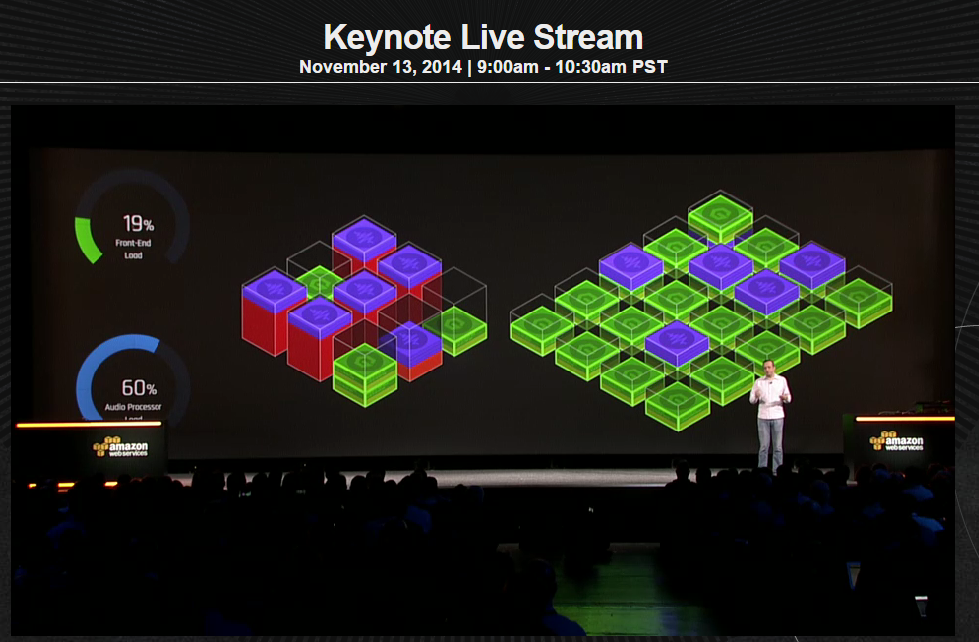
  2. Keynote from Werner Vogels on the new “Amazon EC2 Container Service,” announced to cheers and applause. It allows launching and terminating containers to sets of instances on EC2. Their PM did a demo where they had a big farm of r3 servers and then they deploy a redis cluster and rabbitmq across them, and then front end components on a farm of c3s, and then audio processing across all of them. If you’re new to this it’s basically VMs within VMs but without noticeable overhead.

EC2 Container Service

EC2 Container Service

  1. Next they had the actual docker cofounder and CEO Ben Golub. He mentioned that docker is only 18 months old and its huge success and ecosystem this early in is “surreal.”

Next… Leapfrogging PaaS?

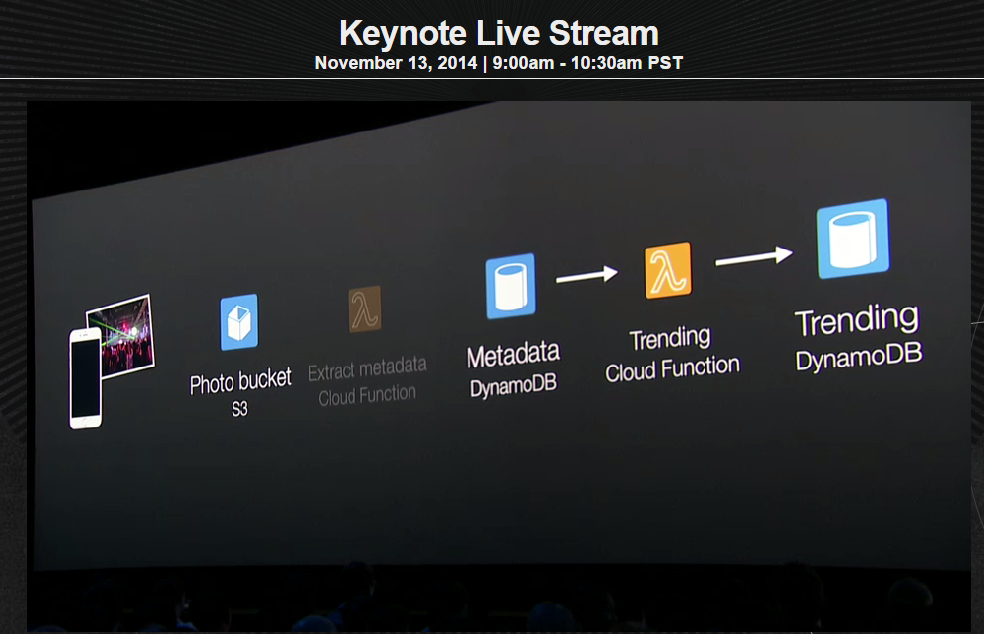
  1. Werner is back to announce AWS Lambda available now in preview – event-driven computing service for dynamic applications. No instance running/management required, events go in and “cloud functions” run on them.  Holy shit, this replaces a large number of servers running semi-trivial apps. 20 cents per million requests, plus some complex stuff for seconds of execution – free for 3.2M seconds/1M requests.

    Amazon Lambda

    Amazon Lambda

  2. Netflix chief product guy came on to show how they’re using lambda as a higher level abstraction and have eliminated a bunch of servers – no system monitoring/management, no inefficient polling, no gaps/opacity. They’re using it to encode video, run backups, run security and compliance checks against instances, and for operational monitoring and dashboards. Replacing procedural control systems with event-driven services.
  3. AWS core innovations… New c4 instance, Haswell based (crazy fast processor, 36 vCPUs). Diane Bryant, SVP/GM Data Center Group from Intel, came on to go into the CPU specifically. Larger and faster EBS volumes, up to 20,000 IOPS. Enhanced and consistent networking speeds.

And this has been your cloud update! Also see Ben Kepes in Forbes for a similar summary.

The container engine is cool – it’ll certainly remove a lot of instance gerrymandering and instance reservation pain if nothing else. But Lambda is the potential disruptor here.  It’s taking the idea of “bring your own algorithm” from MapReduce and saying “hmmm you can probably replace your trivial web app just with this” – it’s halfway between a PaaS and a SaaS, none of the Beanstalk complexity, just “here take this function and run it on stuff when it comes in.” If a library of common lambas becomes available, so much computing work done for trivial purposes becomes obsoleted.  Who hasn’t seen a Web service to “upload a file here, then zip it or something, then store it…” OK, no servers needed any more. Very interesting.

Leave a comment

Filed under Cloud, Conferences

AWS re:Invent Keynote Day 1 Takeaways

Sadly I couldn’t attend this year, but heck that’s what the Internet is for.  Here’s the interesting bits from the AWS re:Invent Day 1 keynote (livestreamed here). Loads of interesting stuff.

  1. AWS is growing revenue >40% YOY, far outstripping other large IT companies – EC2 use grew 99% YOY and S3 usage 137%, they have 1M active customers now. (Microsoft cloud services report 128% YOY growth as well.)
  2. New product announcement for Aurora – new commercial-grade database engine – fully MySQL compatible but 5x the performance, available through Amazon RDS, 1/10 the cost of the commercial DB engines (starts at 29 cents an hour, ~$210/mo). Can do 6M inserts/second and 30M selects/second. Highly durable (11 9’s), crash recovery in seconds with no data loss. Nice!
  3. SLDC stuff!
    1. CodeDeploy (was internal tool called Apollo), a new code-deployment system that lets you do rolling updates, rollbacks, and tracks deployment health. This works for all languages and is free. They use it internally for 95 deploys/hour on their own stuff.
    2. In early 2015 will come some more software lifecycle management services – first is CodePipeline for continuous integration and deployment (also used internally)
    3. Second is CodeCommit as a managed code repository that can colocate with where you’re going to deploy and has no size limits of repos or files. These “integrate with” github, jenkins, chef, etc. though it’s not clear how they don’t cannibalize them.
  4. Security stuff! Big push to be able to say “we easily surpass the security you can do on premise.”
    1. FISMA, ITAR, FIPS, FedRAMP, HIPAA, ISO 9001
    2. Current encryption approach is either “let Amazon manage keys” or use their CloudHSM hosted key thing, both of which are still a pain. As a result they’re launching AWS Key Management Service as a HA service that manages keys, provides one-click encryption and transparent key rotation.
    3. AWS Config is a new-gen agile CMDB with full visibility into all your AWS resources. You can query it and see relationships and show scope of a config change. Streams all config changes out to you.
    4. A new-gen service catalog called AWS Service Catalog available early 2015. Create and share product portfolios, let internal people launch them, tracking and compliance.
  5. Enterprise Cloud Adoption Patterns
    1. Often the first wave of moving into the cloud for enterprises is moving dev and test environments to run in AWS for flexibility and spin up/down for cost savings and  brand new apps, custom written for the cloud
    2. Second wave is web sites and digital transformation (media, corp sites, ecomm) and analytics, since mass processing and sharing is cheap in the cloud – data warehouses (like pfizer’s). And mobile app back ends – phone, tablet, gps, more.
    3. Third wave is business critical applications.  Macmillan and Hoya run their SAP in AWS. Conde Nast runs HR and Legal there.
    4. New wave – you’re starting to see entire datacenter migration and consolidation as DCs come up for lease (Hess, Conde Nast, NewsCorp). SunCorp. Time Inc., GPT, Nippon Express moving “all in” to AWS – many ISVs as well. The CIA moved to AWS and now Intuit is doing so now as well.
    5. Intuit moved their “TurboTax AnswerXchange” app there to deal with tax time peaks last year and the scales fell from their eyes when they did so – 6x cost cut, setup 1/5 of the time, faster development. They started doing more and realized the global datacenters, ease of integration with acquisitions, and dev recruiting benefits. They have 33 services on AWS now, and have moved mint.com there. They have decided to move everything else there now. Funny how once companies start looking at how much they accomplish instead of just the monthly cost the “cloud is more expensive at scale” argument gets dropped like a flaming bag of poo.
  6. Hybrid cloud
    1. Various stuff like directory service (AD in the cloud) and identity federation and storage gateway and SystemCenter and vCenter integration already exist to power mixed shops
    2. Johnson & Johnson went on for a while about their use of AWS.  They are planning a 25,000 seat deployment of Workspaces (virtual desktop offering, like Citrix).

Whew, that’s the quick notes version.  Aurora is obviously of interest – a lot of the fretting over whether to use mySQL or RDS I’ve seen will get settled by this – it was just ‘well, run the same thing yourself or have them do it…” and now it’s “have them run something insanely better”. But the SDLC tools are also interesting – they made noise about how these “work with!” ansible, jenkins, git, etc. but that seems mildly disingenuous, without any more looking into it yet they sound more like direct competition for them. But the config and service catalog could be great extensions – yay for simple composable services, not huge painful “BSM/ITMOM suites”.

Feel free and share your thoughts on the announcements in the comments section!

3 Comments

Filed under Cloud, Conferences

AWS Dying! Rackspace Pulls Out Of Cloud! News At 11!

Boy, it’s been quite a week for the cloud-schadenfreude crowd. If you listen to the various news outlets, apparently Rackspace has given up on cloud and Amazon is in free-fall. Here’s some representative hack jobs pieces:

More accurate are these:

Let’s look at what’s actually going on.

First, Rackspace.  I was on the Spiceworks forum yesterday and the news is definitely being interpreted as “Rackspace is getting out of cloud, don’t consider them any more.” Now, it is their own fault for bungling the messaging here, but if you actually go look at what they are doing, at its heart they are making this change:

Rackspace Cloud will be sold only with a support contract now.

Yes, that’s it.  That’s the change. Now it’s “managed cloud!” Which is fine, a heck a lot of software I buy has mandatory maintenance contracts nowadays, but this doesn’t mean “Rackspace is leaving the cloud business!” They just want to add in their “Fanatical Support ™” to the value proposition and not compete purely on a bare-metal (bare-API?) SaaS “how much does a 2-CPU 4 GB server cost” basis.

Rackspace has to get back out in front of this messaging hard – it’s definitely made its way to the practitioner trenches as “they’re pulling out.” I mean, I have to say Rackspace’s strategy is pretty opaque to most folks, but this message misstep has graduated from “muddled and unclear” to “actively harmful.”

Now, Amazon.  The real story is:

Amazon Web Services only grew 38.39% last quarter.

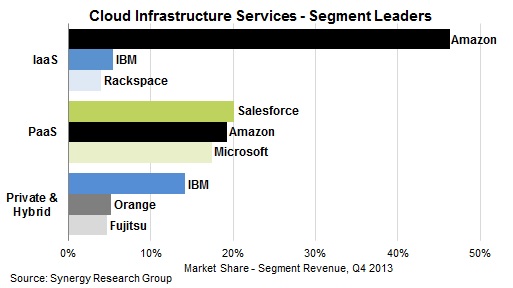
For a large company that’s a pretty good growth rate, right, is yours higher? The press likes to turn IaaS into a 3 provider horse race. But so far – it’s not. Check out this recent (March 2014) Synergy Research graph.

CIS_Q413_graphic

The fact of the matter is that Amazon is beating the holy hell out of everyone else in IaaS. It’s more neck and neck in PaaS, but sadly the entire PaaS market is still low (due to Joe Average IT Shop basically interpreting PaaS pitches as someone standing up and screaming “I’m a sorcerer!!!”).

IBM, HP, etc. don’t have credible offerings yet.  I know they’re investing, I know they have roped some random companies that love them into doing it, but they are just not there yet. IBM is not a commodity company, they’re a “you have a billion dollar contract with us we’re going to build out whatever we feel like with that.”

Google, same thing. It’s cool, it’s well priced, it’s dev friendly – but at the big price cut announcement, we had a big get-together at Capital Factory here in town. I looked around at the crowd of 40 clouderati types and said “OK, so who is comfortable running production apps on Google cloud yet?” Result: zero. Google’s throwing money at it but as with most of Google’s new offerings, it’s hard to trust it’s not just going to dry up tomorrow and get cancelled because they are running after private spaceships or whatever now, and nothing makes them money like their ad business so “it’s revenue generating” won’t save it. And Google is so bad at enterprise support…

Microsoft Azure was really good. Better than it had a right to be!  I was very impressed with Azure in years 1 and 2. Execution was good (we used it for a SaaS service at National Instruments) and the vision was definitely “where the puck is going to be.” But post-Ozzie, it hasn’t exactly been shaking the sheets. At CloudAustin there was more Azure interest two years ago than there is now. They were going strong on dev friendliness and all, but trying to get into IaaS has been a distraction and they just aren’t keeping pace with Amazon’s rate of new features. Docker support, SSDs, new instances, vCenter integration, Dropbox competitor, desktop-as-a-service Citrix competitor…

Let me address the four big “why AWS is crashing and burning (despite being in an obvious position of market dominance)” points from the “Scorpion” article.

  1. AWS is not the low price provider.
    Eh. Not sure why this is relevant and also not sure it’s true for what you are getting… It’s like saying “there are books cheaper than that book you just bought.” Well sure there are, but do they have the information I want in them? See below for why not always having the lowest cent per minute under Google and Microsoft doesn’t really concern me.
  2. AWS is not the best product at anything – most of their features are mediocre knock offs of other products.
    This misses the point – their features are SIMPLER knockoffs of other products. That’s why it’s an accelerator. Dropbox and Salesforce and all the successful cloud entities have said “you know, some enterprise user left to their own devices is going to generate a list of 1000 requirements they don’t really need. Forget that. Let’s make the actual core functionality they need and leave off the rest so it’ll actually get used.” This is why they dominate the IaaS business. Many of their products are named to match. “SIMPLE email service.” “SIMPLE queue service.” “SIMPLE notification service.” This drives a new wave of architectural thought – instead of complicated services packed with stuff, what if instead I integrate simple, well-designed microservices? After doing a lot of cloud architecture work, those attributes are positives, not negatives.
  3. AWS is unbelievably lousy at support.
    I’m not sure I’d want to be in a race with Amazon, Microsoft, and Google to see who supports customers worse. I’m not sure I’ve ever been part of an enterprise happy with its Google support, and all experiences I’ve had with Microsoft support have been some Brazil-esque “you can’t actually ask them questions, only some VP is a designated contact on the corporate contract…”. Amazon is positioning themselves more like a hardware vendor, you don’t bother getting much support from them besides parts replacement, you get support from the managed hosting provider or whatnot that’s a MSP on top of them if you need it.
  4. Once you are at $200k / month of spend, it’s cheaper and much more effective to build your own infrastructure
    This is frequently untrue and based on people not understanding the full costs of getting stuck in the infrastructure business. What’s your cost of delay? Average enterprise “wait for servers” time is about 6 weeks; assuming you’re not just using them for nothing, your ROI is delayed by that amount. And what about all the operation of those complex systems? You can’t just stick in the salary of the developers and sysadmins you’d need – stick in your revenue per employee instead, because that headcount could be doing something useful for your company instead of plumbing. Not to mention the cascading percentage of each layer of management’s time spent worrying ab out the plumbing and the plumbers instead of conducting the core business of the company. Cost of delay from lost agility and opportunity cost are never taken into account but definitely should be.

I know a lot of the old guard want cloud to dry up and go away, it bothers their lovely datacenters.  And some of the very new guard resent it because Amazon continues to be so successful – they keep up a rate of innovation that new players can’t disrupt. But this whole week of “the cloud is falling” news is complete BS, and won’t amount to much.

Leave a comment

Filed under Cloud

Amazon Cuts Prices Too

Well, if nothing else I’m happy to have Google Cloud around to provide some competition to push Amazon Web Services.  Immediately after Google announced dramatic price drops, Amazon has responded doing the same!

Now if they can only also shame them into dropping their whole crazy reserve instance scheme and go to progressive discounts like Google just did too, the world will be better.

5 Comments

by | March 27, 2014 · 7:10 am

Evolution of Bazaarvoice’s Architecture to 500M Unique Users Per Month

Check out this article by @victortrac on High Scalability on how we have scaled our infrastructure at Bazaarvoice to be serving out a billion product reviews a day!

Leave a comment

by | December 2, 2013 · 3:07 pm

ReInvent – Fireside Chat: Part 1

One of the interesting sessions at ReInvent was a fireside chat with Werner Vogels., where CEO’s or CTO’s of different companies/startups who use AWS talked about their applications/platforms and what they liked and wanted form AWS. It was a 3 part series with different folks, and I was able to attend the 1st one, but I’m guessing videos are available for the others online.  Interesting session, giving the audience a window into the way C level people think about problems and solutions…

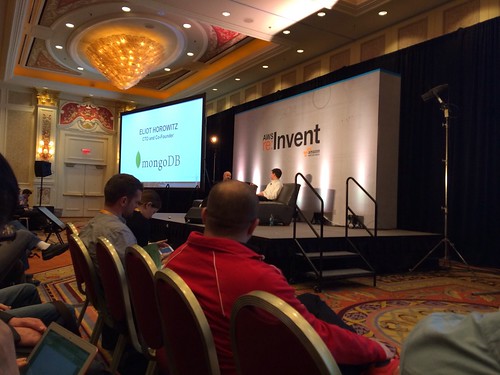
First up, the CTO of mongodb…

Lots of people use mongo to store things like user profiles etc for their applications. Mongo performance has gotten a lot better because of ssd’s

Recently funded 150 million, and wanting to build out a lot of tools to be able to administer mongo better.

Apparently being a mongodb dba is a really high paying job these days!

User roles may be available in mongo next year to add more security.

Werner and Eliot want to work together to bring a hosted version of mongo like RDS.

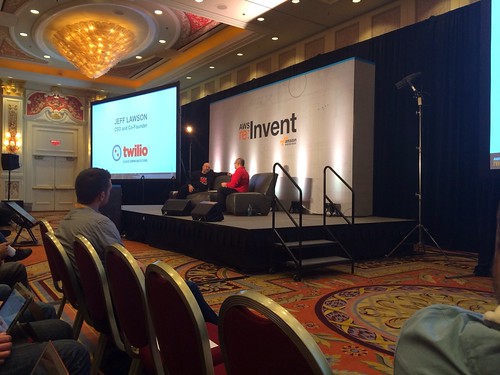
Next up twilio’s Jeff Lawson

Jeff is ex amazon.

Untitled

Software people want building blocks and not some crazy monolithic thing to solve a problem. Telecom had this issue, and that is why I started Twilio.

Everyone is agile! We don’t have answers up front, but we figure out these answers as we go.

Started with voice, then moved to SMS followed by a global presence. Most customers of ours wanted something that didn’t want boundaries and just wanted an API to communicate with their customers.

Werner: It’s hard to run an API business. Tell us more…
Lawson: It is really hard. Apis are kinda like webapps when it comes to scaling. REST helps a lot from this perspective. Multi tenancy issues gets amplified when you have an API business.

Twilio apparently deploys 20 times a day. Aws really helps with deployment because you can bring brand new environments that look exactly like prod and then tear it down when things aren’t needed.

When it comes to api’s, we write the documentation first and show our customers first before actually implementing the API. Then iterate iterate iterate on the development.

Jeff asks: Make it easier to make vpc up and running.

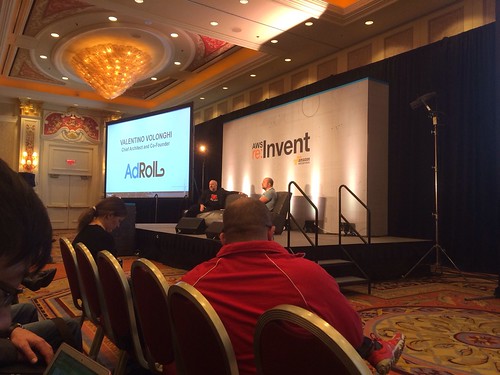
Next up: Valentino with adroll (realtime bidding)

Untitled

There’s a data collection pipe which gets like 20 tb of data everyday.

Latency is king: Typically latency is like 50ms and 100ms. This is still a lot for us. I wish we had more transparency when it comes to latency inside aws and otherwise…

Why dynamo db? Didn’t find something simple at the time, and it was nice to be able to scale something without having to worry about it. We had 0 ops people at the time to work on scaling at the time.

Read write rates: 80k reads per second (not consistent), 40k writes per second.

Why erlang? You’re a python god.
I started working on Python with the twisted framework. But I realized that Python didn’t fit our use case well; the twisted system worked just as well but it would be complicated to manage it and needed a bit of hacks..

Today it would be hard to pick between erlang and go….

Leave a comment

Filed under Cloud, Conferences

ReInvent 2013: Day 2 Keynote

I didn’t cover the day 1 keynote, but fortunately it can be found here. The day 2 keynote was a lot more technical and interesting though. Here are my notes from it:

First, we began by talking about how aws plans its projects.

Lots of updates every year!

Before any project is started, and teams are in the brainstorming phase. A few key things are always done.

  • Meeting minutes
  • FAQ
  • Figure out the ux
  • Before any code is written

“2 Pizza Teams”: Small autonomous teams that had roadmap ownership with decoupled lauch schedules.

Customer collaboration

Get the functionality in the hands of customers as soon as possible. It may be feature limited, but it’s in the hands of customers so that they can get feedback as soon as possible. Iterate iterate iterate based on feedback. Different from the old guard where everything is engineering driven and it is unnecessarily complex.

Netflix platform….

Netflix is on stage and we’re taking about the Netflix cloud prizes and talking about the enhancements to the different tools…looks pretty cool, and will need to check them out. There are 14 chaos monkey “tests” to run now instead of just 1 from before.

Cloud prize winners

Werner is back is breaking down the different facets that AWS focuses on:

  • Performance- measure everything; put performance data in log files that can be mined.
  • Security
  • Reliability
  • Cost
  • Scalability

Illya sukhar CEO from Parse is on stage now (platform for mobile apps)
-parse data: store data; it’s 5 lines of code instead of a bunch of code.
-push notification

Parse started with 1 aws instance
From 0-180,000 apps

180,000 collections in mongodb; shows differences between pre and post piops

Security

IAM and IAM roles to set boundaries on who can access what.
How to do this from a db perspective?
Apparently you can have fine grained access controls on dynamodb instead of writing your own code.
Each data block is encrypted in redshift
Cost:
Talking about how customers are using the spot instances to save $.

Scalability:
We transfer usecase, who take care of transferring large files.

Airbnb on stage with mike curtis, VP of engineering
-350k hosts around the world
-4 millions guests (jan 2013)
-9 million guests today.

Host of aws services
1k ec2 instances
Million RDS rows
50tb for photos in s3

“The ops team at Airbnb is with a 5 person ops team.”

Helps devote resources to the real problem.

AirBnB in 2011

AirBnB in 2012

Dropcam came on stage after that to talk about how they use the AWS platform. Nothing too crazy, but interestingly more inbound videos are sent to dropcam than YouTube!

Dropcam

They keynote ended with an Amazon Kinesis demo (and a deadmau5 announcement for the replay party), which on the outside looks like a streaming API and different ways to process data on the backend. A prototype of streaming data from twitter and performing analytics was shown to demonstrate the service.

Announcements

  • RDS for PostgreSQL
  • New instance types-i2 for much better io performance
  • Dynamo db- global secondary indexes!!
  • Federation with saml 2.0 for IAM
  • Amazon RDS- cross region read replicas!
  • G2 instances for media and video intensive application
  • C3 instances are new with fastest processors- 2.8 gig intel e5 v2
  • Amazon kinesis- real time processing, fully managed. It looks like this will help you solve issues of scalability when you’re trying to build realtime streaming applications. It integrates with storage and processing services.

Announcements

Incase you want to watch it, the day 2 keynote is here: http://www.youtube.com/watch?v=Waq8Y6s1Cjs

And also, the day 1 keynote: http://www.youtube.com/watch?v=8ISQbdZ7WWc

2 Comments

Filed under Cloud, Conferences